
Using CSS Text-Shadow to Create Cool Text Effects. The CSS3 text-shadow property has been around for some time now and is commonly used to recreate Photoshop’s Drop Shadow type shading to add subtle shadows which help add depth, dimension and to lift an element from the page.
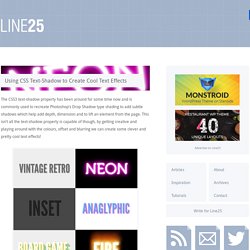
This isn’t all the text-shadow property is capable of though, by getting creative and playing around with the colours, offset and blurring we can create some clever and pretty cool text effects! Check out the six text effects of vintage/retro, inset, anaglyphic, fire and board game in the demo, then copy the code snippets below to use the effects in your own designs. Needless to say you’ll need a text-shadow supporting browser (Safari, Chrome, Firefox) to see them in all their glory. View the demo The text shadow CSS property is used to add shading to any text related HTML element. Linear Gradients. CSS-Tricks. CSS3 Button Generator.