
Minecraft Advanced Machine Designs. Linux. WinUSB: Create Bootable Windows Installer USB In Ubuntu Linux. WinUSB is an Ubuntu application for creating a Windows USB installer for Windows Vista and Windows 7.
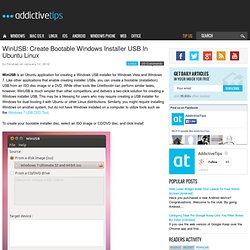
Like other applications that enable creating installer USBs, you can create a bootable (installation) USB from an ISO disc image or a DVD. While other tools like Unetbootin can perform similar tasks, however, WinUSB is much simpler than other competitors, and delivers a two-click solution for creating a Windows installer USB. This may be a blessing for users who may require creating a USB installer for Windows for dual booting it with Ubuntu or other Linux distributions. Similarly, you might require installing Windows on another system, but do not have Windows installed on a computer to utilize tools such as the Windows 7 USB DVD Tool. To create your bootable installer disc, select an ISO image or CD/DVD disc, and click Install.
This will create your Windows Vista/7 installer USB. Sudo add-apt-repository ppa:colingille/freshlight sudo apt-get update sudo apt-get install winusb. Linux OS. An A-Z Index of the Bash command line for Linux. An ARM GNU/Linux box for $25. Take a byte! 20 Awesome Projects for Raspberry Pi Microcomputers.
Using SSH keys for Password-less Logins. Most people start using SSH by logging in with a password, but re-entering your password for every SSH connection quickly becomes tedious.
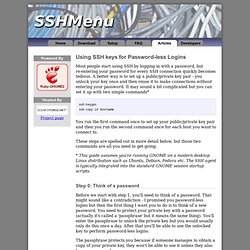
A better way is to set up a public/private key pair - you unlock your key once and then reuse it to make connections without entering your password. It may sound a bit complicated but you can set it up with two simple commands* ssh-keygen ssh-copy-id hostname You run the first command once to set up your public/private key pair and then you run the second command once for each host you want to connect to. These steps are spelled out in more detail below, but those two commands are all you need to get going. * This guide assumes you're running GNOME on a modern desktop Linux distribution such as Ubuntu, Debian, Fedora etc. Step 0: Think of a password Before we start with step 1, you'll need to think of a password.
Xentheon - where is my mind. Linux Links - The Linux Portal. VirtualBox. Note: The package architecture has to match the Linux kernel architecture, that is, if you are running a 64-bit kernel, install the appropriate AMD64 package (it does not matter if you have an Intel or an AMD CPU).
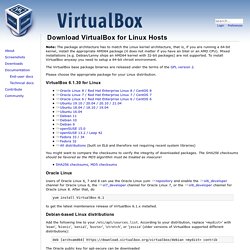
Mixed installations (e.g. Debian/Lenny ships an AMD64 kernel with 32-bit packages) are not supported. To install VirtualBox anyway you need to setup a 64-bit chroot environment. The VirtualBox base package binaries are released under the terms of the GPL version 2. Please choose the appropriate package for your Linux distribution. VirtualBox 6.1.14 for Linux ¶ You might want to compare the checksums to verify the integrity of downloaded packages. SHA256 checksums, MD5 checksums Oracle Linux ¶ Users of Oracle Linux 6 and 7 can use the Oracle Linux yum repository and enable the ol6_developer channel for Oracle Linux 6 or the ol7_developer channel for Oracle Linux 7.
Yum install VirtualBox-6.1 to get the latest maintenance release of VirtualBox 6.1.x installed. The key fingerprint is. Getdeb. Why Linux is better. PDFBEAR is founded by the team behind WhyLinuxIsBetter.net, which brings tons of experience in user conversion tools.
We have decided to change our focus to helping and improving how our users convert files on all platforms including Linux. About WhyLinuxIsBetter.net The webpage was created in order to help people understand the ins-and-outs of Linux. In addition to this, it was emphasized that Linux is a free service, but it also protects the end-user from malware. Similar to PDFBEAR, we have created a malware-free service. Below you will find the pages that will help you have a better experience with PDF documents: More on By now you should have an idea of what PDFBEAR is about. What Is Btrfs Filesystem (and Why Is It Better Than Ext4)? There is more to a hard drive than its size.
While the amount of disk space is all you see marketed about a hard drive on a sales page, there is actually an extensive amount of coding that goes into making a hard drive capable of handling your applications and data in the first place. Most Linux distributions currently default to using the ext4 file system, but the future for many of them lies with the B-tree file system, better known as Btrfs. Resources. Turn a Raspberry Pi Into an XBMC Media Center in Under 30 Minutes.