
Home. jQuery Mobile. Publish/Subscribe with jQuery Custom Events – Publish/Subscribe with jQuery Custom Events – Bocoup Web Log. The Publish Subscribe or pub/sub pattern is used to logically decouple object(s) that generate an event, and object(s) that act on it.

It is a useful pattern for object oriented development in general and especially useful when developing asynchronous Javascript applications. This post explores its implementation in jQuery. The Dojo javascript framework provides an explicit topic-based mechanism for “publishing” and “subscribing” to events. Peter Higgins, Dojo’s author, has also written a jQuery plugin that replicates this functionality. It weighs in at under 30 lines of code… but why use 30 lines when you can do it in zero?
jQuery custom events provide a built in means to use the publish subscribe pattern in a way that is functionally equivalent, and syntactically very similar, to Higgin’s pub/sub plugin: Just bind observers to document. Ideas.repository - web-design, jQuery, design and more. Why and how to create Microsoft Office Minibar with jQuery and CSS3. Although many will argue that Microsoft products are an example of a good design, Minibar was one of design refreshments that came out with the Office 2007.
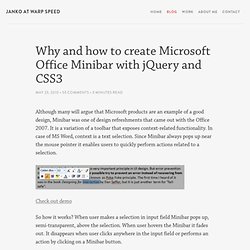
It is a variation of a toolbar that exposes context-related functionality. In case of MS Word, context is a text selection. Since Minibar always pops up near the mouse pointer it enables users to quickly perform actions related to a selection. Check out demo So how it works? Quite simple Minibar will be shown in this tutorial – it has only bold, underline, italic, and link buttons. jQuery Ajax tutorials, jQuery UI examples and more! - The Ultimate jQuery List. Planète jQuery : l'actualité jQuery, plugins jQuery et tutoriels jQuery en français. List of Really Useful Plugins For jQuery Developers. jQuery – The “write less, do more” JavaScript library is great for rapid web development.

New components, tools and applications are literally popping up on daily basis. Numerous plugins are also available to help jQuery developers. W3Avenue has compiled a list of jQuery plugins that you (jQuery Developer) may find really useful. Following list of jQuery plugins is different from other lists which usually features UI components . This is a list of extensions & utility plugins that we feel jQuery developers can utilize in development of their own jQuery components, tools and applications. PeriodicalUpdater Adds ability to loads content at specified intervals, and if the content being pulled doesn’t change, it gradually increases interval to saves bandwidth and reduce the CPU usage on the client’s machine.BlockUI Lets you simulate synchronous behavior when using AJAX, it will prevent user activity with the page (or part of the page) until it is deactivated. Animation & Effects.
jQuery 1.4.4 API Cheat Sheet — Future Colors. jQuery documentation, manuel en francais, jQuery par jarodxxx. jQuery.info. jQAPI - Alternative jQuery Documentation. 14 Helpful jQuery Tricks, Notes, and Best Practices. If there is one bad thing about jQuery, it's that the entry level is so amazingly low, that it tends to attract those who haven't an ounce of JavaScript knowledge.
Now, on one hand, this is fantastic. However, on the flip side, it also results in a smattering of, quite frankly, disgustingly bad code (some of which I wrote myself!). But that's okay; frighteningly poor code that would even make your grandmother gasp is a rite of passage. The key is to climb over the hill, and that's what we'll discuss in today's tutorial. 1. It's important to remember that most methods will return the jQuery object. Knowing that the jQuery object is always returned, we can use this to remove superfluous code at times.
The reason why we "cache" the location of the someDiv element is to limit the number of times that we have to traverse the DOM for this element to once. The code above is perfectly fine; however, you could just as easily combine the two lines into one, while achieving the same outcome. 2. Proof. Uncovering jQuery's Hidden Features.
jQuery is not always as it appears.

There's a lot of cool stuff going on under the surface, and there are many methods just waiting to be discovered, and many potential usages of jQuery's API that you may not have considered before. In this article I'll be taking you through a few of the not-so-obvious things I've discovered about jQuery. 1.
jQuery Bookmarklet Generator. This would probably actually be better called “Run some arbitrary code that requires jQuery, loading a minimum required version of jQuery first (but only if necessary), affecting the host page as little as possible Bookmarklet Generator” but that wasn’t nearly as catchy as “jQuery Bookmarklet Generator” so I’m going to stick with that.
This boilerplate code is useful for bookmarklets that need jQuery to execute their payload, in situations where you don’t know if jQuery or a specific minimum required version of jQuery will already exist in the page. If you just want to load jQuery itself into a page, check out the Learning jQuery “jQuerify” bookmarklet. Release v0.4Tested in Internet Explorer 6-8, Firefox 3, Safari 3-4, Chrome, Opera 9.View SourceUse the super-convenient bookmarklet generator Usage The easy way Visit the bookmarklet generator page. The hard way Notes. Trucs et astuces pour jQuery - Club des décideurs et professionn. Un truc particulièrement utile !
Au lieu de faire ça : $(document).ready(function() { } Vous pouvez faire ceci, qui revient au même : L'attribut target n'est pas valide en (X)HTML strict. Du coup, nous utiliserons l'attribut rel et un peu de jQuery pour créer un attribut dynamiquement et éviter les erreurs de validation. $('a[rel=external]').attr('target','_blank'); <a href=" rel="external">Queness dans une nouvelle fenêtre</a> Cette astuce est très pratique lorsque vous faites des menus avec des balises <ul>. $("ul li").click(function(){ window.location=$(this).find("a").attr("href"); return false;}); Vous voulez donner la possibilité de modifier le design de votre site ? $("a.cssSwitcher").click(function() { $('link[rel=stylesheet]').attr('href' , $(this).attr('rel'));}) Certains veulent désactiver le clic droit ou créer leur propre menu contextuel.