
45 Magnificent Modo Tuts. Hey everyone!

Tutorial - recoil Dynamics Plugin - Bullet Time Effect. This tutorial is for the plugin recoil available now for Modo 501.
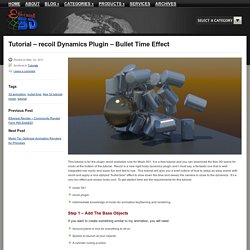
It is a free tutorial and you can download the free 3D scene for modo at the bottom of the tutorial. Recoil is a new rigid body dynamics plugin and I must say, a fantastic one that is well integrated into modo and super fun and fast to use. This tutorial will give you a brief outline of how to setup an easy scene with recoil and apply a nice stylized “bullet time” effect to slow down the time and sweep the camera in close to the dynamics. It’s a very fun effect and simply looks cool. To get started here are the requirements for this tutorial: Training [ Tutorials & Making Of ] TV > Training. MyModo.ru - Все о modo 3D. Моделирование, текстуры, скалптинг, визуализация, рендер, анимация в modo. Инструкция от Язана Малькоша.

Изучите то, как можно использовать пресеты Studio Lighting & Illumination Kit /SLIK/ в Luxology’s modo 401 Studio Lighting & Illumination Kit /SLIK/ – это 125 долларовая коллекция пресетов, сцен, элементов, материалов и видео руководств по освещению сцен в компьютерной графике. Разработанный специально для пользователей modo, набор включает в себя обширную коллекцию точно рассчитанного и смоделированного освещения, штативов, манипуляторов, камер, отражателей и платформ фонов, которые были смоделированы с высокой степенью детализации.
Это руководство из 10 шагов поможет начать использовать SLIK в modo и тем самым сократить время, затрачиваемое на построение осветительной оснастки и тратить больше времени на усовершенствование других деталей. Шаг 1. Установите SLIK при помощи инсталляторов OSX и Windows (XP, Vista и 7). Шаг 2. Пользовательский интерфейс SLIK 1. 2. 3. 4. 5. 6. 7. Шаг 3. Откройте объект, который необходимо осветить. Shifting Grid Topology Keys 0.3i « One Upon The Rock. Modo Gears. Beginner steps to use Modo with Unity.
Modomancer and Moto 2.0 mirror page. Create and use a mask to get your grass to grow around objects. A replicator tutorial. A fast and practice guide to pie menus and nested pie menus creation in Modo. How to create an "auto-hide" pop-up palette for assets workflows. This is one of the most useful shortcut I use to be faster in modeling: Select Through command on a specific pie menu. I've created a nice macro, very helpful to make holes in a mesh or something like that. One of my useful scripts: the "edge-welder". Modo Gears - Assets Floating Palette. Read this first As you know, I like full screen mode when I'm working in Modo and don't like palettes on the edges occluding my view.

One of the best feature in Modo is the "auto-hide" pop-up palette, so you can recall only the needed palette, use it just the time you really need it and then hide it without a click. Easy, really fast and we don't waste pixels on our work space. Well, if you are a modeler, a good idea may be to create an "auto-hide" pop-up palette with the presets, a great speed up in workflows. Modo Gears - Pie Menus and Macros. Read this first Creating pie menus is extremely simple, but not so simple to whom is not familiar with the Form Editor window, so assimilating scripts into a single shortcuts may becomes tedious.
This is a fast practice guide to pie menus and nested pie menus creation. To create a pie menu, just select System > Form Editor to recall the floating palette. In the left upper side, just click on create > new pie template and fill it with the beloved name. Forum > 501 Quick tip: Screen R Input. Using Multi-Region UVs in Modo 501 – CgCarter Tutorials. Using Multi-Region UVs in Modo 501 Introduction Many programs like Maya and 3ds Max allow you to spread your UVs out beyond the normal 0-1 UV space so that you can achieve as much pixel density per UV shell as you want.
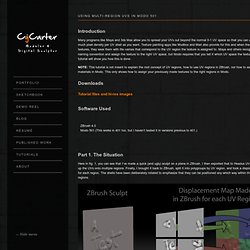
Texture painting apps like Mudbox and Mari also provide for this and when they output the textures, they save them with file names that correspond to the UV region the texture is assigned to. Maya and others recognize the naming convention and assign the texture to the right UV space, but Modo requires that you tell it which UV space the texture goes to. High quality 3D Models, tutorials, textures and plug-ins. Richard Hurrey. Geoff Swartz. Takumi. The ever growing list of modo tutorial videos (eglomot!) Here is the link to my database version (this is a WIP, please let me know about any improvements you would like to see).

I thought I might share my list of modo related (or modo-applicable) tutorial videos that I found on the web, both freely available or "buyable". I know that "google is your friend" (not!) , but I tried to accompany each entry with a short info, that, at least for me, tells me what to expect from the video. I only want to include videos that I have actually watched and found helping, so videos that are only product show-offs or didn't help me at all are not included. This list will grow. I will try and update this first entry with new links (hopefully regularly).
Note: Videos are repeated in this list, if they apply to several categories, that's why I kept the category list shorter ... Marc .... electronic bite off line ... Basics, Setup Gradient editor (vimeo single video)Yazan Malkosh explains modo 501's gradient editor (webcast recording, bad audio);modo;basics;free. Matt Cox. Vertex Tutor.