
Code Snippets. Really Easy Custom Post Backgrounds For WordPress As I’ve mentioned before, I’ve been having great fun with the new Nometet.com design.

It’s now sporting a feature that allows the author to set a custom background for the post just by uploading an image. This image doesn’t even need to be the correct size; that’s all done on the fly. Uploading isn’t hard either; I’ve implemented an uploader that sits inside a meta box so the hardest bit is choosing the image! In this post we’ll have a look at how it’s done. The uploader we’re going to be using later saves the image URL to a custom field, so first we’re going to get the custom field set up so that all you have to do is input a URL into the custom field and it gets displayed as the background. But that still means you’ve got to resize the image and copy out the URL into a custom field. Custom meta uploader We need an uploader in a meta box. At this point I got slightly confused – at the top of the file it says: This code is protected under Creative Commons License: Resizing the images.
Ajouter une image aux catégories wordpress sans plugin. Dans le fichier functions.php : [php] <ul id= »category-bloc »><?
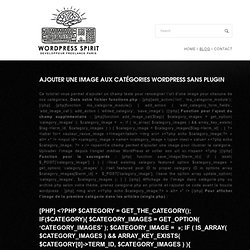
Php $argsCat = array( ‘type’ => ‘post’, //’child_of’ => 0, //’parent’ => , ‘orderby’ => ‘name’, ‘order’ => ‘ASC’, ‘hide_empty’ => 0, ‘hierarchical’ => 1, // ‘exclude’ => , // ‘include’ => , //’number’ => , ‘taxonomy’ => ‘category’, ‘pad_counts’ => false ); $categories = get_categories( $argsCat ); foreach ($categories as $category) { //datas avalaible /* $category->term_id $category->name $category->slug $category->term_group $category->term_taxonomy_id $category->taxonomy $category->description $category->parent $category->count $category->cat_ID $category->category_count $category->category_description $category->cat_name $category->category_nicename $category->category_parent */ ? ><li><? Php $catID = $category->term_id; // Get the URL of this category $category_link = get_category_link( $catID ); ?
><h2><a href= »<? Dans la page des catégories (category.php): [php] <img src= »<? Support » Auto image resize function not working on local install? Hi I'm working on a locally installed (WAMP) website.

I'm using this code in the functions file to limit the largest images to the dimensions set in Settings>Media: add_filter('wp_generate_attachment_metadata','replace_uploaded_image'); /* limits image size to large setting */ function replace_uploaded_image($image_data) { if (! Isset($image_data['sizes']['large'])) return $image_data; // paths to the uploaded image and the large image $upload_dir = wp_upload_dir(); $uploaded_image_location = $upload_dir['basedir'] . '/' . $image_data['file']; $large_image_location = $upload_dir['path'] . '/'. This works great on several other of my sites. Warning: rename(C:\Users\Tevya\Work\wamp\www\acsr/wp-content/uploads/2010/08/American-Construction-Supply-119-800x492.jpg,C:\Users\Tevya\Work\wamp\www\acsr/wp-content/uploads/2009/11/American-Construction-Supply-119.jpg) [function.rename]: No error in C:\Users\Tevya\Work\wamp\www\acsr\wp-content\themes\centivio3\functions.php on line 17 414.