
Digital RenaissanceBaldwin County Public Schools - Digital Renaissance. Student Learning Outcomes. Student Learning OutcomesThe Journey Terminology Tangle We have all heard of terms like course objectives, goals, and outcomes in association with syllabi, course planning, and accreditation.
In recent years, the great "eye of Gondor" (think Tolkien) has come to rest on learning outcomes. If we google the term, 5.6 million sites magically assemble. So do hundreds of viewpoints and definitions. So, let's explore a bit. ASU + GSV Summit 2014. Nic Borg, 27 - In Photos: 2014 30 Under 30 Education. Global Education & Skills Forum. No Silver Bullets: Hybrid High Learns a Tough Edtech Lesson. Ask education leaders and they’ll tell you: Hybrid High, the University of Southern California's experimental two-year old charter school, is doing just fine.
More than two-thirds of its original students are meeting their growth targets. But peek behind the stats and you’ll discover a school that had a nearly disastrous encounter with technology in its first year--and only began to recover when school leaders put teachers back in control. A year ago, Hybrid High ninth graders scored lower on standardized tests than they did when they started at the school. Education Week Leaders To Learn From » Leaders To Learn From 2014 Report. Summit Recordings. Tutorial for Info Power. Think. Learn. Innovate. How to Infuse Digital Literacy Throughout the Curriculum. So how are we doing on the push to teach “digital literacy” across the K12 school spectrum?
From my perspective as a school-based technology coach and history teacher, I’d say not as well as we might wish – in part because our traditional approach to curriculum and instruction wants to sort everything into its place. Digital literacy is defined as “the ability to effectively and critically navigate, evaluate, and create information using a range of digital technologies.” Many educational and business professional cite is as a critical 21st century skill. Even so, many schools have struggled to adapt it into their curriculum. This is often because most institutions already have rigorous, established curricula with little wiggle room – and this is especially true in schools subject to state and federal testing.
Evaluating online content is a research skill For example, when my students do research in US History, they are not only allowed but encouraged to use online content. SafeShare.TV - The Safest Way To Watch and Share YouTube videos. Superintendent John E. Deasy Kicks Off LAUSD's Digital Citizenship Week. Today is the first day of the Los Angeles Unified School District's inaugural Digital Citizenship Week.
Starting today and running through Friday, March 21, all 650,000 students in K-12 classrooms throughout the district are being taught skills to engage safely and responsibly in the vast digital world. The lessons are provided to teachers, parents, and students from Common Sense Media's Digital Literacy and Citizenship Curriculum. Digital Citizenship Week launched at an inspiring event last Friday at Western Elementary School, a smaller K-5 school in South L.A. where students have been using iPads in their classrooms since last September.
Common Core Standards Explorer. Teaching in the New (Abundant) Economy of Information. Part 1 in the series Learning In the New Economy of Information By Shawn McCusker In the past 10 years, perhaps nothing has changed more than the relationship between teachers and the information being distributed in their classrooms.
Historically, the role of teacher has always been that of gatekeeper and distributor of the course canon. Information was dispensed. Your Personalized Education Guide. EDpuzzle. SummarizeThis™ ConnectEDucators: Leveraging Technology in the Classroom. “Technology is not a silver bullet.
It’s only as good as the teachers … using it as one more tool to help inspire, and teach, and work through problems.” — President Barack Obama, February 4, 2014 Technology offers extraordinary new capacities to teachers. The vast breadth and depth of educational materials and other information available on the Internet can break boundaries, making any subject accessible anywhere. EduClipper. In the U.S., 21st Century Skills Linked to Work Success. WASHINGTON, D.C. -- Young U.S. adults who say they "often" developed 21st century skills -- such as real-world problem-solving and global awareness -- in their last year of school are more likely to self-report higher work quality.
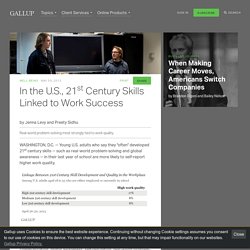
Gallup, in collaboration with Microsoft Partners in Learning and the Pearson Foundation, developed a 21st century skills index measuring seven specific areas: collaboration, knowledge construction, skilled communication, global awareness, self-regulation, real-world problem-solving, and technology used in learning.
21st Century Skills and the Workplace. A study released by Gallup, Microsoft Partners in Learning, and the Pearson Foundation confirms the value of real world problem-solving and 21st century skills development for young people entering college and careers.
The study, 21st Century Skills and the Workplace, also sheds further light on the responsibilities of educators—and parents—including the importance of listening to and engaging today’s kids around issues and topics they care most about. (Usual disclaimer, the Pearson Foundation publishes LEARNING STARTS.) Docs.stamfordpublicschools.org/filestorage/1702/3024/5463/010711-21st_Century_Workplace__Skills_for_Success.pdf. 21st Century Skills and the Workplace.
When Education Is But a Test Score - Education Week. Speaker Resources. We heard the President’s ConnectED call-to-action, and here is our billion-dollar response to put affordable technology in the hands of U.S. students nationwide - The Official Microsoft Blog. The following post is from Margo Day, vice president, U.S.
Education, Microsoft Corp.. Today, President Obama is shining worthy attention on his ConnectED initiative to connect 99 percent of America’s students to the digital age within five years and to ensure the best use of existing funds to get Internet connectivity and educational technology into classrooms and into the hands of teachers trained on its advantages. Microsoft heard the President’s call on our industry to step up, and we are privileged to participate in ConnectED by making a significant commitment today. Microsoft is stepping up to the plate with a significant offer that equates to a billion-dollar response. Together with our Original Equipment Manufacturer (OEM) partners we created a new offer to all U.S. BETT 2014: Exploring the classroom of the future. - SLA Opens Center of Excellence. 0 Comments January 24, 2014 By: Christine Weiser Jan 24 Written by: 1/24/2014 9:51 AM ShareThis This week, the Science Leadership Academy (SLA) and The Franklin Institute in Philadelphia announced a partnership with Dell that will make the school the first in the nation to deploy the Dell Chromebook 11 as part of its new “Center of Excellence in Learning.”
A Self-Directed Learning Model For 21st Century Learners. A Self-Directed Learning Model For 21st Century Learners by Terry Heick The above is the latest draft of our self-directed learning framework, version 1.1. It is based, in spirit, on our Inside-Out School: A 21st Century Learning Model. It is intended to function as a guide for students–likely with the support and facilitation of teachers, parents, and mentors–to help students become expert learners. The goal of the model isn’t content knowledge (though it should produce that), but rather something closer to wisdom–learning how to learn, understanding what’s worth understanding, and perhaps most importantly, analyzing the purpose of learning (e.g., personal and social change). It is therefore built around the central concept of self-knowledge–better understanding one’s self, and using work and study to inform one’s interactions with the world. Youpd. Youpd. EdWeb: A professional online community for educators.
Changing the way you learn. These PowerPoint Experts Can Make You a Star. Sometimes we get so busy that we lose sight of the great resources available to us. It’s not until you pull your head up from your desk and look around that you realize what’s available. That’s why it’s important to be connected to other people who have similar interests or do similar work. You’ll learn from them and have access to all sorts of information. If you think about it, there’s really not much that you know (if anything) that you didn’t learn from someone else or because of someone else.
Last week I was at PowerPoint Live 2009 in Atlanta where I spent some time with people in the PowerPoint community. Today, I’d like to share a little of what I learned from the PowerPoint community and provide some great resources and tools that will help you do a better job building your elearning courses. The Community Inspires New Ideas. How to Find Free Stock Photos & Clip Art for PowerPoint. I was leading a PowerPoint workshop last week and noticed that Microsoft recently changed the way images are searched on their site. That impacted part of my workshop and some of my blog posts where I show how to find free clip art images online. I’m sure you’ll run into similar issues if you haven’t already. For those who depend on the Microsoft site for free stock photos and illustrations, the recent change makes it challenging to find the right images.
Top 10 Skills for Today' s Learners. It's often reiterated within the educational circles and curriculum designers that given the speed with witch technology is advancing, the jobs our students will have in the future are probably not yet created. But the question is : are we teaching students the skills required for this future ? There are now voices raising hither and tither asking for an overall redefinition of the learning priorities; for instance in the United States, there is an increasing trend towards teaching coding in an early age and including it in the curriculum with early literacies. But although technical literacy and digital skills are essential for thriving in tomorrow's job market but they are not enough.
The visual below lists some other important skills. Check them out and share with us what you think of them. source: How to Focus Attention in Adult Learning and E-learning. Studies show that focus is a key attribute for performance improvement and success in life. Yet today’s modern workplace is full of distractions, from text to tweets.
Check out these effective techniques for increasing focus for adult learners participating in e-learning, classroom training, and other learning events. From nano-learning to rewards, learn how to focus attention and improve e-learning outcomes. Daniel Goleman, psychologist and author of the bestseller Emotional Intelligence, has just written a book called Focus: The Hidden Driver of Excellence. How Technology Supports Self-Directed Learning. EdTech for Change. New Presentation Tools Which Teachers Would Love to Use. Hack Education. Webinars. Upcoming Webinars See the calendar of our upcoming webinars and conference presentations. Previous Webinars.
Planning for Digital Content Toolkit. Why Schools Are 'Blending' Learning. Judy Beard, principal of Whittemore Park Middle School in Horry County SC, was so convinced that she had to implement “blended learning” to help her students achieve the common core that she started implementing blended learning before they had the funds to purchase the technology. “It’s not about technology. Tests Document Readability.
100 Useful Tips and Tools to Research the Deep Web. By Alisa Miller Experts say that typical search engines like Yahoo! And Google only pick up about 1% of the information available on the Internet. OER Review: Report - Digital Learning Department @ OSPI. Open Educational Resources. Open Educational Resources - Digital Learning Department @ OSPI. Research Websites!! Presentation tools! StudyJams. StudyJams. Creating a Safe and Respectful Environment in Our Nation's Classrooms Training Toolkit.
IT issues. SysNet - SysNet. How to Automatically Send Gmail Attachments to Dropbox, Box, Google Drive, SkyDrive. Intelligently automating various online tasks can result in increased productivity. One such case is that of automatically sending the received attachments in Gmail to cloud storage. A number of solutions exist for automating this task; below is a step-by-step guide of using the popular service IFTTT to automatically send Gmail attachments to Dropbox, Box, Google Drive or SkyDrive. Create a free account on IFTTT.com or login to an existing one. The 33 Digital Skills Every 21st Century Teacher should Have.
40 websites that will make you cleverer right now. The indexed web contains an incredible 14 billion pages. But only a tiny fraction help you improve your brain power. Here are 40 of the best. 100+ Video Sites Every Educator Should Bookmark (Updated for 2012) Project_FOCUS__Storytelling_Across_Digital_Divide - Project overview. Learning Theory - What are the established learning theories? 7 Best Timeline Creators For Creating Awsome Timelines.
11inShare11inShare When creating a timeline for a project or important event, it is best to use helpful tools or templates so that the timeline can be created accurately without any kind of miscalculations or flaws. One way of doing this is to use PowerPoint templates, such as the Workplan or Arrow PowerPoint timeline template.
7 Best Timeline Creators For Creating Awsome Timelines. By Blackboard is a free learning management system for K12 and Higher Ed Instructors enabling blended & eLearning. TeachThought - Learn better. 10 Open Source Tools For Busy Teachers. There’s a pantload of premium products available to teachers right now. If you’re willing to pay a little (or a lot) then you can have professional-grade products. But what if you don’t need the ultra-fancy version? Five Web 2.0 Sites for Student Presentations.
Www.nasbe.org/wp-content/uploads/Born-in-Another-Time-NASBE-full-report.pdf. Insight: Key Findings - Successful EdTech Integrations. How to Teach Without a Lecture and other fun. 10 rules for a successful edtech program that have little to do with tech, part 1. Presentation: Teens, Kindness and Cruelty on Social Network Sites. Stream - ThingLink. Untitled. Virginiapavlovich. 6 Must Watch Videos on 21st Education. Digital tools. 10 Techy Icebreakers for The 21st Century Teacher. Sample Social Media Guidelines. 50 Education Technology Tools Every Teacher Should Know About.
- From the Principal's Office: 10 Things School Leaders Do to Kill a Teacher's Enthusiasm for Technology. Wright's Law: A Unique Teacher Imparts Real Life Lessons. Huge Collection of Code Snippets: HTAccess, PHP, WordPress, jQuery, HTML, CSS. Technology. Michael McMillan-speaker, author, designer, creative consultant. 10 Awesome Free Tools To Make Infographics.
2010+ Free Powerpoint Templates PPT and Free PowerPoint Backgrounds. Five-Minute Film Festival: Twitter in Education. Free World U, A Free Online pre K-12 Program. Teachers Quick Guide to BYOD. Easy scheduling. Internet Safety for Kids (Grades K-12) Growing Up in the Information Age. iPad in Education. iPad Apps for Teacher Productivity. Teaching In the 21st Century. 7 Awesome Collaborative Whiteboard Tools for Teachers. Outstanding School Libraries.