
Superpower your JavaScript with 10 quick tips. Who doesn't love to write better code?

In this article I will list 10 simple and quick JavaScript tips that will help beginners improve their code quality. You might know some of these already. In case you didn't feel free to buy me a beer later. #1 - Use && and || Operators Like a Boss Well, JavaScript gives you two awesome logical operators : && and ||. Function getMeBeers(count){ if(count){ return count; } else{ return 1; } } Well, our function is simple and returns the required number of beers. Function getMeBeers(count){ return count || 1; } In case of || if the first operand is falsy, JavaScript will evaluate the next operand. Note:null, false,0 (the number), undefined, NaN, and '' (empty string) are falsy values.
Now if you want to allow adults only, you can use && as following: function getMeBeers(age,count){ return (age>=18) && (count || 1); } Instead of : function getMeBeers(age,count){ if(age>=18){ return count || 1; } } By the way you should be a careful here. . #2 - Use === and ! Or, JavaScript Array Remove. I have another handy method, that I recently developed, that allows you to simply remove an item – or a group of items – from an array.
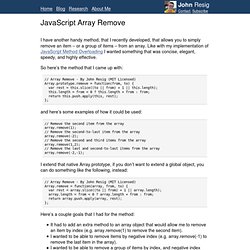
Like with my implementation of JavaScript Method Overloading I wanted something that was concise, elegant, speedy, and highly effective. So here’s the method that I came up with: and here’s some examples of how it could be used: // Remove the second item from the arrayarray.remove(1);// Remove the second-to-last item from the arrayarray.remove(-2);// Remove the second and third items from the arrayarray.remove(1,2);// Remove the last and second-to-last items from the arrayarray.remove(-2,-1); I extend that native Array prototype, if you don’t want to extend a global object, you can do something like the following, instead: Here’s a couple goals that I had for the method: To start with, most “remove” methods that you’ll find on the Internet end up making use of two slice operations (and a concat) in order to compose the final result, like so:
JavaScript Guide. The JavaScript Guide shows you how to use JavaScript and gives an overview of the language. If you need exhaustive information about a language feature, have a look at the JavaScript reference. This Guide is divided into the following chapters. Introduction Grammar and types Control flow and error handling Loops and iteration Functions Expressions and operators Numbers and dates Text formatting Indexed collections Keyed collections Working with objects Details of the object model Promises Iterators and generators.
Array Object. By default sorts an array alphabetically and ascending.
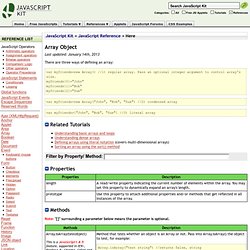
By passing in an optional SortFunction, you can sort numerically and by other criteria as well. If SortFunction is defined, the array elements are sorted based on the relationship between each pair of elements within the array, "a" and "b", and your function's return value. The three possible return numbers are: <0 (less than 0), 0, or >0 (greater than 0): Less than 0: Sort "a" to be a lower index than "b" Zero: "a" and "b" should be considered equal, and no sorting performed. Greater than 0: Sort "b" to be a lower index than "a". Take a look at the following 3 distinct examples: //Sort Alphabetically and ascending: var myarray=["Bob","Bully","Amy"] myarray.sort() //Array now becomes ["Amy", "Bob", "Bully"] //Sort Alphabetically and descending: var myarray=["Bob","Bully","Amy"] myarray.sort() myarray.reverse() //Array now becomes ["Bully", "Bob", "Amy"]