
Education.
Social Media. Mobile technology. E-learning blogs. Web tools. Programming. TEL Conferences & CPD. Digital & Information Literacy. OERs. Papers. Pay Attention. Can't see the video?
Install Quicktime , or view the presentation in another format . How Can I Become A Better Teacher? Teach Me More About... Download Additional Presentation Formats - Original Version View (and subscribe to) the podcast version - See Episode #15 View the YouTube version of the presentation View the TeacherTube version of the presentation Download the high-quality version (640x480) - Pay_Attention.mov - Pay_Attention.zip Download the Windows-friendly AVI version - Pay_Attention.avi Download the PDF version - Pay_Attention.pdf Download Additional Presentation Formats - Updated (Final Cut) Version After speaking with so many different people about Pay Attention , I decided to update it to reflect some of the feedback I had received.
International Versions. Registration. Welcome to Digital Media for Social Learning, an online community where teachers, librarians, and administrators can share exceptional stories of how students are learning through collaboration in digital media.
In our series of free webinars, live chats, and online discussions, you'll hear from educators around the world who provide examples of collaboration, social learning, and global connections. Topics will include: Innovation through digital collaborative media Language practice with native speakers Student engagement and learning through authentic communication Digital farming: students doing work online to create content for others Content curation. Digital Delights for Learners. Instructional Design Fusions. Top 10 Ways to Turn Your Retired Gadgetry into the Technology of the Future. How Augmented Reality Can Change Teaching - Getting Smart by Guest Author - AI, apps for learning, augmented reality, EdTech, science learning, STEM.
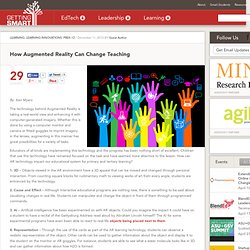
By Ken Myers The technology behind Augmented Reality is taking a real-world view and enhancing it with computer-generated imagery.
Graphic Organizers. Mapmyprogramme. Tuesday is Ada Lovelace Day: let's celebrate inspirational women. In the 1960s, a group of women agreed to undergo the same gruelling tests as the seven male astronauts taking part in Project Mercury.
All seasoned pilots with at least a thousand hours of flight experience, they were subjected to several invasive procedures, such as having to swallow a rubber tube so that their stomach acid could be tested, or having their inner ear frozen by iced water to see how they coped with vertigo. Thirteen of the women passed the first phase of testing, three passed the next phase and one, Geraldyn "Jerrie" Cobb, passed Phase III.
Yet, despite their sacrifices, none ever went into space. Indeed, it wasn't until Sally Ride flew on a Space Shuttle mission in 1983 that an American woman went into space, 22 years after Alan Shepard became the first American man, and the second man ever, to make that trip in 1963. Infographics. Infographic. The Who, What, Where, Why, When and How of Infographics. 50 Activities Replaced By Technology (Or Were They?) In Cisco's Classroom Of The Future, Your Professor Is Just An Illusion. There were a few strange things about the event I attended in a classroom at the San Francisco branch of the University of Pennsylvania’s Wharton School.
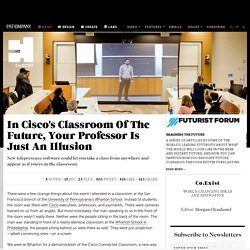
Instead of students, the room was filled with Cisco executives, professors, and journalists. There were cameras trained on us from all angles. But most noticeably, the man speaking to us in the front of the room wasn’t really there. 5 Ways to Get Email Overload Under Control. Dmitri Leonov is vice president of growth at Sanebox.
Follow him at @dmitri. If you’re like most people with a connection to the internet and a job that requires you interact via email, then you probably know what email hell feels like. The only good news is that you’re not alone. In fact, the average person gets more than one hundred emails per day. The bad news is it’s not getting better. ‘Out of Office’ emails put to good use. Email is still the foundation of modern business communication and we use it all day, very day (even weekends and evenings for some).
While some are lamenting its use and hailing its demise, the rest of us still use it because everyone we deal with still uses it. How Technology Makes Us Better Social Beings. Gmail+1 = Student Email Addresses to Register for Online Services. The Gmail+1"hack" isn't a new trick and I can't remember when I first tried it, but it still works and it still provides a solution to a problem that a lot of teachers run into when they want their students to use a new web tool.
Let's say there's a new service that I want my students to use but my students don't have email addresses that they can use to register for that service. In that case I can quickly generate Gmail addresses for my students by using the Gmail+1 hack. Here's how the Gmail+1 hack works: 1. Tech4good. Don’t Let Hackers Crack Your Password [INFOGRAPHIC] I had a quick count-up.
![Don’t Let Hackers Crack Your Password [INFOGRAPHIC]](http://cdn.pearltrees.com/s/pic/th/hackers-password-infographic-41941271)
An Automatic Online Video Editor. Camtasia Cheat Sheet: 10 Tips & 20 Ideas for Educators. Camtasia, a software tool by TechSmith, allows you to create video tutorials and presentations.
As a user, you are able to capture what you are doing on your computer screen as well as record yourself simultaneously which provides for the ability to create online tutorials and post them to class/course websites and more. Although Camtasia is simple to use with a fairly short learning curve, it produces great results. Know When to Use Which File Format: PNG vs. JPG, DOC vs. PDF, MP3 vs. FLAC.
When the Internet was small and young, file formats were pretty much limited to image types and media file types that the browsers of the time could handle. At the very beginning, text was almost exclusively meant to be presented on the Internet in HTML format, or provided as a file download via FTP protocol. Pictures were JPG or GIF across the board, and sound files were these strangely embedded WAV files and those pathetic electronic MIDI files.
Large collection of Free Microsoft eBooks for you, including: SharePoint, Visual Studio, Windows Phone, Windows 8, Office 365, Office 2010, SQL Server 2012, Azure, and more. - Microsoft SMS&P Partner Community Blog - By Eric Ligman. Throughout the year I try to share resources and information with you that I think will be helpful for you. Often times these resources will include links to free eBooks that we make available on a variety of topics. Editable PowerPoint Newspapers PowerPoint Template. Views 925,852 Filed under Educational , Editor's pick, english, newspaper, resource, school We have just updated our popular editable PowerPoint newspapers. With these you can create your own news headlines, articles and insert your own pictures.
Following a couple of requests, we have updated these so that you can now add in your own newspaper name. A few different types of newspapers are included in the template. These spoof newspaper templates could have many uses, including college and school projects and fun cards to send news to your friends and family. The template is also available in portrait (vertical) format and our latest template in the series, the Magazine PowerPoint. Prezi - The Zooming Presentation Editor. Be Beautiful, Be Smart, Be Everywhere.