
Your free online color matching toolbox. KPI Library - Where good KPI definitions meet. Embed a Part of a YouTube Video. If you want to embed a YouTube video that starts to become interesting somewhere in the middle, there's a simple way to skip the boring part.
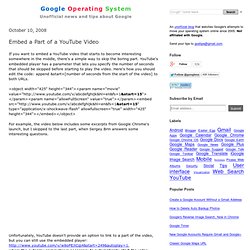
YouTube's embedded player has a parameter that lets you specify the number of seconds that should be skipped before starting to play the video. Here's how you should edit the code: append &start=[number of seconds from the start of the video] to both URLs. For example, the video below includes some excerpts from Google Chrome's launch, but I skipped to the last part, when Sergey Brin answers some interesting questions. Unfortunately, YouTube doesn't provide an option to link to a part of the video, but you can still use the embedded player: where the autoplay parameter is necessary to automatically start the video.
The Official ImgBurn Website. View Flickr Photos in Google Earth. Useful Google Translate Addresses. Translate a web page: Example: translates Corriere della Sera's homepage from Italian into English.
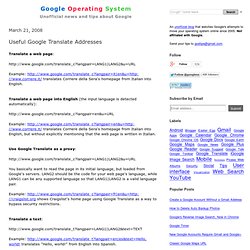
Translate a web page into English (the input language is detected automatically): Example: translates Corriere della Sera's homepage from Italian into English, but without explicitly mentioning that the web page is written in Italian. TagSEA: Tags for Software Engineering Activities in Eclip. 10 Minute Mail. How to Make Skype Portable via USB. By Guest Blogger Mark O'Neill One of the most commonly requested features by Skype forum users is the ability to use the telephony tool from a USB flash drive.
As yet, Skype has not got around to making an official portable version and even the John Haller PortableApps website, which has made portable versions of everything from Mozilla Firefox to Sudoku, doesn't seem to be in any hurry to make a portable version of Skype either. The reluctance is inexplicable, because a portable version of Skype could take off in a big way due to the enormous popularity of USB flash drives. WHOIS Search provides domain registration information from Netwo. Announcing a great feature for WHOIS users You can now start a WHOIS lookup directly in your browser!
Use the format: www.networksolutions.com/whois-search/netsol.com and you'll come directly to our WHOIS results page. Stay tuned for more useful features coming soon to WHOIS! A Periodic Table of Visualization Methods. Speedtest.net - The Global Broadband Speed Test. DNS Quick Check - DNS Report Tool, Test your DNS delegation, DNS. Skype Emoticons & Flags Cheatsheet. Check out the flags or version history.
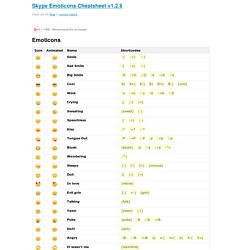
Emoticons Flags Version history 1.2.6: Added Malthe, Tauri, and Priidu from Skype 5. Removed Amazon banner ad and added the +1 button. 2011-09-05. 1.2.5: New Amazon Affiliate banner. Make a badge. Blog Archive » Amberjack Makes Site Tours Easy. Amberjack is a simple and easy way to put up quick tours of your website without needing any programming knowledge.
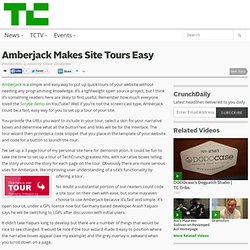
It’s a lightweight open source project, but I think it’s something readers here are likely to find useful. Remember how much everyone loved the Scrybe demo on YouTube? Virtual PC 2004. Fake Name Generator. A - Z of Professional Blogging. Professional DV Editing for the enthusiast. Speed Test. Why do I get a “socket error” message?
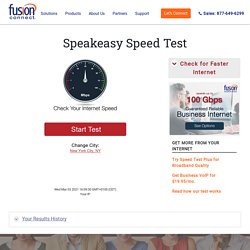
An error may result from having the speed test open in more than one browser tab or window. The test may fail to complete and display the following message: “A socket error occurred during the Upload test. Please try again later.” To prevent this error, and get the most accurate test results, close all other browser tabs and windows before running. If you continue to get a socket error message, or another type of error message, please provide feedback by emailing us at speedtestfeedback@fusionconnect.com. Why is the location I usually pick missing from the City list? A slow response can be caused by latency or packet-loss between the client and server, or particularly high Internet usage (during peak hours). In which browsers does the Speed Test work best? Why am I receiving “Could not connect to the Internet” errors when I am connected?
PBwiki. That's Crazy HOT! Create citations from ISBN. Currency Conversion. In addition to providing easy access to billions of web pages, Google has many special features to help you to find exactly what you’re looking for.
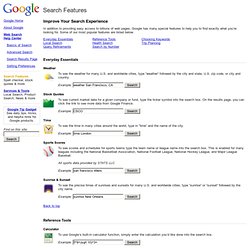
Some of our most popular features are listed below. Everyday Essentials Weather To see the weather for many U.S. and worldwide cities, type “weather” followed by the city and state, U.S. zip code, or city and country. Stock Quotes To see current market data for a given company or fund, type the ticker symbol into the search box. 50 Best Firefox Extensions for Power Surfing. What Time Is It? AltaVista - Babel Fish Translation. Button Maker. Center for Internet Security - Standards. Sysinternals Freeware.
Network Tools, Internet Speed Test and Website Tools. Your internet service provider is --.
Your ISP has an average rating of 2.2353 based on 17 user rating(s).Read what others have to say or Rate your ISP. **The results shown are for the last 14 days only.** -'s average results - 2 Tests Average results for others in your area - 0 Tests To save and view your individual test results, please register here. More Information About Broadband Internet Broadband Internet, generally known simply as Broadband, is the name given to high speed internet access.
Broadband can be delivered in a number of different ways. DSL and Cable Broadband are generally the least expensive and most effective forms of Broadband. One of the most important factors when choosing a broadband delivery method is the amount of bandwidth available. Telephone Prefix Location List. IP Address Locator. YouSendIt: The Leader in File Delivery. The Great Software List. PDF to HTML converter.