
Javascript: Price Calculator in JavaScript, perimeter length, price calculator. Expert: Anthony Levensalor - 1/3/2007 QuestionHi!

I'm trying to create a price calculator for custom-made picture frames to post on my website. I want users to be able to type in the length and the width into a table and then it displays the estimated price. There are three different frame thicknesses; 1.5" Narrow Barnwood, 2" Rustic Barnwood, and 3" Thick Barnwood, so a drop-down menu or something that would let users choose the design would be awesome. I came up with an equation that will do the trick. First we find the square area of the frame by multiplying the perimeter (length+length+width+width) by the thickness of the frame (which will either be 1.5" 2" or 3"). So it is as follows: [2*(l+w) *Thickness] * 0.27 if its 1" Thick, 0.23 if its 2" and 0.18 if its 3" thick. I have no clue whatsoever when it comes to javascript, how to code this. Here's what I got so far: document.getElementById('calc'... = total + 5; } </script> Help with javascript price calculator!
JavaScript/Scripts/Calculators. Javascript Order Calculator. Options - JavaScript Price calculator script similar to this. Javascript Tutorials and Lessons: Javascript variables, continued. We'll design a web page with a three text boxes and a command button.

When the command button is clicked, any numbers in the first two boxes will be added together. The answer will appear in the third text box. Here's what your form will look like when it's finished (The button doesn't do anything yet, if you click it): Number One: Number Two: Total: So you type a number into the Number One text box, and type a number into the Number Two text box. Number One: <INPUT TYPE = Text NAME = txtFirstNumber SIZE = 5 value =""> Javascript Tutorials and Lessons: Javascript Functions. We've already used functions a fair bit in these pages.

We're going to explore them a bit further. Functions, if you remember, are simply sectioned-off pieces of code. When you want to use your code segment, call it by its name and it will come running. We're now going to design a little calculator. It's limited in what it can do, as it only calculates two numbers at a time. Click here for the HTML code Nice, isn't it? To work the calculator, press a number. Doing real-time calculations in a form using JavaScript. In this tutorial, we will learn how to perform calculations using JavaScript.

It is quite often required to do calculations online in order forms, request quote forms and the like. This tutorial will show you how to use different form elements like drop-down list, radio button, check box and text box in a calculation. We will be using a ‘cake order form’ as an example. As the user makes selections in the form, the total price is calculated in real time. JavaScript: Form Validation.
Any interactive web site has form input - a place where the users input different kind of information.

This data is passed to ASP script, or some other technology and if the data contains an error, there will be a delay before the information travels over the Internet to the server, is examined on the server, and then returns to the user along with an error message. Interactive Forms with Javascript, HTML Tutorial. Click here for Spanish Translation What are forms?
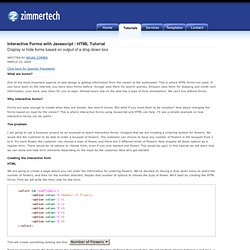
One of the most important aspects of web design is getting information from the viewer to the webmaster. This is where HTML forms are used. If you have been on the internet, you have seen forms before. Google uses them for search queries, Amazon uses them for shipping and credit card information, your bank uses them for you to login. Why interactive forms? Forms are easy enough to create when they are simple, like search boxes. Form. There's nothing more troublesome than receiving orders, guestbook entries, or other form submitted data that are incomplete in some way.

Dynamically populating a JavaScript image slideshow. Dynamically populating a JavaScript image slideshow A pesky problem with JavaScript slideshows it that you need to manually specify the images to display inside the script.
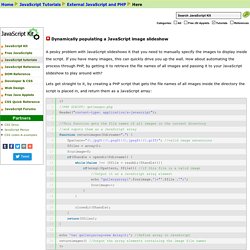
If you have many images, this can quickly drive you up the wall. How about automating the process through PHP, by getting it to retrieve the file names of all images and passing it to your JavaScript slideshow to play around with? Lets get straight to it, by creating a PHP script that gets the file names of all images inside the directory the script is placed in, and return them as a JavaScript array: This script will grab the file names of every image in a directory (based on its extension) and output them as JavaScript array elements: where "dog.gif", "cat.gif" etc are the file names of the images inside the directory.