
Visual studio 2012 Fakes. Introduction In this article we will make a deep dive into VS 2012 Fakes.
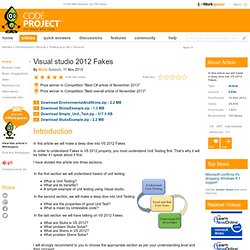
In order to understand Fakes in VS 2012 properly, you must understand Unit Testing first. Model-driven development and prototyping by sample. Download AddressBook model files Introduction This introductory article is about model driven development and prototyping in combination to get solutions very fast.
It is related to database applications or business applications in general where the topic is applicable at best. For the sample demonstrated here and the applications used, you need a Windows operating system, but this is not required in general if you use another template that targets GTK+ for sample. Background Writing software is usually a time consuming job. Required tools Here I will shortly describe tools that are required to follow this article. The first application is ArgoUML and probably well known. Find the repeating points in your project Before we begin with a model using UML and creating a prototype, it is important to understand why we use these tools.
To the point: The repeating points in your project are database forms for sample, or the entity classes that are used in these forms. Why? But why? Start modeling Or. The 30 Minute Regex Tutorial. Fast Binary File Reading with C# Download source files - 26.7 Kb Introduction I’ve been working on a time-series analysis project where the data are stored as structures in massive binary files.
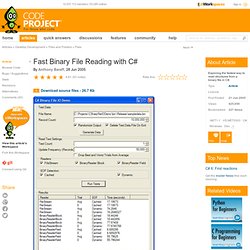
Importing the files into a database would cause a performance hit with no value added, so dealing with the files in their original binary format is the best option. My initial assumption was that throughput would be limited by disk speed, but I found that my first implementation resulted in 100% CPU utilization on my research box. KeePass Password Safe. Note: If you like this project, don't forget to vote for it!
Index Introduction Nowadays you need to remember many passwords. You need a password for the Windows network logon, your e-mail account, your homepage's FTP password, online passwords (like CodeProject member account), etc. etc. etc. The list is endless. Code Project Article FAQ. You know HTML Knowing HTML is the ideal for the editor.
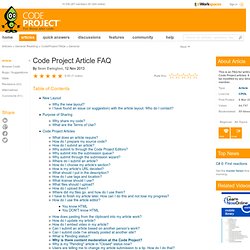
Select the HTML button to switch between HTML and WYSIWYG (What You See Is What You Get) modes. Please note, class designations (ie. table class="ArticleTable") have specific capitalization. Design Patterns 2 of 3 - Structural Design Patterns. Introduction This is the second article about design patterns.
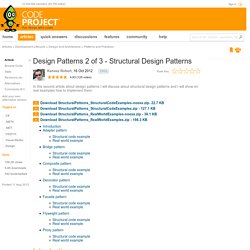
In the first article I have discussed about creational design patters and now I will describe another set of patterns called Structural design patterns. In software engineering, structural design patterns are design patterns that ease the design by identifying a simple way to realize relationships between entities. Adapter pattern. Advanced TreeView for .NET. Download source code - 74.2 Kb Introduction Working on several different projects, I was needed to display and edit hierarchical data.
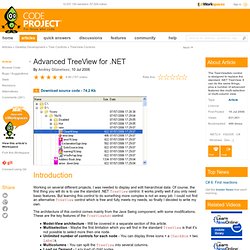
Of course, the first thing you will do is to use the standard .NET TreeView control. It works pretty well if you only need basic features. But learning this control to do something more complex is not an easy job. WPF Charting using MVVM Pattern. Download source - 38.89 KB Introduction There are tons of articles on the MVVM (Model-View-ViewModel) design pattern, and rightfully so.
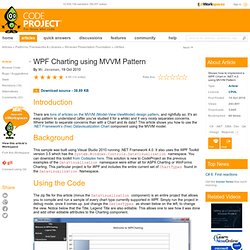
It's an easy pattern to understand (after you've studied it for a while) and it very nicely separates concerns. WPF Toolkit Charting Controls (Line, Bar, Area, Pie, Column Series) Demo. Download source - 303.01 KB Introduction I’m currently working on a few Data Visualization projects and am using WPF most of the time.
Charting controls are very useful for the one related to statistics and data handling. WPF toolkit is free and open source, however is used by few because of its limited charting support. In my opinion, it is quite useful and straightforward to use. MVVM# Episode 1. Download source code - 66.19 KB Other Articles In This Series: Part OnePart TwoPart ThreePart Four Introduction MVVM seems, to me, to be the best way to develop applications that are both flexible - allowing changes to the GUI without complex rewrites, and allowing testing of the client logic without needing to resort to complex macros.
In this series of articles, I will present a small application in WPF, using an enhanced MVV pattern that I'm calling MVVM#. Samples for Parallel Programming with the .NET Framework. More Effective C#: 50 Specific Ways to Improve Your C# Effective Software Development: Amazon.co.uk: Bill Wagner. Review “Shining a bright light into many of the dark corners of C# 3.0, this book not only covers the ‘how,’ but also the ‘why,’ arming the reader with many field-tested methods for wringing the most from the new language features, such as LINQ, generics, and multithreading. If you are serious about developing with the C# language, you need this book.” —Bill Craun, Principal Consultant, Ambassador Solutions, Inc. “ More Effective C# is an opportunity to work beside Bill Wagner. Bill leverages his knowledge of C# and distills his expertise down to some very real advice about programming and designing applications that every serious Visual C# user should know.
—Peter Ritchie, Microsoft MVP: Visual C# “ More Effective C# is a great follow-up to Bill Wagner’s previous book. C# 3.0 and LINQ coverage is extremely timely!” —Tomas Restrepo, Microsoft MVP: Visual C++, .NET, and Biztalk Server —Mads Torgersen, Program Manager, Visual C#, Microsoft From the Back Cover More Effective C# shows how to. Creating a Custom .NET Profiler. Contents Introduction Have you ever wondered how profiling tools hook into .NET applications? This article shows how you can create your own custom .NET profiler for any managed application. Time Period Library for .NET. New in v2: performance improvement and support for accounting (4-4-5) calendar. Introduction When implementing some software for another project, I came across several requirements involving calculations with time periods.
These calculations were an important part of the solution and had high demands in respect to the correctness and accuracy of the results. The required functionality covered the following areas: Support for individual time periodsWorking with calendar periods within calendar yearsWorking with calendar periods deviating from the calendar year (fiscal or school periods)Working with the accounting and broadcast calendar The time calculations should be made available to both server components (Web Services and tasks) as well as for a rich client (WPF and Silverlight) and mobile devices. Analyzing the situation brought me to the conclusion that neither the components of the .NET Framework (which I didn't expect) nor any other available tools would cover all the requirements. Serial Port Programming – Part 3: Final touches and sending data. As always, the full program (after the modification discussed here) is available in the MSDN Sample Library.
There’re a few final touches left and we’ll complete our serial class. Depending on the cabling and the device your serial port is attached to you may require to let it know that your serial port is available for data.