
Hosting. Report. Hci. Favicon. 10 Best Content Management Systems for Designers. There are a lot of content management systems out there, but many of them are overly complicated and require a certain level of technical expertise. However, there are a select few that focus on simplicity and ease-of-use, but still give the designer flexibility in templating features and customization. In this article, we have listed ten of these CMS’s. Some of them are well known, while others you may have never heard of, but deserve a look. If you have a favorite CMS that we didn’t list here, let us know. concrete5 Concrete5 is a free open source CMS that focuses on ease of use, which makes it great for designers. ExpressionEngine ExpressionEngine is a flexible, feature-rich content management system that empowers thousands of individuals, organizations, and companies around the world to easily manage their website.
Textpattern Textpattern is a flexible, elegant and easy-to-use content management system. Joomla! Movable Type Cushy CMS WordPress Radiant CMS Drupal SilverStripe About the Author. Create a Web Layout with 3D Elements using Photoshop. In this web design tutorial, you will discover a way to create a sleek and professional web page layout that incorporates the 3D Ribbon design trend, as well as some other captivating 3D elements, using Photoshop.
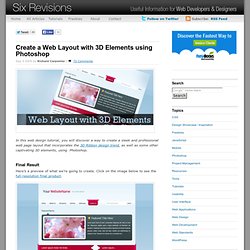
Final Result Here’s a preview of what we’re going to create. Click on the image below to see the full-resolution final product. Creating the Photoshop document 1 Start off by creating a new document (Ctrl+N); enter the dimensions 1200 pixels by 1200 pixels. Making the Background layer editable 2 By default, Photoshop locks the Background layer so that you cannot edit it. Creating the background 3 Now that our background layer is editable, double-click on the layer’s thumbnail to add a Gradient Overlay layer style; use the following figure as a guide on the layer style’s settings. 4 Create a new layer (Ctrl+Shift+N) named "header background". 5 Fill the selection (Alt+Backspace) with any color then add these layer styles. You should now have something like this. Creating the Header. How companies are benefiting from Web 2.0 - McKinsey Quarterly - Over the past three years, we have tracked the rising adoption of Web 2.0 technologies, as well as the ways organizations are using them.
This year, we sought to get a clear idea of whether companies are deriving measurable business benefits from their investments in the Web. Our findings indicate that they are. Podcast How companies are benefiting from Web 2.0: McKinsey Global Survey results Nearly 1,700 executives from around the world, across a range of industries and functional areas, responded to this year’s survey.