
ESB and SOA Omnigraffle Stencils. About Omnigraffle is a nice diagramming tool for Mac/OSX.

To bad (but understandable) not everybody takes it into account when releasing free icon sets. Since I’m working on SOA projects and prefer to work on OSX I decided to loosely ‘port’ the excellent Sonic Icon and Sonic Diagram Library to an Omnigraffle stencil. Downloading the stencil You can download the stencil here: ESB and SOA Stencil 1 (zip / 36 KB) Installing the stencil To make the stencil easily accessible when running OmniGraffle, put it your Library/Application Support/OmniGraffle/Stencils/ folder (within either the top-level Library folder or your user Library folder). Missing something I’ve started porting on a ‘need to have’ basis. Example Diagrams For further documentation on how to use the the elements in the stencil to draw a diagram please read the documentation accompanying the Sonic Diagram Library.
Licensing I’ve redrawn all shapes by hand and made some different design choices. iPad Omnigraffle Stencils & Sketchsheets - ZURB Playground - ZURB.com. What's this all about?

We've been getting a ton of clients requesting our services to help them with their iPad applications—so many, in fact, that we've been getting hand cramps from sketching so many iPad outlines! To avoid carpal tunnel syndrome, we've gone ahead and developed a stencil and some sketchsheets that should make low-fi wireframing for the iPad a lot quicker. Download the Set How to install: Stencil works with Omnigraffle for Mac. After unzipping, open iPad Wireframe.gstencil and Omnigraffle will import it into your stencils panel. What we've included We wanted to be as exhaustive as possible, so we've included everything you've needed in the stencil.
But that's not all! We've enhanced our world famous sketchsheets with some iPad goodness that lets you quickly open and print in case you don't want to mess with any stencils. Included are three different variations: Blank: If all you need is just the iPad and nothing more, this sketchsheet is perfect for you! University Foundation. iPhone Omnigraffle Stencils & Sketchsheets - ZURB Playground - ZURB.com. More Omnigraffle goodies!
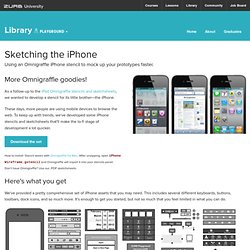
As a follow-up to the iPad Omnigraffle stencils and sketchsheets, we wanted to develop a stencil for its little brother—the iPhone. These days, more people are using mobile devices to browse the web. To keep up with trends, we've developed some iPhone stencils and sketchsheets that'll make the lo-fi stage of development a lot quicker. Download the set How to install: Stencil works with Omnigraffle for Mac. Here's what you get We've provided a pretty comprehensive set of iPhone assets that you may need. There's more (and it's all for free)! We've included our handy sketchsheets infused with iPhone elements in case you want to get started right away. Included are three different variations: Blank: If all you need is just the iPhone and nothing more, this sketchsheet is perfect for you!
Get going! Copyright ZURB, freely available for distrubition under the MIT license. Product Design Training from the Experts at ZURB Your ZURB ID explained University Design Apps Foundation. Interaction Design and Design Strategy. Graffletopia. Distracted by Design » OmniGraffle. When I finally switched to a Mac, I discovered OmniGraffle.

It is lovely. No more Visio headaches and for me, I’ve found it to easier to learn and use than Adobe Illustrator. Plus maybe given the lower-cost point for OmniGraffle, there seem to be many more stencils, templates, and useful materials to get you up and running. And for what it’s worth, I’ve found the extra $100 or so to get OmniGraffle Pro versus OmniGraffle Standard [ have been very worth it. Pro includes Tables, Presentation Mode, and Shared Layers which can be really handy for rapid prototyping of RIA applications especially. Here are OmniGraffle tutorials, stencils, and assorted tips I’ve found useful. A Few of OmniGraffle Features Canvases, Layouts, & Layers – Some powerful options to help you organize your wireframes / rapid prototype and change things in one fell swoop to show / hide items.
Tutorials The Omni Group [ Fox’s (Viget Labs) Short & Sweet OmniGraffle Intro [ Interactive Video Tutorials [