
Baby Boomers on Social Media. There’s a lot of attention paid to how generation Y likes to shop.
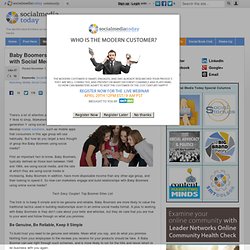
Marketers can target generation Y using social media,and develop mobile solutions, such as mobile apps that consumers in this age group will use habitually. But how do you target a less thought of group like Baby Boomers using social media? First an important fact to know, Baby Boomers, typically defined as those born between 1946 and 1964, are using social media, and the rate at which they are using social media is increasing. Baby Boomers in addition, have more disposable income than any other age group, and their looking to spend it. 9 Social Media Infographics You Must See. Infographics are the latest trend, no doubt about that.
Just google “infographics” and see how many results you get if you do not believe me. People love them because infographics are easy to share and help us visualize the important elements that we desire to learn. Who would read a block of text when the same information could be presented to you with a neat picture? There has been an infographic about the perfect drinks, golf, nacho cheese and just about everything else. The Noob Guide to Online Marketing « Social Media Marketing.
The 7 Secrets of Social Media Conversion [INFOGRAPHIC] 7 Ways to apply conversion centered design strategy to the social media conversion funnel [INFOGRAPHIC].
![The 7 Secrets of Social Media Conversion [INFOGRAPHIC]](http://cdn.pearltrees.com/s/pic/th/conversion-infographic-27799499)
(Click infographic for full size view) Social media should be good for business, but there are two lingering problems. Firstly, the stubborn gaggle of non-adopters that doth protest too much – “it should be for personal use, not business”. Google Plus Cover Photo and Profile Picture Size/Dimensions « BlazoMania. Google Plus is now converted into a Facebook Timeline like interface.
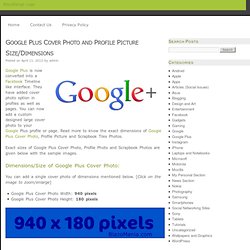
They have added cover photo option in profiles as well as pages. You can now add a custom designed large cover photo to your Google Plus profile or page. Read more to know the exact dimensions of Google Plus Cover Photo, Profile Picture and Scrapbook Tiles Photos. Exact sizes of Google Plus Cover Photo, Profile Photo and Scrapbook Photos are given below with the sample images. Dimensions/Size of Google Plus Cover Photo: How to Grow and Manage an Engaged Online Community. Do you wear many hats at your place of business? Do some of them have to do with reaching out to and interacting with your social media fans and blog readers? If so, then you’re officially or unofficially performing the role of an online community manager . If you’re doing it right, then it’s probably one of the most enjoyable jobs ever. You get to network with interesting people, make new friends, offer guidance, answer questions and so on.
But it’s not all sunshine and roses. In her book, —especially as a customer advocate and brand loyalist. 26 Tips for Managing a Social Media Community. Do you wonder how to go about exercising good social etiquette and managing your social networking communities, all at the same time?
Social media community management has expanded into a growing field and there’s a lot to think about. In this post, I’ll cover 26 tips, an A-Z guide, on ways to manage your company‘s presence. » Aus allen Sozialmedia-Rohren schiessen » Clickomania.ch. Der Dienst seesmic.com veröffentlicht Beiträge parallel in verschiedenen sozialen Medien – sofort oder zeitversetzt.
Facebook, Twitter, Google Plus – die steigende Zahl der Plattformen macht das Social-media-Leben nicht einfacher. Making the Case for Google+: Guy Kawasaki on Marketing Smarts [Podcast] Sign up to gain access to thousands of marketing resources!
![Making the Case for Google+: Guy Kawasaki on Marketing Smarts [Podcast]](http://cdn.pearltrees.com/s/pic/th/kawasaki-marketing-podcast-34091996)
Don't worry ... It's FREE! Guy Kawasaki loves Google+ so much, he wrote a book about it: What the Plus? Mastering the Art of Facebook “likes”: 45 sites, 100K+ articles, 40M+ reactions. Social media is the holy grail of online traffic for content publishers these days.
Almost 10% of all traffic online comes from Facebook alone. If you can figure out how to get your content spread and shared in social media you stand to benefit from a large number of organic visitors. Not only that. Social signals like shares and mentions from Facebook, Twitter and Google+ are increasingly associated with higher rankings in search results. Everyone is looking for the formula on how to break through and get social media traffic and engagement. Distribution is no longer free – the move towards ZERO organic reach. Willkommen in der Matrix: Social Media Analyse & Monitoring (Teil 1)
Social Media Monitoring ist mühsam, aufwendig, ändert sich dauernd und es gibt ca. 5 Milliarden Tools und Meinungen zu dem Thema im Web.
„Okaaay… Aber warum soll ich den Blogpost dann überhaupt lesen? “ Lohnt sich Social Media Monitoring bzw. Analyse, wenn man sinnvoll angehtWenn du dich schon mit dem Thema beschäftigt hast, kommt wahrscheinlich die Bestätigung „Gott ist das mühsam, aber es geht nicht nur mir so“Verrate ich am Ende (ganz am Ende, aber nicht vorscrollen, gell) einen super coolen, ur leichten Trick, wie man mit Social Media Monitoring 10.000 Likes bekommt. Monitoring bezeichnet man idR. die laufende Überwachung von Themen im Web, während die Social Media Analyse der gesammelten Daten punktuell durchgeführt wird. Eine genaue Trennung der Herkunft der Daten nach Ländern ist oft schwierig. Random rules for ideas worth spreading. If you've got an idea worth spreading, I hope you'll consider this random assortment of rules.
Like all rules, some are made to be broken, but still... You can name your idea anything you like, but a google-friendly name is always better than one that isn't.Don't plan on appearing on a reality show as the best way to launch your idea.Waiting for inspiration is another way of saying that you're stalling. You don't wait for inspiration, you command it to appear.Don't poll your friends. It's your art, not an election.Never pay a non-lawyer who promises to get you a patent.Avoid powerful people.
Great ideas aren't anointed, they spread through a groundswell of support.Spamming strangers doesn't work.