
Hosting EXE Applications in a WinForm project. Download demo project and source- 15.6 Kb Introduction Though not a common task, recently I needed to take an existing executable application and embed it into an application I was building.
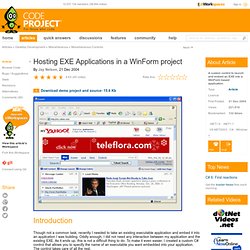
Oddly enough, I did not need any interaction between my application and the existing EXE. As it ends up, this is not a difficult thing to do. To make it even easier, I created a custom C# control that allows you to specify the name of an executable you want embedded into your application. How does it work In design time, the user can specify the name of the executable to embed. Process p = null; try { p = System.Diagnostics.Process.Start(this.exeName); p.WaitForInputIdle(); appWin = p.MainWindowHandle; } catch (Exception ex) { MessageBox.Show(this, ex.Message, "Error"); } After launching, the code must then set the parent of the executable's main window to the control handle. Any time the control is resized, it must also resize the executable window. History. Window Tabifier. Contents Introduction This program allows to host several open Windows in one parent window so that you can easily access and navigate between them, as well as clean up space in the taskbar.

The idea of creating this program came to me when I was reading an article by Jay Nelson: Hosting EXE Applications in a WinForm project. Instead of hosting just a single executable inside a WinForm project, I decided to have a tabcontrol and host different Windows on different tabs. This will allow to group similar Windows together, easily navigate between them and clean up space in the taskbar. Background All the functionality of this application is achieved using Windows API functions, so you should be familiar with basic winapi programming. How the Program Works When you run the application, it hides the main form and an icon is shown in the system tray. Code Behind the Application Enumerating Windows and Filtering Them After this, we need to filter this list. Finding Windows Executable Hosting Windows. Curiosity killed the Programmer - Maxim. Inspired by "Google Chrome" web-browser I tried to create some small application and called it "Casper Browser".

I tried to check the approach of using multi-process architecture for web-browser and for .Net applications in general. At the past I built a couple multi-process applications in .Net, but these applications were GUI-less and shared functionality by using ".Net Remoting" mechanism. The main problem while building this small test-project was to get "Main-Form" from another process and to put it in main application's GUI (as new tab in tabs' container). I knew that "Process" class contains pointer (IntPtr -> MainWindowHandle) to Main-Form of the process, if that process contains main form that used by "Application.Run(…)" procedure (this is very common in Win-Forms applications in .Net).
When I tried to create "Control" or "Form" by using function "FromHandle" with "MainWindowHandle", it always returned NULL: The new code: Back to main goal of the application: