
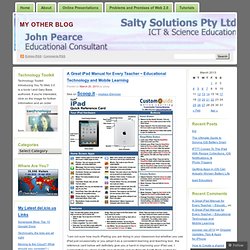
A Great iPad Manual for Every Teacher ~ Educational Technology and Mobile Learning. Posted on March 20, 2013 by johnp See on Scoop.it – mrpbps iDevices.
100+ iPad Apps Perfect For High School. PE Department. Train thoughts #pegeeks In having an opportunity to facilitate a short session today on the issues with KS3 PE and the future of KS3 PE it has got me thinking about the confidence on our leaders of PE in schools.
And I’m sat on a train for 3 hours too! Sir Michael Wilshire commented recently (something like – I can’t quite remember!) How to Properly Clean All Your Gadgets Without Ruining Them. Gotta chime in here about the Mr.

Clean Magic Eraser. It does an amazing job, but you need to know that it's a micro-abrasive. It's like using Comet. I wouldn't personally use it on electronics of any kind, save corroded contacts (for which it's great). Using a lint-free microfiber cloth (or two), first with diluted white vinegar and then with rubbing alcohol gets rid of nastiness without scratching the crap out of your control surfaces. Evernote in Education.
Five steps to a sustainable 1-1 student device roll-out. The use of technology in education has evolved rapidly in the last decade, with schools, colleges and universities striving to create high-quality learning experiences through its effective application.
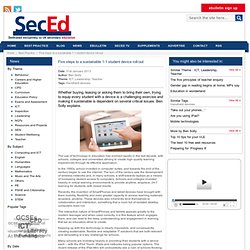
In the 1990s, school invested in computer suites, and towards the end of the century began to use the internet. The turn of the century saw the development of wireless networks and, in many schools, a shift towards laptops as a means of increasing student access to computers. Schools and colleges invested heavily in virtual learning environments to provide anytime, anyplace, 24-7 learning for students, with mixed results. Recently, the invention of SmartPhones and tablet devices have brought with them mobility, flexibility and even greater capacity to access learning materials anyplace, anytime. The iPad vs. the Samsung Galaxy Note 10.1. As much as I love the iPad, iPhone, and iOS, I have to admit that I have become intrigued by some of the new and exciting features offered by some of the competing Android phones and tablets.
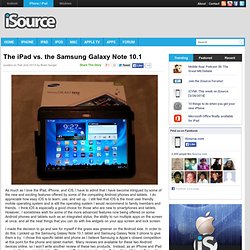
I do appreciate how easy iOS is to learn, use, and set up. I still feel that iOS is the most user friendly mobile operating system and is still the operating system I would recommend to family members and friends. I think iOS is especially a good choice for those who are new to smartphones and tablets. However, I sometimes wish for some of the more advanced features now being offered on some Android phones and tablets such as an integrated stylus, the ability to run multiple apps on the screen at once, and all the neat things that you can do with live widgets on your app screen and lock screen. I made the decision to go and see for myself if the grass was greener on the Android side. The Samsung Galaxy Note 10.1 I purchased the white 16GB version for my comparison with the iPad.
App Multitasking. Bring Your Own Device in schools - an implementation strategy Part 1. Forgive me in advance, this might be a long one.
Cartoon at the end for your efforts? Deal... 1:1 Learning Technology and iPad Articles by James Bowkett. Currently, to help lead senior leaders through the current maze of possibilities with technology supporting learning.
However, several recent experiences have led me to resurrect my iPad series of articles to try to help leaders in the vacuum before my book is complete. All of these topics are explored much more in the book, but I hope to at least make some stop to consider with this article. Some sections of paragraphs I have extracted from the draft chapters of my book. So, the article: Kanex MeDrive – unlimited storage for the iPad? Kanex have recently released meDrive a little box of wizardry that allows you to expand your storage and create your own local cloud using external USB storage.
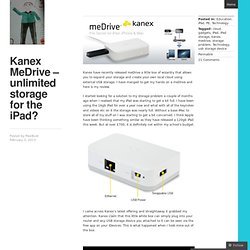
I have manged to get my hands on a meDrive and here is my review. I started looking for a solution to my storage problem a couple of months ago when I realised that my iPad was starting to get a bit full. I have been using the 16gb iPad for over a year now and what with all of the keynotes and videos etc on it the storage was nearly full. Great Video Tutorials on Creating Textbooks Using iBook Author. iBook Author is an awesome free app that allows users to easily create stunning multi-touch textbooks for iPad.

It provides all the tools one might need to start creating and publishing ebooks including galleries, video, interactive diagrams, 3D objects, and many more. iBook Author provides you with a set of pre-defined templates to help you design the background of your textbook. You can choose from a wide variety of styles, like classic textbook, or photo book in both landscape and portrait orientations. You can also choose from a variety of page layouts in each template, or even create one of your own. Check out these posts to learn more about iBook Author : Today we are providing you with another great resource that can help you learn more about iBook Author.
Apple TV in the Classroom by @InstTechTalk. Instructional technology takes so many forms.
In some buildings that may mean simply having a computer lab of desktop computers. In others, you may find SMART Boards and laptops in every room. What Students Can Actually DO With An iPad. Online, in workshops, and even with friends, I frequently get asked What can the iPad actually do? As a sort of challenge to the worth of the device. I would rather that they ask, What can you actually do with an iPad? So last week, in preparing for the New England Reading Association Conference and the NYSCATE Mobile Learning Summit , I decided to change my approach. Rather than structure my presentations by tool, or by app, or even by project, I organized myself around desired student outcomes – aka. what students can actually do.
The Secret To Successfully Using iPads In Education. My brother recently built a shelf for my daughter’s room. It is in the likeness of a boat that she will one day spend sunny afternoons on, cruising around Plymouth harbor. He used a saw, a hammer, glue and other assorted tools that I couldn’t explain or name. I am not a carpenter nor am I skilled at building anything with my hands. However, I do know this. 10 Important Questions To Ask Before Using iPads in Class. Digital Tools Teaching Strategies Lenny Gonzales By Terry Heick. A fine WordPress.com site. How the iPad Is Changing Education. The iPad may only be two years old, but it's already begun to change many things. Reading is one of them. Work is another. It is selling like crazy, but it will be some time before most of the people you know own a tablet. 10 Free iPad Creativity Apps for Young Learners. Teaching our kids to be creative is just as important as teaching them critical thinking skills.Creativity open up students mind to new learning horizons and makes them capable of tackling new and novel situations way better than any explicit instruction would do.
We, in Educational Technology and Mobile Learning , strongly believe in the importance of creativity in education and we have dedicated a whole section in this blog to articles covering this topic. We have also reviewed some web tools that teachers can use to integrate creativity in their instruction and today we are going to introduce you to an awesome set of iPad apps that can do the same job but this time for young learners in primary schools. 1- Draw Free for iPad This is a great free iPad app that lets users create beautiful drawings. It has an intuitive interface and is very simple to use, ideal for young learners. 2- Pic Collage 3- Our Story 4- Scribble Press.
Reflection app for PC : Show your iPad on your IWB screen. An introductory guide to iPads for Teachers. 5 Innovative Mind-Mapping Tools For Education. Creating a plan with students to use cell phones for learning. Want to integrate cell phones into learning? You can involve your students with this planning lesson where students will focus on cell phones as learning tools. With an overview of the educational uses of cell phones (the Gr8 8, below), students will determine how they will choose to use their cell phones for educational purposes.
Contracts for tools will be developed by students and the result will be a plan for educational uses of cell phones. Lesson Title: Plans for Phones or Plnz 4 fonzTools Used: Poll EverywhereLesson Description:Start with a class discussion about tools, and their purpose, for learning.Multiple choice poll: Ask students to text into a poll everywhere free text poll examples of tools and their uses: pencil-communicating/taking notes, calculator-do math, dictionary-learn meanings of words, notes, books, websites, teacher instruction.Free text poll: Ask students to share the tools available on their phone. APPitic - 1,300+ EDUapps. iPads in Education. The iPad as a Tool For Education - a case study. In the first two terms of implementing an iPad programme, Longfield Academy in Kent have noticed a great impact on teaching and learning.
Research carried out on behalf of Naace and supported by 9ine consulting is published here. It’s really exciting to be able to announce our research into the use of iPads. After a successful implementation at Longfield Academy in Kent and two terms of embedded use, the research shows some incredibly positive impacts on teaching and learning. The report on the research, carried out on behalf of Naace and supported by 9ine Consulting is available below.
It outlines the conclusions of one of the most extensive studies so far undertaken into the use of tablets for learning. Please note: the tablet implementation surveys here include the questions used in this research. The Must-Have Guide To Helping Technophobic Teachers. Five tools for global educators. Gpaeanews. Erin School to kids: BYO gadgets - m.JSOnline.com. In Some Cash-Strapped Schools, Kids Bring Their Own Tech Devices. Digital Tools Teaching Strategies. Supporting the Reluctant Teacher - 21cLN. Turning Students Into Teachers. Fix Safari Crashing on iPad and iOS 5. Getting teachers on board the iPad Express. Redefining Instruction With Technology: Five Essential Steps. Reflecting on two years of 1:1 [guest post] Of Course iPads Belong In Classrooms — It’s All About Balance.