
Using Caching on an Object Data Source and Making it Unique Per User. I am a fan of the Object Data Source control especially when binding objects to controls such as a GridView for ASP.NET web forms.

Not a 'huge' fan, but a fan none the less. I find its ability to organize binding methods and events consistently makes it a decent option for binding, along with its ability to present the objects wired up in a strongly typed manner during configuration. One of the nicest features of the ODS is its ability to implement caching. The ODS control will call it’s wired up '.Select()' method on the object upon binding. For (2) main reasons I can see how caching can be useful. Using async call to enable a custom ribbon button. It is not always appropriate to enable custom buttons on the ribbon all the time.

Sometimes one or multiple conditions have to be met to enable the button. As showed in one of my previous posts ‘A better user experience with the dialog framework and notifications‘ the attribute EnabledScript of the CommandUIHandler can be used to test when to enable or disable the button. The check in the example used in the previous post is quite simple and checks if one or more items are selected in the list.
To perform other, less simplistic, checks, it is likely you have to use asynchronous calls when working with ECMA script. Working with async calls in the ribbon is a bit different than working with synchronous calls and this is what this post is about. Functionality Suppose you want to display a button on the ribbon on a default Tasks list. The example will focus on the asynchronous part of the solution, not on creating a button on the ribbon. Solution. Add custom menu actions programmatically in SharePoint 2010. Chapter 14: Silverlight and SharePoint Integration (Professional SharePoint Branding and User Interface Design)
Summary: This chapter discusses Microsoft Silverlight features and tools, how to create a Silverlight Web Part, how to access SharePoint 2010 data by using the Client Object Model, and how to extend Microsoft Visual Studio to create Silverlight solutions.

This article is an excerpt from Professional SharePoint Branding and User Interface Design by Randy Drisgill, John Ross, Jacob J. Sanford, and Paul Stubb, published by Wrox Press (ISBN 978-0-470-58463-7, copyright © 2010 by Wrox, all rights reserved). No part of these chapters may be reproduced, stored in a retrieval system, or transmitted in any form or by any means—electronic, electrostatic, mechanical, photocopying, recording, or otherwise—without the prior written permission of the publisher, except in the case of brief quotations embodied in critical articles or reviews. Contents Download code Silverlight delivers rich user experiences and the tools developers and designers need to rapidly create these experiences.
PowerCollections and C5 Collections for Silverlight4 - JayKimble.net. I have been doing a lot of “hobby” porting over the last couple months.

Alexander Brütt » SPFieldUser. SharePoint 2010 Cookbook: Using the Silverlight Client Object Model in SharePoint 2010 to Create a Silverlight Web Part - SharePoint 2010. Introduced with SharePoint 2010, the Client Object Mode helps developers design client applications that access SharePoint content without installing code on the server.
The Client Object Model can run directly on client machines without having been installed on the SharePoint server. An article on MSDN tells us that the SharePoint 2010 Client Object Model supports "three new client APIs for interacting with Sharepoint sites: from a .NET managed application, from a Microsoft Silverlight application, or from ECMAScript (JavaScript, JScript) that executes in the browser. " In this post, we will explore and utilize the Silverlight Client Object Model. Blogs. I am in training this week with Andrew Connell (by far the best SharePoint training I have ever attended), learning about SharePoint development.

As I get started with my deep dive into learning SharePoint, something that comes up a lot is the need to find the public key token of the current .NET assembly. He just showed a great shortcut. In Visual Studio, go to the Tools menu and choose External Tools. That brings up a new dialog window. Click the Add button and add the following: Title: Get &PublicKeyToken Command: C:\Program Files\Microsoft SDKs\Windows\v6.0A\Bin\sn.exe Arguments: -Tp $(TargetPath)
Claims Walkthrough: Creating Forms-Based Authentication for Claims-Based SharePoint 2010 Web Applications Using ASP.NET SQL Membership and Role Providers. Summary: Learn how to create forms-based authentication for claims-based web applications by using ASP.NET SQL membership and role providers.

In this walkthrough, you create a claims-based web application by using a Microsoft ASP.NET membership and role provider as the authentication provider. Forms-based authentication provides custom identity management in Microsoft SharePoint 2010 by implementing a membership provider, which defines interfaces for identifying and authenticating individual users, and a role manager, which defines interfaces for grouping individual users into logical groups or roles. Deploying a Document Library including content using a Feature. Recently I needed to deploy a SharePoint document library as a feature, but with some documents already in it.

In my case it was because of demo content, the customer wanted to do some training and needed a pre-filled document library. I can see this useful in other times however, such as including templates for documents, etc. Deploying Branding Solutions for SharePoint 2010 Sites Using Sandboxed Solutions. Now it is time to move through the steps of creating a generic branding solution using the SharePoint development tools in Visual Studio 2010.

You can start by creating an Empty SharePoint Project named Branding101, as shown in Figure 1. Figure 1. Programmatically create a browser enabled InfoPath form. Introduction The article gives an overview of the steps and code required to create, fill, and upload an InfoPath form using code.
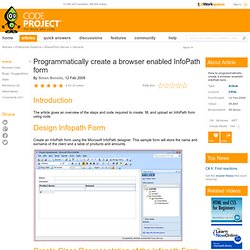
Design Infopath Form Create an InfoPath form using the Microsoft InfoPath designer. This sample form will store the name and surname of the client and a table of products and amounts. Approve/Reject Multiple Items. You can approve/Reject an item from SharePoint ribbon. But only one item can be approved or rejected. But I’ve found requirements from few of my clients that they want to approve/reject in batch rather than one by one. This is logical. Generating Documents from SharePoint with Open XML Content Controls.
It's often the case that a department manager needs to regularly send a nicely formatted status report to her general manager or that a team leader needs to send a weekly status report to a number of interested parties. To collaborate with others in their organizations, both the manager and the team leader can maintain status information in SharePoint lists. The question for developers is how to include the information in the lists in a document such as a status report. Open XML, the default file format for Office 2007, is an ISO standard (documented in exacting detail in IS29500). Put simply, Open XML files are Zip files that contain XML, and it is very easy to generate or modify Open XML documents programmatically.
List fields + Workflow = controled Word document. « SharePoint AfterWork.