
Educational Technology and Mobile Learning: Tips to Engage 21st Century Students. How To Address Negative Student Behavior in 1:1 Classrooms. Twitter. Technology tools. Google. 12 Ways To Integrate (Not Just Use) Technology In Education. There are a couple dozen ways to ‘use’ technology in education. There are also a couple dozen ways to integrate technology in education. Think those two things are the same? Think that throwing a few iPads and a few Edudemic blog posts into a classroom is the best way to launch a 1:1 initiative? In case you couldn’t guess, it’s not. So here’s a hypothetical to clear up my rhetorical questions even more: 7 Habits of Highly Effective Teachers Who Use Technology. 5 Ways to Add Interactive Elements to Your Videos. Over the last few days I've featured a couple of free tools for adding interactive elements to your videos.

In the last year I've reviewed a few other services and methods for doing the same thing. This is a round-up of the ways that you can add interactive elements to your videos. The first four tools could be used by students to create a series of choose your own adventure videos. These tools could be used by teachers to enhance the short videos that they create for flipped lessons. YouTube has annotation tools built right into the editor that you can use when you upload your own content to the site. A Letter To Parents Of Digital Age Children. A Letter To Parents Of Digital Age Children by Susan Lucille Davis first appeared on gettingsmart.com First, let me thank you for entrusting me with teaching your children, honoring the amazing individuals they are, and helping them discover the confident and empowered young people they can be.

Providing a rich and engaging environment for your children to learn in is my utmost concern, but Iately I have had to acknowledge that the young people I see every day do much of the learning that is important to them when they leave the parking lot and head home from school. Thus, I am writing to solicit your help. For a long time, I have bemoaned how as teachers we have allowed a generation of students to explore the Wild West of the Internet largely without our guidance. Top 7 eBooks for Educators. If you know us here at SimpleK12, you know we love our free eBooks.
From time to time, we give them out via email, blog posts, Twitter, Facebook, and webinars. And it turns out, you love our free eBooks too! I've received so many questions about eBooks (mainly, on how to get MORE), that I thought I'd share a list of our most popular eBooks. So grab some coffee, kick up your bunny slippers, and take it all in... Top 7 SimpleK12 eBooks for Educators.
David Pogue: 10 top time-saving tech tips. Storyboard That - A Good Storyboarding Tool. Educational Technology and Mobile Learning: Teachers Easy Guide to The Most Important Web Tools in Education. When it comes to using web resources with our students, time plays a decisive role.It is next to impossible for a busy teacher restricted by curriculum constraints, day to day lesson preparations, assignment corrections, to mention but a few of his chores, to effectively search the web and find the adequate resources to share with his/ her students.
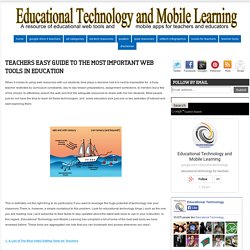
Most people just do not have the time to learn all these technologies and some educators pick just one or two websites of interest and start exploring them. This is definitely not the right thing to do particularly if you want to leverage the huge potential of technology into your classroom.There is, however, a simple roudabout to this problem. Physical Education.
25 iBooks Author Tutorial Videos. 5 Ways to Add Interactive Elements to Your Videos. Over the last few days I've featured a couple of free tools for adding interactive elements to your videos.

In the last year I've reviewed a few other services and methods for doing the same thing. This is a round-up of the ways that you can add interactive elements to your videos. The first four tools could be used by students to create a series of choose your own adventure videos. These tools could be used by teachers to enhance the short videos that they create for flipped lessons. YouTube has annotation tools built right into the editor that you can use when you upload your own content to the site. The Mad Video is a new service for creating interactive videos. Embed Plus is a handy tool for editing and annotating videos that you find on YouTube. WireWax is a new service that takes the concept of YouTube annotations and makes it much better. PIP Teachers & Technology_PDF. Now You Can Export Padlet (Wallwisher) Walls as PDFs and Images. 40 Sites for Educational Games. With the start of school right around the corner, I decided to revisit a post I've done on sites for educational games.
This list I've compiled has a nice mix of subjects and grade levels that teachers can use w/ their students. *This list is in alphabetical order. 40 Sites for Educational Games ABCya - A great site for games and mobile apps for elementary students.Academic Skill Builders - A wonderful site w/ learning through the use of multi-player games. Also, there is an educational portal which allows for student tracking.Arcoiris - A nice site for educational games in English and Spanish.Braineos - Games based on flash card in a wide variety of subjects.BrainNook - A fun site for students that focuses on English & Math.
For my Pinterest board on educational games click here. Things I Will Not Be Missing In My Paperless Classroom. As I head into the new school year, I'm not scrambling for my old lesson plan book or looking for notes in some long buried folder.

All of my work is saved in Evernote and I will be sharing the work with my students on the second day of school. As I was sitting and thinking about all of the things I was going to need to start the year, I was struck by the number of things I will not need now that I'm as paperless as I can get. In no particular order, here are the things I will not miss in the upcoming school year. 1. Milk Crates I will not miss these guys at all. All of my student work will be on Turnitin.com or saved in their Evernote notebook that can be shared with me and acts as an e-portfolio.