
How to transpose a values in a row to column using formulas… [Quick tip. Posted on May 14th, 2013 in Excel Howtos - 23 comments This is interesting, I am in Columbus to meet one of my college friends.
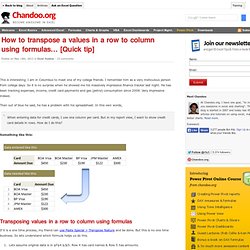
I remember him as a very meticulous person from college days. So it is no surprise when he showed me his massively impressive finance tracker last night. He has been tracking expenses, income, credit card payments and gas (petrol) consumption since 2008. Very impressive indeed. Then out of blue he said, he has a problem with his spreadsheet. When entering data for credit cards, I use one column per card. Something like this: Transposing values in a row to column using formulas If it is a one time process, my friend can use Paste Special > Transpose feature and be done.
Lets assume original data is in $F$4:$J$5. This is good, but I don’t like the extra column… If that is the case, you can use the ROWS() formula to generate these running numbers for you on the fly. =INDEX($F$4:$J$4, ROWS($A$1:A1)) would work perfectly. Play with this formula. Make Something Every Day. What will you make to greet the dawn of a new decade?

Whether sketching self-portraits, welding wildebeest sculptures or baking banana bread, a daily project can be just the thing to break out of your routine while making creativity a part of your daily life. As Noah Scalin, the brains behind the Skull-a-Day project and author of 365: A Daily Creativity Journal, says, “A daily project is like a marathon. It’s a ridiculously daunting task, but making an original creation every day gives you an incredible sense of accomplishment. It also forces you to push beyond your mental and physical barriers (especially the ones you’ve erected for yourself). You’ll be amazed at what you produce and what you learn about yourself in the process.” Have you broken any of your New Year’s resolutions yet? Okay, so results may vary, but the point is, you never know what will come from taking on the challenge of a year-long daily project! So what’s the big deal? Ch oosing a Subject or Medium 1. 2. 3. 4. 5. 11 Tips to Carve Out More Time to Think.
“The person who reads to much and uses his brain too little will fall into lazy habits of thinking” - Albert Einstein How much time do you get a week to just think?

Not while listening to music, driving your car or during group brainstorms. Not while playing video games, doing chores or taking a shower. Just you and your brain. I’d wager that few people ever average more than twenty unbroken minutes of thinking each week. Thinking Versus Daydreaming: What’s the Difference? When you look at most people who spend all their day “thinking”, it’s easy to wonder how they get anything done.
In order to be useful, thinking needs to be: Directed. Creating a Thinking Hour One hour, once per week is all I suggest. Why create a thinking hour? Everything from quality of life to work, relationships to health are all based on the quality of the ideas you have. Creating a thinking hour gives you the ability to get outside the trees and see the entire forest. How to Set Up a Thinking Hour Write.
Productivity Articles at Stepcase Lifehack.