
Minecraft Forum - News, Forums, Mods, and Texture Packs. Minecraft Forum. Minecraft Mods. 4.7][SMP][Forge] Portal Gun - Reconstructed [v4] - Rewritten... again. 1.4.5v1 onwards has been documented.
![4.7][SMP][Forge] Portal Gun - Reconstructed [v4] - Rewritten... again.](http://cdn.pearltrees.com/s/pic/th/reconstructed-rewritten-73972523)
Read this till I can bring myself to editing the topics: 1.4.6 mods work on 1.4.7 and vice versa. In the first week of January I will begin to make changes to the mod page on my blog, so if you're still using the old version (pre-rewrite) I suggest you go read them up before the information gets updated. Recommended you use Forge 482 or later, due to an important fix in FML. Top Issues. 4.7] [Jan.10] Rei's Minimap v3.2_06. Minecraftforge Downloads. [V1.4.7] Risugami's Mods - Updated. 4.7][Forge] Cave-Gen mod 2.26_1 - New World type [Separate lantern mod,LAN support] 2.27_5 - Fixed commands 2.27_4 - Fixed bug that prevented plugin functions from working(i.e. latern crafted using shard with lantern mod and coffee plant in jungle zone with cocoacraft) 2.27_3 - Fixed dirty code for saving data 2.27_2 - Recipe adding moved from Lantern mod into CaveGen plugin container 2.27_1 - Fixed bug crashing game when launching vanilla world before playing any cave world 2.26_1 - Fixed bug crashing game using LAN 2.26 - Switched from Modloader to Forge, Full and correct LAN support using packets, Plugin container supporting CocoaCraft and Lantern mod, Lantern plugin, lantern can be placed on ground or hung from ceiling, removed Mossy stone, removed Cave Lantern and Lantern (since you can now place Lantern on the ground, the lying lantern now replaces cave lantern in case you install Lantern plugin), mcmod.info file with description and mod icon in Forge mod manager, new village names (now 40 in total!)
![4.7][Forge] Cave-Gen mod 2.26_1 - New World type [Separate lantern mod,LAN support]](http://cdn.pearltrees.com/s/pic/th/roleplay-support-minecraft-75223854)
Minecraft. Minecraft Wiki - The ultimate resource for all things Minecraft. Blocks. Crafting. Crafting is the method by which many blocks, tools, and materials are made in Minecraft. In order to craft something, players must move items from their inventory to a crafting grid. A 2×2 crafting grid can be accessed from the player's inventory. A 3×3 grid can be accessed by using a crafting table. Java & Bedrock Edition crafting system[edit | edit source] For some items, the arrangement of their ingredients on the crafting grid is unimportant. On the other hand, many of the more important or useful game objects must have their ingredients placed in the correct relative positions on the crafting grid. Players always have access to the 2×2 crafting grid from their inventory screen, and this can be used whenever the screen is brought up. Notes Jump up ↑ On this wiki, shapeless recipes are marked with a pair of intertwined arrows on the crafting table graphic.
Recipe Book[edit | edit source] Crafting recipes are organized in several different categories, as follows: Pressing. Brewing. Potion brewing chart (excludes splash potions) Brewing (or Alchemy) is the process of creating potions and splash potions by adding various ingredients to water bottles in a brewing stand.
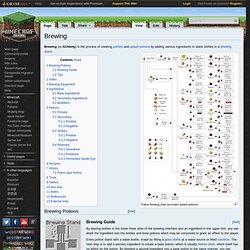
[edit] Brewing Potions Brewing "grid" (Ingredients are placed at the top. Bottles placed underneath) [edit] Brewing Guide By placing bottles in the lower three slots of the brewing interface and an ingredient in the upper slot, you can distill the ingredient into the bottles and brew potions which may be consumed to grant an effect to the player. Every potion starts with a water bottle, made by filling a glass bottle at a water source or filled cauldron. Smelting. Smelting is a method of producing refined goods in Minecraft, also known as melting, baking, cooking, burning, and producing.
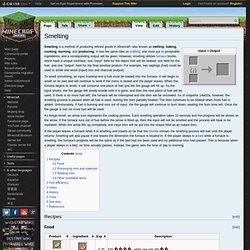
It has the same idea as crafting; one must put in acceptable ingredients, and a corresponding output will be given. However, smelting utilizes furnace blocks, which have a unique interface: one "input" field for the object that will be heated, one field for the fuel, and one "output" field for the final smelted product. For example, two saplings (fuel) could be used to smelt one wood (input) into one charcoal (output). To smelt something, an input material and a fuel must be loaded into the furnace. It will begin to smelt on its own and will continue to work if the menu is closed and the player leaves. As things smelt, an arrow icon represents the cooking process. If the player leaves a furnace while it is smelting and travels so far that the chunks unload, the smelting process will halt until the player returns. Thunderstorm. Mobs. Mobs are living, moving game entities.
The term "mob" is short for "mobile"[1] and has been used as a general term referring to any moving entities in games since the first MUDs surfaced. General behavior Mobs are affected by the environment in the same ways as the player: they are subject to physics, and they can be hurt by the same things that harm the player (catching on fire, falling, drowning, attacked by weapons, etc.). Some mobs may be resistant or immune to certain hazards, such as Nether mobs which are immune to fire.