
Interactive map of Linux kernel. Kernel links. Juan-Mariano de Goyeneche < jmseyas@dit.upm.es > /* * The latest version of this document may be found at: * */ The need for a document like this one became apparent in the linux-kernel mailing list as the same questions, asking for pointers to information, appeared again and again.
Fortunately, as more and more people get to GNU/Linux, more and more get interested in the Kernel. But reading the sources is not always enough. It is easy to understand the code, but miss the concepts, the philosophy and design decisions behind this code. Unfortunately, not many documents are available for beginners to start. Please, if you know any paper not listed here or write a new document, send me an e-mail , and I'll include a reference to it here.
The papers that follow are listed in no particular order. Enjoy! : "Iptables-tutorial" : Oskar Andreasson. : : iptables, netfilter, firewalls. Retro Programming: Itsy-OS Kernel: Preemptive Switcher. Itsy-OS v0.1 is a small 8086 operating system kernel providing two basic services: a simple preemptive task switcher and memory management.

If necessary, simple IPC and task management can be added to provide the features of a traditional microkernel. Weighing in at about 380 bytes, Itsy should port well to tiny architectures. Memory Control Blocks Each block of memory is preceded by a memory control block which is 32 bytes long. How The Kernel Manages Your Memory. After examining the virtual address layout of a process, we turn to the kernel and its mechanisms for managing user memory.

Here is gonzo again: Linux processes are implemented in the kernel as instances of task_struct, the process descriptor. The mm field in task_struct points to the memory descriptor, mm_struct, which is an executive summary of a program’s memory. It stores the start and end of memory segments as shown above, the number of physical memory pages used by the process (rss stands for Resident Set Size), the amount of virtual address space used, and other tidbits. Within the memory descriptor we also find the two work horses for managing program memory: the set of virtual memory areas and the page tables. Each virtual memory area (VMA) is a contiguous range of virtual addresses; these areas never overlap. In Windows, the EPROCESS block is roughly a mix of task_struct and mm_struct. Linux has functions to read and set each flag in a PTE. Things could have been different. Linux Directory Structure (File System Structure) Explained with Examples.
By Ramesh Natarajan on September 8, 2010 Have you wondered why certain programs are located under /bin, or /sbin, or /usr/bin, or /usr/sbin?
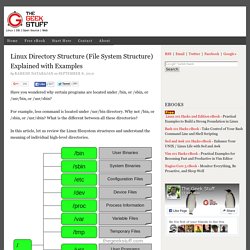
For example, less command is located under /usr/bin directory. Why not /bin, or /sbin, or /usr/sbin? What is the different between all these directories? In this article, let us review the Linux filesystem structures and understand the meaning of individual high-level directories. 1. / – Root Every single file and directory starts from the root directory.Only root user has write privilege under this directory.Please note that /root is root user’s home directory, which is not same as /. 2.
Contains binary executables.Common linux commands you need to use in single-user modes are located under this directory.Commands used by all the users of the system are located here.For example: ps, ls, ping, grep, cp. LKDDb: Linux Kernel Driver DataBase. About LKDDb LKDDb is an attempt to build a comprensive database of hardware and protocols know by Linux kernels.

The driver database includes numeric identifiers of hardware, the kernel configuration menu needed to build the driver and the driver filename. The database is build automagically from kernel sources, so it is very easy to have always the database updated. There exists two versions: text based database, to be processed automatically (see lkddb.list below), and the web LKDDb version, which includes also text and hardware strings from kernel and other databases.
Automagical Kernel Configuration. Bran's Kernel Development Tutorial: Introduction. Kernel development is not an easy task.

This is a testament to your programming expertise: To develop a kernel is to say that you understand how to create software that interfaces with and manages the hardware. A kernel is designed to be a central core to the operating system - the logic that manages the resources that the hardware has to offer. One of the most important system resources that you need to manage is the processor or CPU - this is in the form of allotting time for specific operations, and possibly interrupting a task or process when it is time for another scheduled event to happen. This implies multitasking. There is cooperative multitasking, in which the program itself calls a 'yield' function when it wants to give up processing time to the next runnable process or task. Diet libc - a libc optimized for small size.