
LeJOS. Pronunciation[edit] According to the official website: In English, the word is similar to Legos, except there is a J for Java, so the correct pronunciation would be Ley-J-oss.

If you are brave and want to pronounce the name in Spanish, there is a word "lejos" which means far, and it is pronounced Lay-hoss. The name leJOS was conceived by José Solórzano, based on the acronym for Java Operating System (JOS), the name of another operating system for the RCX, legOS, and the Spanish word "lejos. " History[edit] leJOS was originally conceived as TinyVM and developed by José Solórzano in late 1999. As of August 20, 2006, the original leJOS for the RCX has been discontinued with the 3.0 release. In 2013, development began on a port to the Lego Mindstorms EV3 brick. Architecture[edit] leJOS NXJ provides support for access to the robot's I²C ports. Here is a simple leJOS program: Community[edit] Since the first alpha release of leJOS NXJ in 2007, the project has had a consistently active following. LINUX LeJos - Java for Mindstorm. Getting Started on Linux This version of the tutorial is for the 0.9 release of leJOS NXJ.
Prerequisites Java Development Kit You will also need a Java Development Kit (JDK) on your PC. Note that a Java Runtime Environment (JRE) is not sufficient as it does not allow you to compile Java programs. LeJOS NXJ needs to know the locations of java.exe and javac.exe. USB Driver In order to use a USB connection to your NXT brick on Linux, libusb must be installed. You will need to ensure that the packages that leJOS NXJ is dependent on are on your system. If you are running leJOS NXJ from a non-root user, you will need to ensure that you have read and write access the NXT USB device in /dev/bus/usb. Sudo chmod a+w /dev/bus/usb/xxx/yyy The xxx and yyy numbers need for you NXT to be determined beforehand. A better solution is to use udev rules. These rules rely on your username being in the lego usergroup. Bluetooth Back to top Installing leJOS Downloading the software Setting up environment variables. WINDOWS LeJos - Java for Mindstorms. Getting Started on Microsoft Windows This version of the tutorial is for the 0.9 release of leJOS NXJ.

Prerequisites Java Development Kit You will also need a Java Development Kit (JDK) on your PC. Note that a Java Runtime Environment (JRE) is not sufficient as it does not allow you to compile Java programs. LeJOS NXJ only works with 32-bit version of the JDK and JRE, so even if you have a 64-bit system, you should select a 32-bit version of the JDK. USB Driver To run leJOS NXJ on Microsoft Windows you will need a suitable USB driver on your PC. It has come to our attention, that NXT-G as well as the Fantom driver don't install under Windows 7 Starter Edition. Bluetooth Stack If you want to communicate with the NXT over Bluetooth, you will need a Bluetooth dongle or built-in support on your PC, and a Bluetooth software stack. leJOS NXJ has been tested with the Microsoft and Widcomm stacks, but might also work with others. Back to top Downloading the software Running the GUI installer Examples: Controlling the Motors. Controlling the Motors Introduction to the Motor class.
This Motor class provides access to the NXT motors. To be useful, a motor must be connected to one of the three NXT motor ports. This class provides an instance for each port. They are: Motor.A, Motor.B and Motor.C. Each of these three objects is an instance of the class NXTRegulatedMotor. This tutorial contains a set of five programs for you to write.
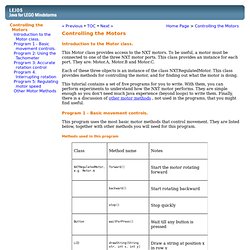
Program 1 - Basic movement controls. This program uses the most basic motor methods that control movement. Methods used in this program What the program should do: Display "Program 1 " in row 0 of the LCD. Solution Back to top Program 2 - Using the Tachometer. The NXT motor has a built in tachometer that keeps track of the current angle (in degrees) of the motor axle. New methods used in this program.