
Bash - design patterns or best practices for shell scripts. Common shell script mistakes. I've written a few shell scripts in my time and have read many more, and I see the same issues cropping up again and again (unfortunately even in my own scripts sometimes).

While there are lots of shell programming pitfalls, at least the interpreter will tell you immediately about them. The mistakes I describe below, generally mean that your script will run fine now, but if the data changes or you move your script to another system, then you may have problems. I think some of the reason shell scripts tend to have lots of issues is that commonly one doesn't learn shell scripting like "traditional" programming languages. Instead scripts tend to evolve from existing interactive command line use, or are based on existing scripts which themselves have propagated the limitations of ancient shell script interpreters. Inappropriate use shell is the main domain specific language designed to manipulate the UNIX abstractions for data and logic, i.e. files and processes.
Stylistic issues [ ! If ! [ ! The printf command. - Article pages now have a discussion option at the bottom (moderated/captcha, but no registration needed) Stranger, this is a very big topic that needs experience - please fill in missing information, extend the descriptions, and correct the details if you can!

Attention: This is about the Bash-builtin command printf - however, the description should be nearly identical for an external command that follows POSIX®. GNU Awk expects a comma after the format string and between each of the arguments of a printf command. For examples, see: code snippet. Unlike other documentations, I don't want to redirect you to the manual page for the printf() C function family. Due to conflicting historical implementations of the echo command, POSIX® recommends that printf is preferred over echo.
General The printf command provides a method to print preformatted text similar to the printf() system interface (C function). Syntax printf <FORMAT><ARGUMENTS Thus, a typical printf-call looks like: Options Arguments or: Bash scripting Tutorial.
Working with images. String manipulation. Basic Synthax. ShellEd Eclipse Plugin. BashEd Eclipse Shell Debugger. Bash by example, Part 2. Let's start with a brief tip on handling command-line arguments, and then look at bash's basic programming constructs.
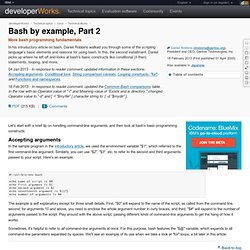
Accepting arguments In the sample program in the introductory article, we used the environment variable "$1", which referred to the first command-line argument. Similarly, you can use "$2", "$3", etc. to refer to the second and third arguments passed to your script. Here's an example: #! The example is self explanatory except for three small details. Sometimes, it's helpful to refer to all command-line arguments at once. Back to top Bash programming constructs If you've programmed in a procedural language like C, Pascal, Python, or Perl, then you're familiar with standard programming constructs like "if" statements, "for" loops, and the like.
Conditional love If you've ever programmed any file-related code in C, you know that it requires a significant amount of effort to see if a particular file is newer than another. If [ -z "$myvar" ] then echo "myvar is not defined" fi #! BASH Programming - Introduction HOW-TO: Functions. NextPreviousContents 8.
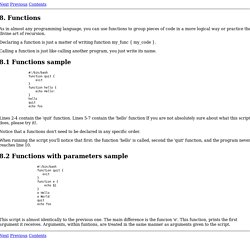
Functions As in almost any programming language, you can use functions to group pieces of code in a more logical way or practice the divine art of recursion. Declaring a function is just a matter of writing function my_func { my_code }. Calling a function is just like calling another program, you just write its name. 8.1 Functions sample #! Lines 2-4 contain the 'quit' function. Notice that a functions don't need to be declared in any specific order. When running the script you'll notice that first: the function 'hello' is called, second the 'quit' function, and the program never reaches line 10. 8.2 Functions with parameters sample.