IF Tracker. Advanced SystemCare Free 5/4/3 Download Review for Windows XP/Vista/7. Hidden - The most advanced theft tracking software for your Mac. Dual monitors: How to connect two monitors to one computer. Computer Maintenance Guide: 25 resources for keeping your PC or Mac in tip-top shape. iTunes Store: Transferring purchases from your iOS device or iPod to a computer. Languages If you purchased items from the iTunes Store and the only place you have them stored is on your iOS device or iPod, you can transfer them to any computer that is authorized for your iTunes Store account.
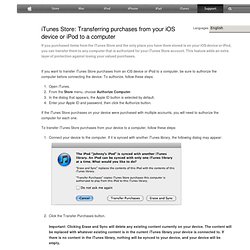
This feature adds an extra layer of protection against losing your valued purchases. If you want to transfer iTunes Store purchases from an iOS device or iPod to a computer, be sure to authorize the computer before connecting the device. To authorize, follow these steps: Open iTunes. From the Store menu, choose Authorize Computer. In the dialog that appears, the Apple ID button is selected by default. If the iTunes Store purchases on your device were purchased with multiple accounts, you will need to authorize the computer for each one. To transfer iTunes Store purchases from your device to a computer, follow these steps: Connect your device to the computer. Click the Transfer Purchases button. Last Modified: Oct 15, 2013 One Moment Please Thanks for your feedback. Downloading past purchases from the App Store, iBookstore, and iTunes Store.
Languages With iTunes in the Cloud, you can access your past purchases from the iTunes Store, App Store, iBooks Store, and Mac App Store. Before you begin Sign in with the Apple ID that you used for the original purchase. See which Apple ID you used to download an item. Download previous purchases on your iPhone, iPad, or iPod touch Make sure your iOS device meets these system requirements: iOS 4.3.3 or later You need iOS 5 or later to download items to iPhone (CDMA model). iBooks 3.0 or later to download books If you can't find an item in Music or Videos using the steps below, you might try downloading it from the iTunes Store app: iPhone or iPod touch: Tap the iTunes Store app and go to More > Purchased. iPad: Tap the iTunes Store app, then tap Purchased.
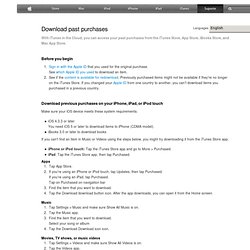
Apps Tap App Store. Find the item that you want to download. Music Tap Settings > Music and make sure Show All Music is on. Tap the Download icon. Movies, TV shows, or music videos Tap Settings > Videos and make sure Show All Videos is on.