
15 Things Teachers & Students Can Do With Edmodo. Last week the Wall Street Journal had an article announcing that Edmodo had received a $15 million venture capital investment from the founder of LinkedIn and a former VP of Facebook.
YouTube for Schools - Now More Schools Can Access YouTube. 11 Free Online Drawing Tools. As long as there has been a mouse connected to a computer there have been tools for making drawings on a computer.

Here are five drawing tools that you might consider the next time you or your students need a free and easy drawing tool. Sketchpad is a free, feature-rich, online drawing tablet that I recently came across in my stumbling around the Internet. Sketchpad offers users the ability to quickly create drawings. Sketchpad doesn't require you to create an account in order to create and save your drawings. All of the drawing tools that you would expect to find like brushes, pencils, and a large range of colors are offered by Sketchpad. Art Pad and Sketch Pad (different from the Sketch Pad above) are both blank slate drawing utilities. Graffiti Creator is best described not as a drawing tool, but a text editor. Bomomo is an interesting drawing utility that creates images out of controlled chaos.
Guest Post - Education Technology's Hidden Ticking Time Bomb. Forget Box - Simple Sharing of Large Files. Technology Education for Pre-Service Teachers - Guest Post. Like practicing educators, today’s pre-service teachers are faced with the challenge of connecting with 21st century learners.
Despite the fact that many of these teaching candidates are proficient with technology for personal use, university teacher education programs must prepare them to integrate technology effectively in their content areas. 7 Good Screen Capture Tools for Teachers. Introducing new technology tools to your students or to your colleagues can become a frustrating exercise if you end up repeating the same step-by-step directions over and over again.
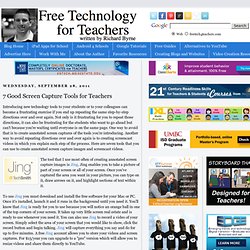
Not only is it frustrating for you to repeat those directions, it can also be frustrating for the students who want to go ahead but can't because you're waiting until everyone is on the same page. One way to avoid that is to create annotated screen captures of the tools you're introducing. Another way to avoid repeating directions over and over again is to creating screencast videos in which you explain each step of the process. Creating an Online Classroom With Posterous - Guest Post.
Pages Thursday, February 23, 2012 Creating an Online Classroom With Posterous - Guest Post Before becoming an English language teacher, I had primarily worked in the photographic industry as a salesperson, manager, and teacher/trainer.
I was a prime example of the old adage, “those who don’t, teach” since I don’t have an artistic bone in my body (I blame my older sister for taking all the talent with her when she was born). My focus was on the technical skills, helping people learn how to use their cameras, especially during the seismic shift from film to digital. With Posterous, I can integrate photos into the post as a gallery, upload documents and presentations directly into the post for the students to view and download, and students can contribute and comment.
Simplicity: Everything on the site is meant to be used with the minimum amount of learning. At 9:00 AM Email ThisBlogThis! Labels: Blogging, classroom blogging, Guest Bloggers, posterous, posterous spaces. Video Games in Teaching - Lessons Learned. Pages Tuesday, February 21, 2012 Video Games in Teaching - Lessons Learned Over the years, I’ve worked with a lot of teachers who have expressed interest in using video games in their teaching, but they are not sure how to start, and what their options are.
In this post I’d like to share some tips for success garnered from working with talented teachers who have successfully integrated video games into their teaching.1) Know where to look, there is a lot of good free stuff out there, but it can be hard to find: iCivics, Playing History, BBC School Games (variety), The JASON Project (science), and PBS Kids (literacy and early math skills), are a few places that will list several games and interactives. These are great places to start to see what is out there. 2) Know the value and drawback of games. 3) You don’t have to jump in with both feet. 4) Kids love transgressive play.
Guest Post - Look at the Camera and say "Think" Pages Wednesday, February 22, 2012 Guest Post - Look at the Camera and say "Think" I think back on my own days in elementary and even high school and am disappointed by how little I actually remember, despite the fact i probably spent 75% of my time there from ages 5-18.

How could I have spent so much time in a place that I really did enjoy and feel successful but still have relatively little memory? Now, one of my top goals as a teacher is to make what happens in the classroom everyday a memorable learning experience.No denying, drill and kill will most likely embed a skill into someones’ brain. If a classroom is a place where it doesn't seem like a lot of pictures should be taken , then it makes me think memories are not being made. At 10:30 PM Email ThisBlogThis! Labels: Guest Bloggers, guest posts, imovie, posterous. Most Popular Posts of the Year - #4, 10 Comic & Cartoon Creators. Like a lot of other people are, I'm taking this week to relax a bit and do some things that I haven't had time for lately.

Therefore, all this week I'm rewinding the year with the 25 most-read posts of the year. I hope that those of you who are also on vacation this week, enjoy every moment of it. See you (virtually) in the New Year. Best of the Web 2012. Most Popular Posts of the Year - #3, 47 Alternatives to YouTube.