Une plateforme #PHP open source de prise de not... #Evernote « Vider au lieu de stocker au b. Puisqu'on parle d'organisation - la paperasse d. Des webinars dédiés à #Eve. Maîtriser un peu plus le potentiel de #Ev. Evernote vs Petit Carnet Noir. Quand je parle d’Evernote et de son utilisation dans les recherches généalogiques, j’entends souvent le commentaire : moi j’ai un petit carnet noir, pourquoi donc me compliquer la vie avec Evernote ?
Très bonne question, que je me suis posée un moment avant de me laisser convaincre par Sophie Boudarel d’essayer Evernote . Si vous lisez son dernier article, vous remarquerez que même Sophie a toujours elle aussi son carnet noir, qu’elle traine partout avec elle. En fait, le carnet de notes à portée de la main et Evernote sur les appareils, mobiles ou pas, que nous utilisons ne sont pas antinomiques. #Catch, une alternative à #Evernote, sur...
How to Use Evernote as a Blogger. A few weeks ago, I started using Evernote as my primary “blogging workbench.”

It is where I store blog post ideas, collect various post components, and then write the post itself. This has proven to be a robust solution that enables me to be working on several posts simultaneously. I thought I would share my workflow with you. Yours will be different, I’m sure. But, hopefully, this will provide you with a few ideas. Evernote reaches more than 10M users. Multi-platform note-taking program Evernote on Monday announced it had reached more than 10 million registered users.
The 10 million mark is a significant bump from the company’s reported 6 million users in January. It also reported that more than 400,000 of its customers pay $5 a month for a premium plan that enables bigger uploads and better collaborative tools. “Ten million users seemed like an inconceivable number when we were getting ready to launch the service into open beta less than three years ago,” founder and CEO Phil Libin wrote on the company’s blog. “Well, it wasn’t literally inconceivable; we actually put it on business plans and investor pitch decks and everything.” Evernote launched less than three years ago and helps customers keep notes in sync across different computers and mobile devices. Evernote three months on ...
I've been using evernote as my notebook application for about three months and I can say I'm pretty much satisfied with it, even to the extent of tinning up $45 for a premium subscription.
Not that it's perfect, sychronisation can be slow, especially when one machine is catching up, and the Mac client sometimes refuses to exit, but that said it's pretty good. Killer features for me have been You can also share notes with non-users by emailing them straight out of the app. Nice to haves would include being able to submit straight into Google or Zoho docs, or being able to post to wordpress or blogger - but these really are nice to haves - ctrl-c/ctrl-v works just fine and given that you're probably going to work on the document before sharing or posting it (and the use case I'm thinking of is creating internal technical or reference documentation such as engineering changes) the lack of a direct post facility is pretty minor.
All the functionality is there in a free account. How to Get Your Stuff into Evernote. It is no secret that I am a big fan of Evernote.

It is one of those amazing tools that can radically boost your productivity. I use it probably more than any other program other than Mac Mail. It has enabled me to realize my dream of a paperless office. But Evernote can also be initially intimidating. The program is so deep and feature-rich that new users hardly know where to start. Livescribe and Evernote – Keeps Getting Better! Posted by Kasey Fleisher Hickey on 23 May 2011 Comment For those of us who love the feeling of taking notes the ‘old-fashioned’ way — with pen and paper — there’s something that takes these familiar products and does a lot more with them.
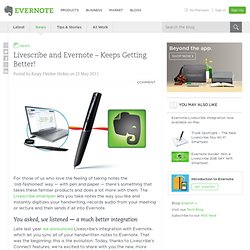
The Livescribe smartpen lets you take notes the way you like and instantly digitizes your handwriting, records audio from your meeting or lecture and then sends it all into Evernote. You asked, we listened — a much better integration. Evernote and Livescribe reading my writing. In October last year Andrew Sinkov wrote about the integration between Livescribe (desktop application for managing notes and audio recorded with an Echo or Pulse pen) and Evernote (online note storage with benefits).
I tried it today for the first time. Andrew describes how the integration works so I won’t go into that. I’m using this as a second test as the first was very untidy writing and only some words were recognised. YES! Handwriting recognition. Keywords: writing, evernote, livescribe In the iphone & ipad Evernote apps the search terms are highlighted. In the images below you can see how the words I searched for have been highlighted. 9 Reasons I Love the Green Elephant — Stress-Free Productivity. How to Move Your Stuff from Your Cellphone or iPad or Netbook to Your Computer and Vice Versa. Smartphones (not to mention tablet computers and netbooks) are great, but they have a number of annoying properties.
On the top of that list is the trouble getting information --files, clips, notes, photos-- from one device to another. This can be especially aggravating with iPhones and iPads because they don't have USB ports into which you can plug a little thumb drive. In the realm of software solutions, there are those programs that will transfer your stuff when you connect your device to the mother ship, your PC. But in a perfect world, you shouldn't have to physically connect your phone or tablet computer to another machine: You should be able to transfer everything without wires. No wires is one of the points to having a smartphone or tablet computer in the first place. There are two programs that can easily move data from one device to another: DropBox and Evernote. DropBox is the perfect solution for transferring files, especially videos and photographs. Evernote Dropbox: Saving Files, Scanned Documents Quickly!
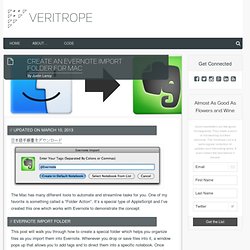
Updated on March 10, 2013 日本語手順書をダウンロード The Mac has many different tools to automate and streamline tasks for you.