
Abort, Retry, Hack? A Preview of the 0.5 Weave Server API « Tapestry. As announced as part of the 0.6 Weave client roadmap, we’ll be moving over to the 0.5 server API.
I wanted to make a post to talk about some of the changes, and what to expect in migrating over. The documentation for the APIs can be found at: Here are some of the changes and highlights from the 0.3 version: Better separation of the storage and user management pieces As Weave grows, there’s a fairly clear separation between the user-management portion and the storage portion (unfortunately, the break isn’t perfect, since creating a user in SQLite requires setting up their storage). Thus, each section has it’s own subfolder, with just the parts of the code it needs, and its own config files. As you can see, we’ve been busy trying to improve the Weave experience as we move towards full releases, and we’d love to hear any feedback you might have on the server (or the client, though I can’t help you as much there). Like this: Like Loading... Weave Minimal Server update « Tapestry.
I’ve updated the server so that it’ll be compliant with the upcoming 1.0 beta release.
There are three ways to play along at home, in order of most difficult first: 1) grab and do a fresh install. Ick. That’s way too much hassle. 2) grab untar it somewhere and replace the index.php file in your weave_minimal folder. 3) Go to your current install and change index.php line 119 from if ($version ! To if ($version ! Yeah, it really is that straightforward.
FAQ for Thunderbird contact sync. Also see: Getting Started If your browser uses a proxy server to connect to the internet, use the same settings in Thunderbird.
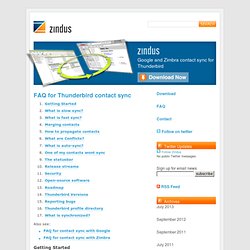
See Thunderbird/Tools/Options/Network/Connection. Visit Thunderbird/Tools/Zindus, then click “Add” and enter your login details.Click “Test Connection”, then OK.Click ‘Sync Now’ Before getting started, backup your contacts. What is slow sync? SOGo: Open Source Groupware. Roundcube Subject Filtering - Fusion Reactions - Web Design Rochester NY. Roundcube Subject Filtering We put this patch together in order to fill the gap between Roundcube Webmail and SpamAssassin.
Our SpamAssassin setup automatically appends the string "SPAM" to subject of spam email. Without the ability to setup inbox filtering rules spamassassin can clog up your inbox. This patch will take the string of your choice and move emails with that string into your junk folder. Instructions. Documentation. Funambol provides several types of documentation for users and developers. This includes user and admin guides for Funambol Data Synchronization server, the Funambol Device Management Framework.
You can also buy the official Funambol book to speed up the development of mobile applications and services. Documentation To Install And Run Funambol Device Management Services (DM) The Funambol Device Management (DM) Server is a full implementation of the OMA SyncML DM protocol. The project is maintained by the community and contains a demo interface that allows you to explore its protocol implementation. Below you find a list of PDF guides for many of the Funambol sync clients. For new Funambol Data Sync (DS) developers If you're new to Funambol and syncml in general, you should start by reading the Funambol Developer's Guide .
Learn more about Funambol Data Sync server The code repository contains much more documentation in the form or Design Documents and tutorials. Core: Discussion topic. Software Downloads. If you want to keep your pictures, videos, files, contacts and calendar in sync between your devices and desktop applications the easiest way is to try the free myFUNAMBOL demo service.
Install and run your own Funambol Community Edition Funambol Server Stable Release v. 10.0 The Funambol Server package contains what most people need in a single download: server components, an app server, connectors and documentation. Funambol Sync Client for Microsoft Windows The Funambol Client for Windows adds sync capabilities to your Windows OS, enabling syncing of pictures, videos and files with almost any mobile phone. If Microsoft Outlook is installed it makes also possible to sync Microsof Outlook address book, calendar and notes Funambol Android Client The Funambol Android Client allows you to sync your Pictures, Videos, File, Contacts and Calendar with a Funambol server. Get started developing Funambol Documentation Source code repositories Funambol also offers a commercial edition Sync your iPod Symbian. Vitriol and Routing Tables » Blog Archive » Sharing, Syncing and editing iCal over WebDAV.
(Sep 11 2010)Update: I am still seeing some traffic to this page in my logs.
I thought I should mention that the method described below no longer works. A better alternative now would be to use the CalDAV protocol. You might want to investigate running Apple’s Open Source implementation. I did that for the longest time before I finally just switched to Gmail, which supports CalDAV and syncs with iCal both ways like a dream.