
Teaching with Google+ Stream This is like Facebook's News Feed, where the sharing happens.
Updates, links and other media from the people you follow will show up here. Posts aren't "hidden," but are "muted. "Circles This was a defining feature for Google+ when it was released -- a selling point that allows users to add people to different "circles" as a way of separating content, updates and the general mixing of different areas of your life.
Whereas Facebook lumps everyone together in a single feed, Google+ streams allow you far more flexibility. Users are currently split regarding how well this works in application. Most of the differences between Google+ and Facebook are a matter of branding: one company's "follow" is another company's "Add to Circles.
" Connecting the class, home and school. Using Evernote to organize teaching and teaching online. This school year, I made a conscious decision to go paperless.
Last year I carried around my computer to every class, a planner and a pen. I constantly lost the pen or the planner. I used a LOT of paper. On top of that, if I wanted to check when I completed a lesson, I’d have to flick through my planner, find the task then find when I started and fished. I dreamed of the time when I could do a search of my planner. I knew there had to be a better way. The other way I utilized Google Calendar this year was with my parent teacher conferences (PTC). I then needed a way to plan my lessons. Last year I did all of my planning in my planner. This system worked but it was time consuming. So I planned to do this all on my computer. Evernote is very simple software that organizes your notes. I utilized the stack feature so that I have two main stacks in Evernote, private notebooks and work related notebooks.
If I am ever at work and I need a word processor, I reach straight for Google Docs. Flipping the classroom thanks to online course content. Flipping the classroom is a great concept which allows students to listen to or watch lectures at home and do homework assignments at school.
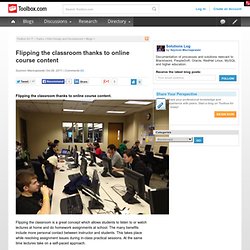
The many benefits include more personal contact between instructor and students. This takes place while resolving assignment issues during in-class practical sessions. At the same time lectures take on a self-paced approach. In my Introduction to Programming course, I was able to flip the classroom with the aid of online course content. I am teaching an in-class course with the use of Blackboard LMS. Instead of repeating what is already available in the online videos, I provide shorter lectures, more like introductions to the topic, and assign the video lectures as homework. This approach improves the retention of programing principles because students learn through doing the work and through helping other students in the classroom. The online course content allowed me the flexibility of concentrating on individual students and their progress.