
Free video chat and video conferencing. Scalable platform From start-up to established enterprise, our platform scales to meet your needs.
Advanced features Our industry-leading suite of features is second to none. Simple implementation Our comprehensive API makes it easy to deliver world-class communication experiences powered by WebRTC. New to OpenTok:Archiving & Playback. Archiving & Playback makes it easy to record, save, and retrieve OpenTok sessions. Now launched as a private beta, Archiving & Playback allows developers to record real-time communication during OpenTok sessions. Features include: Server-side recording of all streams Live compositing Single downloadable result file (MP4) REST API Our beta period allows partners to evaluate the Archiving & Playback solution and influence its feature set.
Beyond text chat. Our messaging stack allows users to distribute data between all endpoints. Intelligent Quality Control Intelligent Quality Control (IQC) ensures a smooth and consistent experience for all users. Beyond text chat. Error "The Windows Installer Service could not be accessed" in Windows Vista. When you try to install a program which uses Windows Installer in a Windows 7/Vista computer, you may receive the following error.
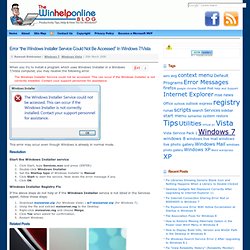
The Windows Installer Service could not be accessed. This can occur if the Windows Installer is not correctly installed. Contact your support personnel for assistance. This error may occur even though Windows is already in normal mode. Start the Windows Installer service Click Start, type Services.msc and press {ENTER}Double-click Windows InstallerSet the Startup type of Windows Installer to ManualClick Start to start the service. Windows Installer Registry Fix If the above steps do not help or if the Windows Installer service is not listed in the Services applet, follow these steps: WMI Access is denied. (Exception from HRESULT: 0x80070005 (E_ACCESSDENIED)) USB Booting Hiren's BootCD. To launch Hiren’s BootCD from USB flash drive, first of all, your BIOS settings should be configured in order to change the boot order of your computer to USB drive.

If you are having problem on changing boot order in BIOS, please refer Change the Boot Order in BIOS document. Please note that some computers may not support booting from USB drive and the steps below only works for the versions of Hiren’s BootCD 9.7 or newer. Step1: Formating USB Flash Drive Please note that, all data on your usb flash drive will be lost. Before doing this step, don’t forget to backup your files on the usb flash drive. How to Create a Hirens Boot CD Usb Thumb Drive. Posted by purehate in Insights at 4:32 PM Occasionally I get a PC in my shop which has a broken or non working cd drive.

One of the mail tools I use is a disk called Hirens Boot CD. Yes I know its considered Warez however it is by far the best collection of tools for a PC tech around so I use it all the time. I will leave finding the actual disc up to you however once you have it you may want to create a USB drive with Hirens for situations when you dont have your cd or the cd option is unavailable. Below I will outline how to create a Hirens Boot CD usb drive: First off you will need 3 files: a.
How do I integrate NexentaStor into my ACLs or my Active Directory domain? NexentaStor CIFS Shares with Active Directory Authentication « SolutionOriented Blog. Sharing folders in NexentaStor is pretty easy in Workgroup mode, but Active Directory integration takes a few extra steps.

Unfortunately, it’s not (yet) as easy as point-and-click, but it doesn’t have to be too difficult either. (The following assumes/requires that the NexentaStor appliance has been correctly configured-in and joined-to Active Directory.) Typical user and group permissions for a local hard disk in Windows. Let’s examine the case where a domain admin group will have “Full Control” of the share, and “Everyone” will have read/execute permissions. This is a typical use case where a single share contains multiple user directories under administrative control. For this process to work, we need to join the NexentaStor appliance to the Active Directory Domain. This is important because the AD queries will pull service records from the configured domain name servers. The other way the NexentaStor appliance knows what AD Domain to look into is by its own host name.
Like this: Reset the Registry and the File Permissions in Windows XP. Associate OST file with another Outlook profile : Microsoft, Outlook, 2007.