
35+ Ubuntu Icon Themes - Ubuntuka. Top 10 Apps that Boosts Ubuntu’s User Experience. 1) Ubuntu Tweak Ubuntu Tweak allows changing all the itsy-bitsy pieces of Ubuntu desktop OS.
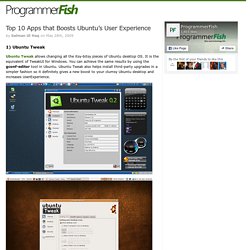
It is the equivalent of TweakUI for Windows. You can achieve the same results by using the gconf-editor tool in Ubuntu. Ubuntu Tweak also helps install third-party upgrades in a simpler fashion so it definitely gives a new boost to your clumsy Ubuntu desktop and increases UserExperience. 2) Screenlets The Screenlets application provides access to hundreds of Google Gadgets and other open source widgets, like Remember the Milk or Google Calendar. Linux Newbie Guide: Shortcuts And Commands.
[an error occurred while processing this directive] Linux Shortcuts and Commands: Linux Newbie Administrator Guideby Stan and Peter Klimas This is a practical selection of the commands we use most often.

Press <Tab> to see the listing of all available command (on your PATH). Fedora Linux capitulates to Microsoft boot certificate. In order to get its Linux distribution to run on the next generation of secured desktop computing hardware, the Fedora Project will obtain a digital signature from Microsoft, a developer from the project announced Wednesday.

"This isn't an attractive solution, but it is a workable one," wrote Matthew Garrett in a blog post on Wednesday. "We came to the conclusion that every other approach was unworkable. " The next release of the open-source distribution, Fedora 18, due in November, will be the first version able to run on computers that use UEFI (Unified Extensible Firmware Interface), which requires the operating system to furnish a digital key before it can be run by the machine.
With the growing adoption of UEFI among hardware developers -- largely at the behest of Microsoft -- the Fedora Project faced a number of alternatives, none of them completely satisfying, Garrett said. Mavizen's 130 MPH TTX02 Electric Motorcycle Runs on Linux. Photo: Mavizen Why did you stop?

Well, I was recompiling my kernel and got a segfault... Mavizen has decided to offer a new electric bike based on the previous winner of the TTXGP so that other teams can have a solid foundation to build on for next year. The TTX02 is based on the KTM RC8 with a Agni powerplant. The twist is that they call it a "laptop on wheels" because of all the electronics it packs on top of what is strictly required to control the electric motor (dash-mounted computer that runs Linux, has wifi connectivity and a web-server, etc). 25+ Useful Linux and Unix Cheat sheets. Faster programming gives you more time for small business website design and other projects.
This is my first post on Cheat sheets. Actually Cheat sheet is a concise set of notes used for quick reference. Cheat sheets will contain most of the shortcuts needed to program faster. I Ditched Windows...and, So Can You. I've suffered slow computer performance, system crashes, and inexplicable Internet outages for 10 long years.

I officially ditched Windows two weeks ago...and, so can you. Long story short, I decided to find another operating system and my first attempt was Linux, the free, open-source operative system (for those of you unfamiliar with Open Source operating systems: show me). Linux: The Good, the Bad, and The Verdict The Good – The transfer to and installation of Ubuntu Linux was shockingly easy and refreshingly seamless. My computer is now blazingly fast, all of my hardware devices were instantly recognized (even my tablet screen) and, no more system crashes. The Bad – I still need Windows for a few programs. UnixTutorials - Tutorials and howtos for Unix based operating systems (Linux, Ubuntu, BSD and more) WineHQ - Run Windows applications on Linux, BSD, Solaris and Mac OS X.
58 Cool Hacks - LXF Wiki. From LXF Wiki (Originally written for Linux Format issue 58, October 2004) Increase your guru points and apply these cunning hacks to boost performance, secure your system and increase productivity - or fun!
One of the great things about Linux is that there's usually more than one way to do something. Chances are, the way you are doing a particular task right now isn't necessarily the best way either. This collection of hacks is the result of a lot of effort: some are functional, some are fun, but they are all cool! DISCLAIMER: Obviously, anything you do to your computer is your responsibility, and while we have made every effort to test these hacks, your mileage may vary. Fix a wonky terminal Difficulty: Easy Application: bash We've all done it - accidentally used less or cat to list a file, and ended up viewing binary instead. Reset and all will be well again. 17 Best Conky Configs for Linux Desktops.
15+ Beautiful Conky Configs for Linux Desktops Whether you are a Fedora, Ubuntu, Arch Linux or any other Linux distribution user you probably have used the lovable system monitor software, Conky.
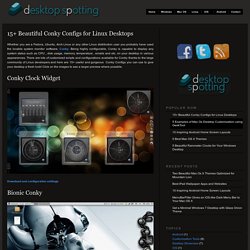
Being highly configurable, Conky is capable to display any system status such as CPU , disk usage, memory, temperature , emails and etc. on your desktop in various appearances. There are lots of customized scripts and configurations available for Conky thanks to the large community of Linux developers and here are 15+ useful and gorgeous Conky Configs you can use to give your desktop a fresh look! Click on the images to see a larger preview where possible. Conky Clock Widget Download and configuration settings.
Best Linux Software. You’ve made the switch from Windows or Mac OS X, and now you’re looking for applications to install.
Or maybe you’re a long-time Linux user who’s keeping an eye out for what’s new. Either way, you’ve come to the right place. You’ve already picked a Linux distro and have settled on a desktop environment. Those are the big choices that determine what software you start with and what will run best on your machine. 32 Best Linux Desktop Customization #4. Linux_file_structure.jpg (JPEG Image, 1000 × 647 pixels) LinuxScrew: Linux Blog. Ubuntu, Centos, Cisco, Unix, Databases, Networks. Linux Directory Structure (File System Structure) Explained with Examples.
By Ramesh Natarajan on September 8, 2010 Have you wondered why certain programs are located under /bin, or /sbin, or /usr/bin, or /usr/sbin?
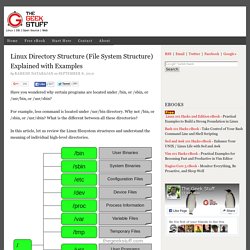
For example, less command is located under /usr/bin directory. Why not /bin, or /sbin, or /usr/sbin? What is the different between all these directories? Top things to do after installing Ubuntu Linux 9.10 Karmic Koala. See the new version: Ubuntu 10.04 Post-Install Guide: What to do and try after installing Lucid Lynx! So you've just installed Ubuntu 9.10, the cute and cuddly Karmic Koala, but now you're confronted with a most pertinent question, "What do i do now? " Ubuntu is a very complete and full-featured Linux distribution, but no operating system can come with everything you want. There's much more fun to be had in what comes after installing the OS on your machine: now you get to set it up with all the best software it didn't already come with! Basic Stuff Download Mirror & Updates.
Famous Linux Unix People : Real Engineer. Top 10 Linux Speed Hacks. Do you like this story? Ah…Linux..The pinnacle of what open source can achieve today..the brainchild of Linus Torvalds has surely come a lot further and evolved to show the world what it is capable of.As an extremely reliable Operating system, Linux rarely needs to be rebooted. But when it does, it’s often slow to boot.Loads of Matrix style lines scrolling down the screen are sure to drive nuts added with boot time of GUI initialization..
Fortunately, there are ways to speed things up. Some of these methods are not terribly difficult. Open Source, Open Standards. Linux File Permissions Tutorial. December 14, 2011By Roman Rafacz What we’ll cover in this article is how to identify permissions for files & directories and how to change them, as well as changing ownerships, groups, etc. Depending on what you want to do, you’ll want to make sure you have the appropriate permissions (obviously), so let’s find out how to change them.
Let’s start by making a file we can use. I issued the “touch” command to make a file creatively named testfile. GNOME Desktop News. The Original Magazine of the Linux Community. Be Polite. Be Helpful. 16 Best Linux Desktop Customization #3. About recordMyDesktop. 10 Best Security Software Tools for Linux. That you should check out. 1. John the Ripper 2. Nmap. The Linux Documentation Project. Home - The Community's Center for Security. Wine Binary Downloads. Nautilus File Manager Scripts: Welcome to G-Scripts. Dedicated Hosting Services - VPS Hosts - Shared Web Hosting. Sweep. Debian Administration - Debian Administration Resources. Linux Users. Linux on Laptops. Eyecandy for your KDE-Desktop - KDE. Linux System Administration Portal. GNOME Applications Repository - GnomeFiles.org. Linux Gamers' Game List. Experience Freedom! Apt-get.org. Why Linux is better.
PDFBEAR is founded by the team behind WhyLinuxIsBetter.net, which brings tons of experience in user conversion tools. Linux Command Line Cheat Sheet by DaveChild. Xfce Desktop Environment. The UNIX and Linux Forums - Learn UNIX and Linux from Experts.