
Red/library/jslider/Makefile at master · friendica/red. 11 Things I Wish I Knew About Django Development Before I Started My Company: — CS + Math. Tutorial: Using Django's Multiple Database Support.
Render placeholder to template variable. Cmsplugin-text-ng 0.3. An enhanced version of the Text plugin for django CMS.
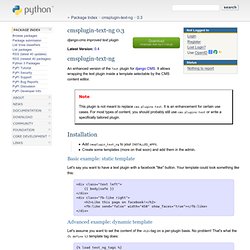
It allows wrapping the text plugin inside a template selectable by the CMS content editor. Note This plugin is not meant to replace cms.plugins.text. Profiles. The Perfect Django Settings File. I know this isn't the best way to start an article, but I lied.
Filter - Django Admin Custom Change List Arguments: Override /?e=1. Where Django Caching Bust at the Seams. Django-admin-ext 0.1.6. Working with models, part 2. Now that we’ve got a handle on how to generically load models without necessarily knowing in advance which models, it’s time to start looking at interesting things we can do with them once we’ve got them.
There are lots of uses for code which can introspect any model and extract information from it, some of which you’ve probably already seen: The Django admin interface introspects model classes to determine how to display and edit them. Shortcuts in both the old and new forms systems exist for generating forms automatically from a model (AddManipulator and ChangeManipulator in oldforms, form_for_model and form_for_instance in newforms). Django’s serialization system can transform a QuerySet into JSON or XML, and back again into objects in your database.
So how can your code do the same sorts of things? When you can't return a response object, throw it. Django documentation. Django CMS: copying a complete page tree to a new site. Within Django you can use a manager to execute frequently used database queries.
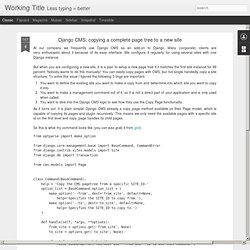
Within you self-written apps it's just a matter of defining the manager in the model. But in some projects you just want to make a add a few queries within a existing package. Yeah sure, I could redeclare a model and add my manager to it. But that mostly requires additional development to make sure the model and manager continue to work properly. Editing multiple objects in Django with forms.
February 18, 2008 at 1:45 pm | Posted in django | 6 Comments A common problem I see when helping people in the Django IRC channel is people who are trying to create or edit multiple objects, but for some reason try to make a single form object to deal with them – this makes things quite convoluted and much harder than they have to be.
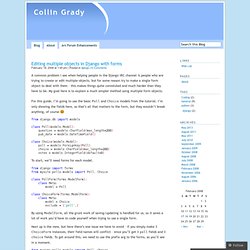
My goal here is to explain a much simpler method using multiple form objects. For this guide, I’m going to use the basic Poll and Choice models from the tutorial. I’m only showing the fields here, as that’s all that matters to the form, but they wouldn’t break anything, of course :) Creating forms from models. ModelForm class ModelForm If you’re building a database-driven app, chances are you’ll have forms that map closely to Django models.
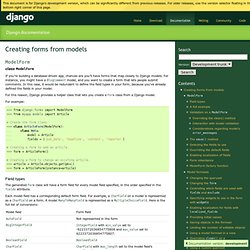
For instance, you might have a BlogComment model, and you want to create a form that lets people submit comments. In this case, it would be redundant to define the field types in your form, because you’ve already defined the fields in your model. Selectors Level 3. Abstract Selectors are patterns that match against elements in a tree, and as such form one of several technologies that can be used to select nodes in an XML document.
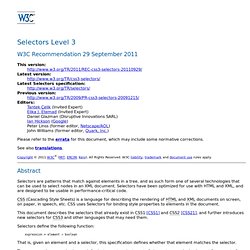
Selectors have been optimized for use with HTML and XML, and are designed to be usable in performance-critical code. CSS (Cascading Style Sheets) is a language for describing the rendering of HTML and XML documents on screen, on paper, in speech, etc. CSS uses Selectors for binding style properties to elements in the document. This document describes the selectors that already exist in CSS1 [CSS1] and CSS2 [CSS21], and further introduces new selectors for CSS3 and other languages that may need them.
Selectors define the following function: expression ∗ element → boolean That is, given an element and a selector, this specification defines whether that element matches the selector. Status of this document This section describes the status of this document at the time of its publication. Table of Contents.
Encrypting Database Data in Django. This last week I was putting together a password management application for our group at work.
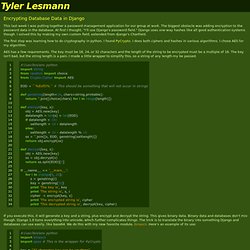
The biggest obstacle was adding encryption to the password data in the database. At first I thought, "I'll use Django's password field. " Django uses one-way hashes like all good authentication systems though. I solved this by making my own custom field, extended from django's CharField. Set Up Python and Install Django on Mac OS X Lion 10.7. NOTE: This guide was written for Lion 10.7 and has since been superceded by these new guides: First steps Lion has done away with the “Sites” folder by default, but it’s easy to add it back — the custom icon will even show up automatically.
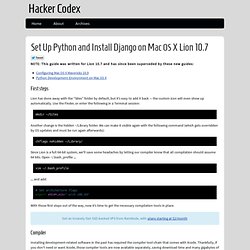
Use the Finder, or enter the following in a Terminal session: Another change is the hidden ~/Library folder. We can make it visible again with the following command (which gets overridden by OS updates and must be run again afterwards): chflags nohidden ~/Library/ Since Lion is a full 64-bit system, we’ll save some headaches by letting our compiler know that all compilation should assume 64 bits. . … and add: Deschler/django-modeltranslation. Easymode : toolkit for making xml based flash websites — django-easymode v1.0b1 documentation. With easymode you can create backends for dynamic flash/flex websites.
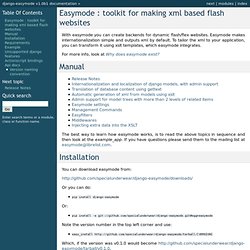
Easymode makes internationalization simple and outputs xml by default. To tailor the xml to your application, you can transform it using xslt templates, which easymode integrates. For more info, look at Why does easymode exist? The best way to learn how easymode works, is to read the above topics in sequence and then look at the example_app. If you have questions please send them to the mailing list at easymode@librelist.com. Starting a Django 1.4 Project the Right Way. Check out the new, updated version of this post with Django 1.6 specific changes and updates. Back in February, I wrote a post titled 'Starting a Django Project the Right Way', which still draws a consistent audience eight months later. In those eight months, Django has released version 1.4 of the framework, with 1.5 under active development and promising experimental support for Python 3.x. Pinax.