
How To Make AirPrint Work with Just About Any Printer. A quick rundown on How to Use AirPrint Hacktivator to Make AirPrint Work with Any Printer: I’ve talked a lot here recently about how hugely disappointing the much-hyped new AirPrint feature has turned out to be in the recent iOS 4.2 update.
Apple originally promised it would support a wide range of wireless printers and virtually all shared printers. On release, it supports a very small handful of HP wireless printers and no shared printers at all – making it unusable for the vast majority of iPad users. The good news is that now there is an easy and free way to get AirPrint working as it was originally intended, and use it with your shared printers on your network.
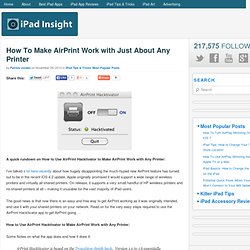
Read on for the very easy steps required to use the AirPrint Hacktivator app to get AirPrint going … How to Use AirPrint Hacktivator to Make AirPrint Work with Any Printer: Some Notes on what the app does and how it does it: irPrint Hacktivator is based on the Troughton-Smith hack. Steps to Use AirPrint Hacktivator: That’s it. Change Settings, Launch Apps And Dial Friends Through Notification Center, No Jailbreak Required. There’s a lot to like about iOS 5’s Notification Center, but unfortunately, it’s not nearly as configurable as it could (and perhaps should) be.
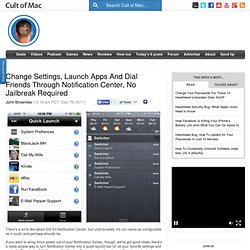
If you want to wring more power out of your Notification Center, though, we’ve got good news: there’s a really simple way to turn Notification Center into a quick launch bar for all your favorite settings and contacts. Even better? Unlike many Notification Center tweaks, there’s no jailbreak required. The app is called App Switcher, and what it does is allow you to quickly and easily launch your favorite tasks right from the Notification Center. Here’s how it works.
Once you’ve set up your Quick Tasks, they will always show up as notifications in Notification Center, with no limit to the number of quick tasks you can set up. The result? App Switcher is available now from iTunes, and costs just $0.99. Related. My Must-Have iPad Apps, 2011 Edition. Last year, six months after the release of the original iPad, I published an article called “My Must-Have 20 iPad Apps” in which I collected my favorite iPad applications — the ones I used and enjoyed the most — as of September 2010.

Fast forward thirteen months, the iPad’s software ecosystem has matured into something completely different from last year’s “experimentation” stage, when third-party developers, and quite possibly Apple as well, were still trying to figure out how, exactly, the iPad would change our digital lifestyles. Looking back to the iPad 1 and the App Store in 2010, it’s no surprise the list of apps I have today is so much different. In the past year, Apple has sold millions of iPads and has seen the device being used in far more variegate scenarios than they initially expected. Once again, Apple itself has set new standards for developers to write their apps against. It’s always been about the apps. Still Great Gone The Huge Update New Entries.
Artist Series - Uncommon.