
DOM Scripting Web Design with JavaScript and the Document Object Model pdf free ebook download from www.pinceladasdaweb.com.br. CSS Refreshers: Borders. Sure, we’re all familiar with borders.

Is there anything new that could possibly be introduced? Well, I bet there’s quite a few things in this article that you never knew about! Not only can CSS3 be used to create rounded corners, but plain-ole' CSS can also be wrestled into displaying custom shapes. That’s right; in the past, before these techniques were discovered, we might have resorted to using absolutely positioned background images to display circles or arrows. Thankfully - as we gleefully take one more step away from Photoshop - this is no longer the case. The Basics You’re likely familiar with the most basic use of borders. The above code will apply a 1px border to an element. In addition to passing a specific value to border-width, three keywords may alternatively be used: thin, medium, and thick.
Perhaps you need to change the color of a border when the user hovers over a specific element. A Better Way To Manage Affiliate Links. One of the more lucrative monetization methods for a blog is affiliate marketing (or referral marketing).

Basically, you set up your blog with an affiliate link (or referral link) and send traffic to your advertiser. For each visitor that completes an action — i.e., subscribe to a service, buy a product, etc. — you’ll get paid a fixed amount or a percentage of the sale as compensation. Three Problems With Affiliate Links 1. Non-Descriptive Non-descriptive affiliate links are the ones that don’t tell the user information about the site it is leading to. By the way, that’s the affiliate link for Lunarpages web hosting. 2. Complicated affiliate links are the excessively long ones.
Integrate Google Custom Search in WordPress. How to Create a Custom WordPress Page Template (Video Tutorial) How to Add Widgets to WordPress Theme's Footer. I wanted to use widgets in the footer of my WordPress theme but my wordpress theme didn’t come with a footer-sidebar by default.

I didn’t really wanted to change the theme just because of that. So I hacked the wordpress theme to introduce footer-sidebars. If you are looking for a tutorial that explains how you can add sidebars/widgets to the footer of your WordPress theme then keep reading. There are really three main parts to introducing a footer sidebar/widget area in your theme: Registering the Sidebar(s) in the WordPress ThemeInserting the Sidebars In the WordPress ThemePutting some style into the sidebars WordPress has introduced a few new functions recently which makes it hard to write one tutorial that will cater for every theme out there. Keep a backup copy of your “functions.php” and “footer.php” file just in case you make a mistake when making the code changes.
Advanced HTML for Squidoo. My Favourite CSS Tricks on Squidoo. Scroll back up to the top of this lens, and take another look at the Introduction module.

What do you notice is different? How does it compare to this module, with the same image in the corner? (Bear with me while I pad this bit of text to be a bit longer, so that it demonstrates the effect that you would normally on a lens.) Yes, long Introductions will usually wrap underneath the lens photo, as it does here, making it look untidy. It looks really bad if you have a border as well. However, the Introduction of this lens does not wrap around the lens photo, and the border is drawn neatly around the text.
But you can fix that. <p style="margin-left:262px;">... The 262 pixels used here is the magic number that should work on most lenses, as the largest size a photo can be is 250 pixels. This same trick can be used on Text / Write modules that have a photo in the top-right corner, as shown by this example. Css code generator for text - CSSTXT. Kuler. Warm Hex Color Codes: Hexadecimal codes for named colors used in HTML page features. The Hex Hub Warms: red orange brown yellow yellowgreen Need mobile?
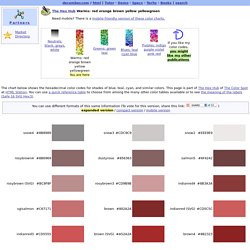
There is a mobile-friendly version of these color charts. Warms: red orange brown yellow yellowgreenYou are here The chart below shows the hexadecimal color codes for shades of blue, teal, cyan, and similar colors. This page is part of The Hex Hub of The Color Spot at HTML Station. How to Install and Setup WordPress SEO Plugin by Yoast. Theme: Twenty Ten CSS Upgrade: How to edit Site Title and Page Title’s font color,size, Header Image width and Height, site description or tagline font color , remove search bar and blog post text alignment « All About Basic. If you are passionate to use Twenty Ten Theme for your wordpress.com free blog and have purchased or want to use CSS upgrade then this section will give you some basic and important idea about CSS modification of your blog. Here I have tried to show you about Twenty Ten Theme’s Site Title’s font color and font size, Header Image Width and Height, Site description or tagline’s font color and font style, Page Title/Entry Title font color size and also Your blog Contents Font or text alignment.
You may also like to check 1. WordPress.com Visitor Tracking :Know who is visiting your site 2.