
A task-based approach to PowerShell cmdlet design. Several years ago I had a discussion with a colleague about how Windows PowerShell functions/cmdlets should be designed.
As a developer by trade, he liked the idea of having a small number of cmdlets that output objects through several methods. I can definitely see the benefit of this approach -- for a developer. But for IT admins, this really turns us off. Calling methods on the output of a command is completely foreign to administrators; we are used to running a command and getting back the data we want. I love the idea of having task-based cmdlets that perform a single action and provide feedback related to that task.
Santhosh Sivarajan's Microsoft Technology Web Site. Powershell Research - System.Security.Cryptography.X509Certificates.X509Store. Creating a Managed Service Account. Updated: February 28, 2009 Applies To: Windows Server 2008 R2 This topic explains how to use the Active Directory module for Windows PowerShell to create a managed service account.
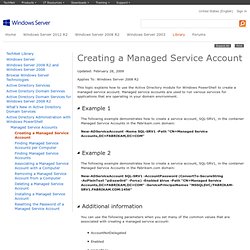
Managed service accounts are used to run various services for applications that are operating in your domain environment. The following example demonstrates how to create a service account, SQL-SRV1, in the container Managed Service Accounts in the Fabrikam.com domain: Create Managed Service Accounts with PowerShell. Do not create managed service accounts with Active Directory Users and Computers. - Active Directory Documentation Team. Getting the Contents of an Active Directory Integrated DNS Zone, Version 2.
In June of 2009, I published the first version of Getting the Contents of an Active Directory Integrated DNS Zone.
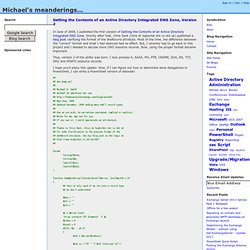
Shortly after that, Chris Dent (chris at highorbit dot co dot uk) published a blog post clarifying the format of the dnsRecord attribute. Most of the time, the difference between the "correct" format and what I had deduced had no effect. Tech Ed 2008 - Demo 2 - Administering Servers in Bulk - Benp's Guide to Stuff. Bonjour Bonjour It’s time for Demo 2 – Administering Servers in Bulk.
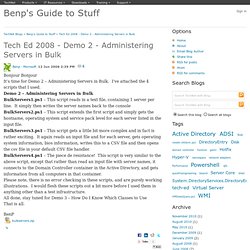
I’ve attached the 4 scripts that I used. Tech Ed 2008 - Demo 1 - Administering Windows - Benp's Guide to Stuff. Hello Again Well I’ve delivered my session “Windows, PowerShell and WMI: Unveiling Microsoft’s Best Kept Secret”, and as promised here are the scripts for the Demo’s I used during my session: Demo 1 – Administering Windows All these demos are simple command lines that I just typed straight in PowerShell, no need for any fancy scripts.
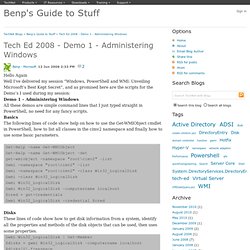
Basics The following lines of code show help on how to use the Get-WMIObject cmdlet in PowerShell, how to list all classes in the cimv2 namespace and finally how to use some basic parameters. Disks These lines of code show how to get disk information from a system, identify all the properties and methods of the disk objects that can be used, then uses some properties. Hotfixes. Windows PowerShell Survival Guide - TechNet Articles - Home - TechNet Wiki. This article was formerly titled "Automating IT Tasks with Windows PowerShell Overview.
"** Introduction and Getting Started PowerShell is a vast product, especially when you take into account how it's used in other products such as Lync Server, Exchange, and the Windows Operating System. MAML - Microsoft Assistance Markup Language. Note: Notice the news of 2005-04-12!
Table of Contents MAML - Overview Microsoft Assistance Markup Language (MAML) is a XML based markup language used by "Longhorn" Help. The current help system HTMLHelp 1.x is using HTML topic files. HTML is a markup language that combines presentational and semantic elements.The most significant aspect of MAML is the shift to a structured authoring model.
MAML consists of several distinct content types, each one specific to a type of document. Content authored in MAML can be output to many different formats, including DHTML, XAML, RTF, and print. Conceptual Content Type The conceptual content type is the most generic of all the content types. Simple Structure Example. Active Directory Powershell Blog. Scripting with Windows PowerShell. DFS-R Health Report for SYSVOL « blog.powershell.no. Included in the Windows Server 2008 and Windows Server 2008 R2 are the DFS Management-console as well as several command-line tools for administering DFS.
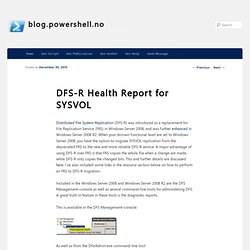
A great built-in feature in these tools is the diagnostic reports. This is available in the DFS Management-console: As well as from the DfsrAdmin.exe command-line tool: Using this feature we can generate an HTML-report containing a great overview of the replication health for the SYSVOL replication group: Any errors and warnings will be shown with detailed explanations. Since the reporting feature are available from the DfsrAdmin.exe command-line tool, it makes it easy to set up a script as a scheduled task that also sends the generated report via e-mail i.e. every morning.
Resources Verifying File Replication during the Windows Server 2008 DFSR SYSVOL Migration.
TechNet. Windows PowerShell Survival Guide - TechNet Articles - Home - TechNet Wiki. This article was formerly titled "Automating IT Tasks with Windows PowerShell Overview.
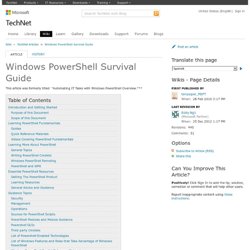
"** Introduction and Getting Started PowerShell is a vast product, especially when you take into account how it's used in other products such as Lync Server, Exchange, and the Windows Operating System. It can be a little daunting to those new with PowerShell - there is a vast array of deeply technical discussions of all of PowerShell's many aspects, quirks and peculiarities and all. Purpose of this Document The purpose of this document is to help you to learn more about PowerShell and to be successful in applying it. Powershell Scripts, Tips and Resources. Use the New Computername Parameter in Windows PowerShell 2.0.
Silverlight, WPF, WP7 Charts & Gauges. PowerShell Wiki - PowerShell Wiki. Scripting Series – Interesting things you can do with VBScript and Powershell – Post 1, Self Deletion « .\Matthew Long. Posted by Matthew on February 25, 2011 For the first challange i’m going to tackle in this series, we have the problem of self deletion.
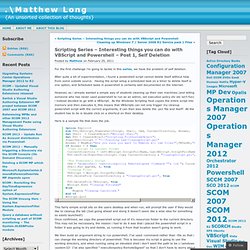
After quite a bit of experimentation, i found a powershell script cannot delete itself without help from some outside source. Having the script setup a scheduled task on a timer to delete itself is one option, and Scheduled tasks in powershell is certainly well documented on the internet. However, as i already wanted a simple way of students cleaning up their own machines (and telling someone who has never used powershell to run as an admin, set execution policy etc etc isn’t fun) i instead decided to go with a VBScript. As the Windows Scripting Host copies the entire script into memory and then executes it, this means that VBScripts can not only trigger my cleanup powershell script with the correct arguments, it can then also delete the .ps1 file and itself! Here is a sample file that does the job. Windows PowerShell Owner's Manual. Poshoholic. This morning PowerWF and PowerSE 2.7 were released to the web and they can now be downloaded from These releases offer a lot of new value to PowerWF and PowerSE users, as follows: PowerWF 2.7 Highlights New Start Page with New Workflows The start page in PowerWF has been completely redesigned to provide immediate value out of the box for PowerWF customers.
The new design highlights the Workflow Library that is included with PowerWF, allowing customers to play workflows in the library without opening a workflow or script document. Users can also customize the workflows on the start page and add their own groups of workflows for easier runbook automation. New Management Packs for System Center Service Manager (SCSM) PowerWF for Service Manager has always included several useful management packs for SCSM in the product.
Improved Toolbox Search The search engine in the Activity toolbox just got better! Getting ALL Your Parameters - Windows PowerShell Blog. When you write a function, you can name a set of parameters and PowerShell will bind command line arguments to them. Any command line argument that is NOT bound do a parameter is available as $args. Let me illustrate: PS>function test ($a) {"Remaing args = $args"}PS>test -A valueRemaing args =PS>PS>test -A value -B value2 -C this is a testRemaing args = -B value2 -C this is a testPS>PS>function test ($a,$b,$c) {"Remaing args = $args"}PS>test -A value -B value2 -C this is a testRemaing args = is a testEric asked me the question, "How can I get ALL the arguments and not just the "remaining arguments". You can get this but it requires a tiny amount of work on your part. If you haven't already explored $MYINVOCATION – you should. eBook: Layman’s guide to PowerShell 2.0 remoting. If are you a regular visitor to this blog, you may be aware of my PowerShell remoting series of blog articles.
Traffic to this blog increased by almost 80% ever since I started the remoting series. This set of articles appear on the first page of Internet search almost all the time. The idea behind starting the remoting series was to develop the content in to an eBook at the end. I have been sitting on it for while and just got a chance to complete it after a few late night efforts.This eBook has more content than the remoting blog posts.
This kinda concludes the remoting series. You can download the eBook here. Microsoft Expression Blend - Working with the Canvas Video. Let us start working with Layout. I have opened Blend all ready. I am going to switch over to the Projects tab on the welcome screen and this time, I am going to the project. I need to open it from my Assets Folders that was created for me when I installed the Total Framing software. In the Project Files, Part 1, Lesson 02, I am going to open the Layout Tutorial project. Now, once the project opens, I am going to use Pen tools so I can see it a little bit better.
The Canvas is a control that application designers and UI designers are most familiar with because it is the oldest and most basic control. I am going to go ahead and bring the first three elements into my Layout Container and now we can take a look at how it behaves. Get-credential and Decrypting a SecureString in MSH. In MSH there are a couple of places where you will find a SecureString. the Most Common will be Get-Credentials. this will give you a secure way to enter and pass credentials to a CMDlet or function. one place in MSH where this is very handy is in get-WMIobject.if you want to connect with alternate credentials you can pass a Credential object.this will give you a safe way to let the user enter a password for this.
MSH>get-wmiobject -credential $(get-credential) -computer ComputerName win32_process. Scripting Series – Interesting things you can do with VBScript and Powershell – Post 2, UAC Elevation « .\Matthew Long. In the first challenge in this series, I covered script self deletion. Creating Organization chart from Active Directory using Power GUI « Virtualize SharePoint, SharePoint Virtualization, Virtualization Tips.
Getting Credentials From The Command Line - Windows PowerShell Blog. Interesting. Using Get-Credential to Store Passwords “securely” in a file. Ben's blog.
Debugging using PowerShell ISE102. August 18, 2009 at 12:08 PM — Andy Schneider. Debugging using PowerShell ISE 101. I have always found the origin of words to be fascinating. Apparently, the terms bug and debugging in regards to computers are attributed to Admiral Grace Hopper in the 1940’s. Industrial Strength Functions in PowerShell V2 CTP 3. With PowerShell V2 we can now get nearly all the functionality of the PowerShell engine that is available to Cmdlet developers that are using C#.
Granted, if you haven’t written any Cmdlets in C#, you probably don’t understand the power that this brings, but trust me, its huge! Syntax Highlighting in PowerShell – Precision Computing. More PowerShell Syntax Highlighting – Precision Computing.