
A Treasure Trove of Digital Citizenship Resources for Teachers. 11 Tips For Students To Manage Their Digital Footprints - 11 Tips For Students To Manage Their Digital Footprints by Justin Boyle If you’ve scratched your head over suggestions to manage your “digital footprint,” you aren’t the only one.
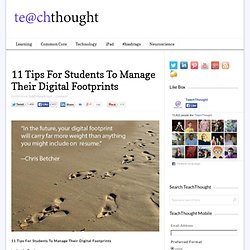
A surprisingly large percentage of people have never even heard the phrase, let alone thought about how to manage theirs responsibly. Among students, the percentage is probably higher. We’ll talk about ways you can help students understand and manage their digital footprints before they get themselves in trouble. Learning the law of the digital jungle.
The ABCs of Digital Citizenship. The ABCs of Digital Citizenship by TeachThought Staff In thinking recently of all of the different strands of digital citizenship–human, legal, media-based, technological, and so on–it occurred to me that citizenship online was really not much different than citizenship in person.
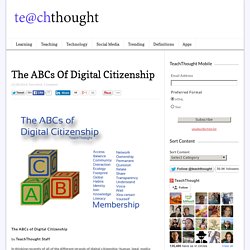
That is, it’s complicated. Usually conversations around digital citizenship are limited to its most visible parts–cyberbullying, identity theft, drama, etc. Mom catches daughter bullying classmates, hands out new millennium punishment - National Pop Culture. This morning, a young girl is getting a taste of the abuse she was apparently serving up to her classmates, thanks to her innovative mother.
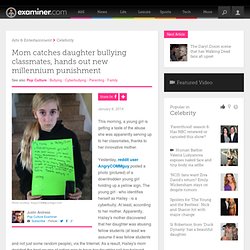
Yesterday, reddit user AngryCOMMguy posted a photo (pictured) of a downtrodden young girl holding up a yellow sign. The young girl - who identifies herself as Hailey - is a cyberbully. At least, according to her mother. Apparently, Hailey's mother discovered that her daughter was abusing fellow students (at least we assume it was fellow students and not just some random people), via the Internet.
The 3 Tech Ninjas. Free e-Safety Newsletter for Schools. How to Block Access to Adult Content & Websites on iPhone & iPad. Apple has long included various means of placing parental controls and filtering for content available on the iPhone, iPad, and iPod touch, but up until recent iOS updates there was not a simple method of blocking web-based adult content and material in Safari.
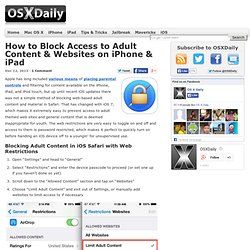
That has changed with iOS 7, which makes it extremely easy to prevent access to adult themed web sites and general content that is deemed inappropriate for youth. The web restrictions are very easy to toggle on and off and access to them is password restricted, which makes it perfect to quickly turn on before handing an iOS device off to a youngin’ for unsupervised use. Blocking Adult Content in iOS Safari with Web Restrictions Note the wording used is “Limit”, because while iOS Website Restrictions are not 100% perfect at blocking all inappropriate content, the filtering is generally very effective at restricting access to adult themed material. A Visual Guide To Teaching Students Digital Citizenship Skills. Though we’ve talked about digital citizenship in the past, since we’re constantly using technology and interacting in digital communities, an ongoing discussion about digital citizenship isn’t a waste of time, but rather a necessity.
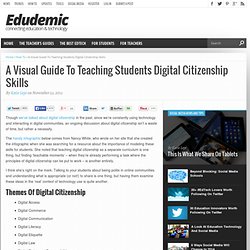
The handy infographic below comes from Nancy White, who wrote on her site that she created the infographic when she was searching for a resource about the importance of modeling these skills for students. She noted that teaching digital citizenship as a separate curriculum is one thing, but finding ‘teachable moments’ – when they’re already performing a task where the principles of digital citizenship can be put to work – is another entirely.
I think she’s right on the mark. 5 Excellent Videos to Teach Your Students about Digital Citizenship. Edutopia is one of my favourite educational web resources .
Today while I was checking its Five Minute Film Festival page I came across a link that took me to their YouTube channel where I found a treasure trove of interesting videos on digital citizenship and because digital citizenship is one of the important themes in this blog, I decided to handpick some of the clips that grabbed my attention and share them with you below , you can also check the entire list here. But before that, let me share with you this concise and to-the-point definition that Amy gave to digital citizenship : "Digital citizenship" is an umbrella term that covers a whole host of important issues. Broadly, it's the guidelines for responsible, appropriate behavior when one is using technology. How to Instill Digital Citizenship in Students. What is a parent’s greatest fear that first day they drop their precious child at kindergarten?
You might think it’s whether they’ll get along with new friends or handle academic pressures. Or even that their eyes will be opened to the vastness of the Universe and no longer see their parents as the Answer to Everything. Those are frightening, and might be ranked in the top ten–or even five–but today, the biggest concern is how to protect an innocent from the pernicious onslaught of the technology that grows like mold over every part of the education landscape.
Will that trusting child be cyberbullied? Will they see stuff they shouldn’t on school websites? It may surprise you that this scenario also keeps teachers awake at night, especially new teachers. Chicks! Truth, all stakeholders do their best, but stuff happens. A Must-Have Internet Safety Cheat Sheet. Navigating the jungle of the internet isn’t always easy for ourselves, but when we add kids into the mix, worrying about what inappropriateness might show up next is even more of a priority.
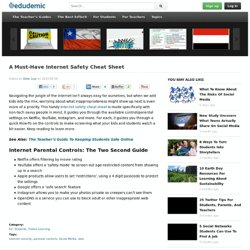
This handy Internet safety cheat sheet is made specifically with non-tech savvy people in mind, it guides you through the available control/parental settings on Netflix, YouTube, Instagram, and more. For each, it guides you through a quick How-To on the controls to make screening what your kids and students watch a bit easier. Keep reading to learn more. See Also: The Teacher’s Guide To Keeping Students Safe Online. Younger Kids are Embracing Technology. Although there is an app for just about everything, that isn’t what is fascinating parents nowadays.
Parents cannot believe it when their young, one-year-old child touches an iPad screen and navigates it with ease. According to an infographic created by MDG Advertising, nearly half of first-time mobile tech users are not even in kindergarten yet. Guide for parents - digital citizenship. Digital Citizenship k-6. What Kids are (Really) Doing Online. Maybe you’ve already heard?
It appears that Facebook is losing its groove. A recent survey of 5,200 teenagers found that while 33% called Facebook their “most important” social network in Spring ‘12, by Spring of this year that number had fallen to just 25%. An unofficial survey of the eighth graders in my Cyber Civics class at Journey School yielded even worse news for Facebook. During a project that involved using social media, I asked how the students how many of them used Facebook and not a single hand was raised. Instagram? If none of these apps sound familiar to you, you’re not alone. We hope that this video: “What Kids are (Really) Doing Online” will help.
The first phase rollout, called “BE a PRO Mobile: Connect with Confidence” is currently being introduced to a few select California schools. In addition to being research-based, this video has also been kid-approved. References: Crook, Jordan (Apr. 10, 2013). A Must Have List of Resources on Digital Citizenship for Teachers. Today, I am sharing with you Edutopia's resources on Digital Citizenship. These articles are really a treasure trove of insightful knowledge on everything you and your students need to know about digital citizenship. Check them out below and make sure you book mark them for future return visits : Cyber bullying 1- "She Used to Be Pretty": Schoolyard Harassment Goes OnlineThe wounds cyberbullies cause can run deep.2- Techno Prisoners: Musings on the New Bullying ParadigmIn the age of cyberbullying, a Stone Age tormentee looks back.3- Social-Networking Sites Draw Teens InIn the largely unsupervised digital world, youths set the rules.4- Cinema vs.
Cyberbullies: Using Filmmaking to Fight Online HarassmentFilmmaker Debbie Heimowitz employs the power of movies to promote online empowerment and awareness.5-Google+: The Dark Side of the CircleGoogle's social network is built on the idea of social stratification. The Importance of Netiquette. Awesome Digital Citizenship Graphic for your Classroom. Digital citizenship is " the norms of appropriate, responsible behavior with regard to technology use. "It is the combination of technical and social skills that enable a person to be successful and safe in the information age. Just like literacy and numeracy initiatives which provide people with the skills to ' participate in the work force, digital literacy has become an essential skill to be a confident, connected, and actively involved life long learner.' I personally recommend that teachers and educators should, throughout the entire school year, devote special sessions to just teaching students about Digital Citizenship.
A Must-See Anti-Bullying Poster Perfect For Classrooms. A Must-See Anti-Bullying Poster Perfect For Classrooms Added by Katie Lepi on 2013-04-25 Bullying is a tough topic. In short, bullying sucks, and no one should be doing it, and no one should have to endure being on the receiving end of a bully’s message. Don't Miss This Awesome Graphic on Cyberbullying. Bullying is like an epidemic that is spreading all over the map.It is a danger that threatens the safety of our kids and unfortunately schools are sometimes a safe haven of this epidemic.
Several students are reported to be bullied in school but now with web technologies and particularly the widespread use of social networking sites a new kind of bullying emerged, one that is way worse than the real one , I would say. Cyber bullying is different in that it can happen anywhere, anytime. It is also different because messages and images can be posted anonymously and distributed quickly to a very wide audience. It can be difficult and sometimes impossible to trace the source.Given the gravity of cyberbullying, Educational Technology and Mobile Learning is sharing with you an excellent graphic on this topic Please make sure you share it with your students and colleagues Enjoy Original source: CollegeStats.org. Top three 2012 cyber safety tips for parents - Sacramento Cyber Safety. Children today cannot imagine a world without WWW connectivity.
And they crave authenticity because attention is the scarcity of our time. As a society, we are multitasking and distracted by mobile devices, responding to texts and posting and checking status updates around the clock. Common Sense Tips for Digital Generation Parents. Voice Over: Few parents can keep pace with the rapid evolution of digital technology. 10 Internet Safety Tips for Students. Posted by Mrs Kathleen Morris on Friday, October 12th 2012 Last night I attended a presentation by former police officer and cyber safety expert, Susan McLean. She addressed many issues around internet safety, cyber bullying, sexting, problematic internet behaviour and digital reputation.
The Teacher’s Guide To Digital Citizenship. How you act online is important. Not just because everything is stored, backed up, and freely available to anyone with a keyboard. But because your online reputation is actually just your reputation. 12 Things Students Should Never Do on Social Media. The last thing young people want is another set of rules. But these days, social media comes with great responsibility, whether you're just starting high school or finishing up college. The fact is, irresponsible social media conduct could potentially ruin your education and negatively impact your career, not to mention hurt others in the process.
(And we're not just talking kids, either.) Kid Safe Browsers for iPad and iPhone. 6 Rules for Younger Kids and the Internet. By TheOnlineMom Children as young as five or six are now as familiar with the computer and the Internet as they are with their toy cars and dolls. A Cleaner Internet - Browser Extensions and Add-ons for Amazon, YouTube and more.
Teaching Students to Use the Internet. A search engine is essentially a database that points to Web sites and Internet resources. The search engine database is compiled by means of often called spiders, crawlers, or bots. These spiders, crawlers and bots are programmed to find web pages, follow all the links they contain and add any new information they find to the master database. It is important to remember that when you are using a search engine, you are not really searching the entire Internet, but a database of pages and resources from the Internet compiled by the bots. Once the information has been collected by the robot programs it is turned over to the search engine's indexing program. 15 Resources for Safer Internet Day. Tomorrow, February 7, is Safer Internet Day.
Cybersafety Information for parents. Each of the sites below is organised for various users, and parents will find information of use under sections for young people and for teachers. Cyberbullying: Scourge of the Internet [INFOGRAPHIC] The explosive growth of social media in recent years has enabled a lot of new opportunities for kids and teenagers — sharing achievements with family, making plans with new friends and reliving past memories with old friends, just to name a few. But the proliferation of social networking has also come with an unfortunate downside. Introducing School-Wide Digital Citizenship Practices with iPads. Google Launches YouTube Curriculum to Educate Students on Digital Citizenship (Video) World’s simplest online safety policy.