
Artist 3D: Free Human Models. 100+ Awesome Grunge Background Textures. Textures library - free surfaces for 3ds Max, LightWave. The Ultimate Collection Of Maya 3D Tutorials. Advertisement Ever wonder how animated films like Ice Age are made?
Maya is the answer. Maya (or Autodesk Maya, having recently been acquired by Autodesk) is powerful 3D modeling, animation, texturing, rendering and visual effects software. Maya was developed for the film industry and is now being used for design, visual effects, games, film, animation, visualization and simulation. The most significant thing that sets it apart from other 3D packages — and the reason it is used so widely in these major industries — is that it is highly customizable.
Below, we feature tutorials that address most Maya-related topics for beginners and advanced users. For Beginners Poly Head Modeling Box Modeling a Male Brief tutorial on the box-modeling technique. Low Poly Character In this tutorial, you will see how to create a low poly character in 3D. 82 Earth-Shattering ZBrush Tutorials. This is my most epic CGtuts+ Roundup to date!
I got 82 ZBrush tutorials for all you Pixologic fanatics out there, so get ready and noobs and experts alike, cuz there is something for each and every one of you today! ZBrush Basics Series (30 Tutorials) In this HUGE 30 tutorial series, you will be able to get yourself up to speed in ZBrush.... and then you can think about tackling what is to come in the rest of this roundup. Making of Matrouk In this eleven page tutorial, Yousef Ikhreis shares his knowledge and experience through the process of making his character, Matrouk.
Speed Sculpting a Vampire Watch Glauco B. Modeling of the Dinosaur Watch how Damir G. Creating Quick Cloth. Ryan Ellis. Computer graphics, whatnot » Create Maya shaders that react to key frames. Create generative artwork in Flash. In this tutorial, we’ll explore how to set up a drawing engine in Flash to create generative abstract prints.
You’ll learn how to use an image as the source for your colours, as well as how to create a function that lets you animate. We’ll also explore Flash’s drawing API to create a unique piece of art, and I’ll walk through how to export your final composition from Flash as a transparent .png file so you can edit it in Photoshop. You’ll need the Adobe AIR SDK installed for this tutorial and you’ll find all the additional code required in the support files. 01 Open Flash and create a new ActionScript 3.0 file (Ctrl/Cmd+N). Open the Document Settings dialog (Ctrl/Cmd+J) and change the stage size to 960x960px. 02 Create a new movie clip (Insert>New Symbol), name it ‘image_ mc’ and hit OK. 03 We’re going to animate a few points on the stage and use the drawing API to connect them with strokes.
Paint a planet tutorial. Cloudtut. I used Photoshop, but any paint program should work.
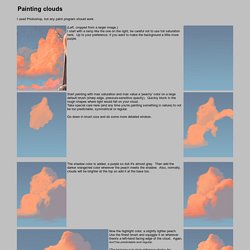
(Left, cropped from a larger image.) I start with a ramp like the one on the right; be careful not to use full saturation here. Up to your preference, if you want to make the background a little more purple. Start painting with max saturation and max value a 'peachy' color on a large default brush (sharp edge, pressure-sensitive opacity). Quickly block in the rough shapes where light would fall on your cloud. Go down in brush size and do some more detailed strokes. The shadow color is added, a purple so dull it's almost gray.
Now the highlight color, a slightly lighter peach. (The best way is to study reference photos, for example this environment textures site has more than 1000 hi res photos in their "Sky" category.) We need to soften the right-hand side edges of all these squiggles, while trying to keep the left sides as sharp as possible. On the right is the finished cloud. Use a similar ramp to the above, just a bit lighter. Christian Grajewski Scene Rendering. Website design and creation by Allan Macdonald.

All rights reserved. Contact: info@designertechniques.com It was time to change my viewpoint again... I detailed the plants to the left and added some light from the top. I did the same thing to the midground behind the waterfall, adding shiny fog. Here you can see my layer work. A big step... 20 PSD Tuts That Will Turn You Into A Photoshop Guru. Many people can use Photoshop, but only a select few can call themselves gurus.

Learn all the methods in the 20 tutorials below and you’ll be well on your way to joining this elite. Rather than focus on tuts for beginners, intermediates or advanced users, we’ve simply chosen ones which produce jaw-dropping effects. All of them are easy to follow, although most do require at least some prior knowledge and experience. 1. Colorful Plexi Text Effect Follow this tutorial to create dazzling, multi-layered, semi-transparent lettering, with a Perspex-like quality. 2. 3D Pixel Stretch Effect File this tutorial under “simple but effective”.