
Iona Ascherson
Secret London: 2012 Serco Prize for Illustration - Competition opportunity: deadline 4/6/2012. 101 Amazing Examples of Photo Manipulation Design. 101 Amazing Examples of Photo Manipulation Here are some incredible examples of amazing Photo manipulated images from some really extremely talented artists.
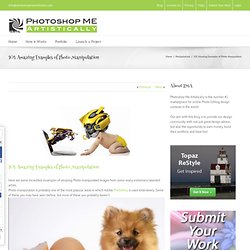
Photo manipulation is probably one of the most popular areas in which Adobe Photoshop is used extensively. Deconstructed Head Illustrations by Smithe. Hire an illustrator hai. Featured Artists: Tommaso Meli. Color Wizard - Color Scheme Generator - Colors on the Web. ARTIST / INSPIRATION - Lori Nix. Carnovsky. RGB Color est e pluribus unus RGB is a work about the exploration of the “surface’s deepness”.

RGB designs create surfaces that mutate and interact with different chromatic stimulus. Carnovsky's RGB is an ongoing project that experiments with the interaction between printed and light colours. The resulting images are unexpected and disorienting. The colors mix up, the lines and shapes entwine becoming oneiric and not completely clear. Adding Monsters to Thrift Store Paintings. Apr 13, 2012 Have you ever been to a thrift store (think Goodwill or Salvation Army) and noticed that they usually carry a small selection of landscape paintings?
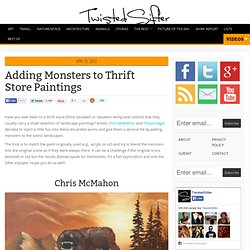
Artists Chris McMahon and Thryza Segal decided to inject a little fun into these discarded works and give them a second life by adding monsters to the scenic landscapes. The trick is to match the paint originally used (e.g., acrylic or oil) and try to blend the monsters into the original scene as if they were always there. It can be a challenge if the original is too textured or old but the results (below) speak for themselves. It’s a fun exploration and one the Sifter enjoyed. Personal Work - Art - Pat Perry. Artboardz surf board. Strange Spring Trap. Hexagonal Stacking Boxes. The inspiration for this week’s project comes from the Japanese stacking octagonal box kit shown above.
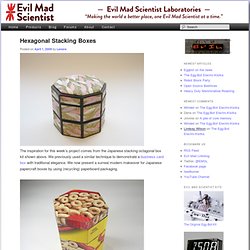
We previously used a similar technique to demonstrate a business card box with traditional elegance. We now present a surreal modern makeover for Japanese papercraft boxes by using (recycling) paperboard packaging. We follow the same basic construction techniques, but simplify it by eliminating the paper coverings and decorations. In their place, we use paperboard from cereal, cracker and cookie packaging. These cheerful boxes are easier and less expensive to make and have a surreal quality to them. They are great for storage, gift giving, and decorative use. The abstraction created from taking the package out of its context can be wonderfully fun. To get started, download the pattern here (18K pdf). Browse Album. 12 Creative Business Cards. Forget putting QR codes on your business card in order to stand out from the competition.
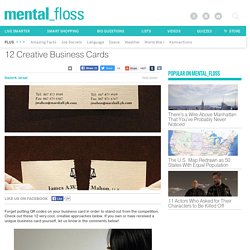
Check out these 12 very cool, creative approaches below. If you own or have received a unique business card yourself, let us know in the comments below! (via richbugger.wordpress.com) 12 Wonderfully Useless Flyers. Logopond - Identity Inspiration. Minimalist Posters Of Disney Films. MWM Graphics. Chobani Champions - Ayaka Ito. Design Daily: Are Minimalist Brands the Future? - Design. When these "minimalist brands" started popping up on the A2591 blog a few weeks ago, they seemed like a fun design exercise.
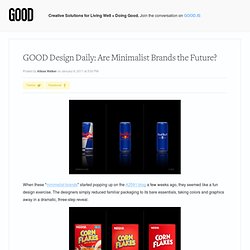
The designers simply reduced familiar packaging to its bare essentials, taking colors and graphics away in a dramatic, three-step reveal. TOOLS / RESOURCES. Line | shape | value | color | space | texture | balance | contrast | repetition | emphasis | unity | art techniques.
25 Helpful Tutorials for Lighting Effects in Photoshop. Photoshop allows designers with unlimited possibilities when it comes to creative effects, including lighting effects.
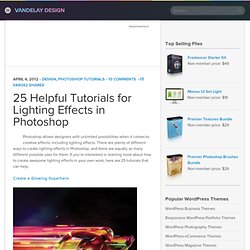
There are plenty of different ways to create lighting effects in Photoshop, and there are equally as many different possible uses for them. If you’re interested in learning more about how to create awesome lighting effects in your own work, here are 25 tutorials that can help. Looking for hosting? WPEngine offers secure managed WordPress hosting. 10 ways to work more efficiently in Photoshop. After Effects - Creating a 3D Room Video. Hey, what’s up?
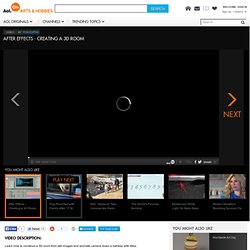
Andrew Kramer here and I got a tutorial that is going to knock you socks off, literally, knock them off even if you got sandals on, you just knock them right off. What we have here is just a 3D room, kind of dark 3D room. I like to call it ‘the room of darkness’ and this is actually the room police put you in when you get caught stealing printers from best buy. Well actually, we probably would got away with it except that we have to go back there they get the USB cables, so that kind of jammed us up there. Okay, let us go ahead and get started. Now the next step is the turn this layer into a 3D layer by clicking on the 3D layer switch, hitting W for the rotate tool. Photoshop Secret Shortcuts.
It is proven that by using software shortcuts can boost up productivity.
Here are 30 secret Photoshop shortcuts that I’ve learned from years of experience. Well, what I mean by "secret" is that these shortcuts are not documented in the menus. Keep reading and you will find how these shortcuts can speed up your productivity. I bet you don’t know all of them. Note: this article is written in Mac Photoshop format. Drag selection With the Marquee tool, drag on the document (do not release the mouse yet), now hold down Spacebar, it will let you drag the undefined selection. Art 1. Optical Design.
Moss graffiti. The Big Caption. Writing tips. Fonts O - the best free fonts found Online. Color — Method of Action. Lost Type Co-op. [CG Textures] - Textures for 3D, graphic design and Photoshop!