
14 fantastic scrolling websites that tell a story. In the past year or so there has been a trend in web design towards the use of scrolling, which can help to engage visitors and provides a feeling of movement and animation.

These web pages are entirely static, and rely on the visitor to interact in order to generate the ‘movement’. Back in the day if you asked for this a developer would reach for Flash, but nowadays HTML5 (which has a <ParallaxScroll> tag), CSS3 and JQuery are usually employed to achieve scrolling effects. I’ve collected a bunch of scrolling websites that are built with the arrow keys in mind. Some of these are more 'animated' than others, and some scrolling websites feel a little bit clunky, but all of them are interesting and creative web experiences. I’m not yet convinced that scrolling is something that e-commerce companies should be embracing en masse, but it can certainly be used to support brand and product campaigns, given that the best examples are inherently narrative.
Smart USA Activate Drinks Nike Air Jordan. HTML5. Treesaver. To help you take advantage of Treesaver ® technology quickly, Treesaver offers pre-designed grids. They’re grouped into themes—a set of basic pages. You can use these themes right out of the “box”—adapt them as you see fit—or engage the Treesaver design team to modify them to fit your brand. We’re offering additional services: support, hosting and updates. See below for details. At launch, we’re introducing two themes, Trumbull and Sanford. Send a message or call us at 212-918-0993 to get the details and pricing. Trumbull For publishers creating a rich and attractive magazine. Cover Table of Contents Editor’s Letter Letters to the Editor Contributors Department News Feature Columns Interview Calendar / Listings / Events Masthead Sanford For news. Index Story Every grid in both themes includes HTML and CSS files and the Treesaver Javascript framework.
Solution alternatives DIRECT: Buy a theme and make adjustments yourself. Treesaver Media.
Easy HTML5 Video : HTML 5 Video Converter. Overview HTML5 is the fastest growing web development trend and HTML5 video as a part of HTML5 becomes the new natural way to show video online. iPad, iPhone, Android, all new browsers declare the support for HTML5 video.
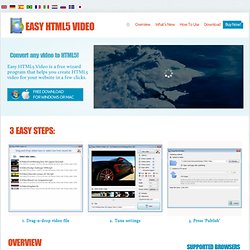
It's great, but what is the usual route to create HTML5 video? First you need to find converters and make three versions of your video - .OGG, MP4, WebM. Then, to provide the compatibility with IE and old browsers you add a fallback Flash version of your video with Flash video player. And finally, you extract an image for poster and write batch lines of code to combine all of it... Forget about it with EasyHTML5Video! All it takes is 3 easy steps to convert any of your video to HTML5: 1. EasyHTML5Video makes your life easier with HTML5 video! What's new EasyHTML5Video v2.1 (Feb 6, 2014) - Preview window now shows a real-size output - "Quality" selector - select the video quality from Low, Normal, and High.
Easy Html5 Video v2.0 (August 2, 2013) FAQs Step 2 - Specify settings. HTML / XHTML Forms. The NAME Attribute The name attribute in HTML was used on many elements to provide a identification token for reference by the browser and by scripts.

As documented in the W3 XHTML Specifications the HTML name attribute is deprecated for the elements a, applet, form, frame, iframe, img, and map for XHTML 1. The id attribute is now used in place of the name attribute as a unique identifying token in XHTML documents. The W3 HTML Compatibility Guidelines noted that the change from name to id could affect the intended functionality of a web page. For example, the name attribute was often used in conjunction with a to create anchors on a web page. The ID Attribute The id attribute can be used on nearly every HTML element, although it is a well-known standard documented by the W3 that the id attribute must be unique (appear only once) within a given document.
How NAME Deprecation Affects Forms The name element is the one used to pass the values of form fields. How to use ID in Forms Tests Examples.