
jQuery Mobile: Demos and Documentation. Envoyer une variable vers une page en PHP [Résolu]
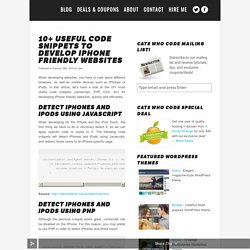
Useful code snippets to develop iPhone friendly websites. Detect iPhones and iPods using Javascript When developing for the iPhone and the iPod Touch, the first thing we have to do is obviously detect it, so we can apply specific code or styles to it.
iPhone Webapps 101: detecting essential information about your iPhone. In this second instalment of iPhone Webapps 101 I’ll discuss some issues I ran into earlier this week during the development of my own iPhone Webapp.

It deals with five separate issues, but all have something in common. Today we are detecting some essential information about your iPhone. What version of the iPhone OS is your app running on? If you have an application that requires certain features that are only present in recent versions of the iPhone OS you may want to prevent users of an earlier version from starting your Webapp. For example your application might depend on CSS Animations or CSS Transforms. You can detect which version the iPhone is running by using JavaScript and looking at the navigator object; more specifically the userAgent property of the navigator object.
Below is a small example of how to use the navigator object to detect the version of the iPhone OS. 10 Useful Frameworks To Develop HTML-Based Webapps for Touch Devices. HOWTO: Native iPhone/iPad apps in JavaScript. More resources On top of the information below, I can recommend a few other resources: Building iPhone Apps with HTML, CSS, and JavaScript is the only book I found that covered everything.
I highly recommend it if you're planning on doing serious app development in JavaScript. If you'd like to get into native app development, take a step back and learn Objective-C first. The best Objective-C book I've found is Cocoa and Objective-C: Up and Running. Making it full-screen Normally, if you press "+" in mobile Safari and then "Add to Home Screen," the icon it creates acts like a bookmark into Safari. To get rid of the URL and button bars, just add a meta tag: /packer/
Position Absolute, web apps and front-end stuff - Templates xhtml/css gratuits. JavaScript Ray-Tracing. Ray Casting / Game Programming Tutorial - Page 6. Notice from the previous image (Figure 11), that the wall can be viewed as collection of 320 vertical lines (or 320 wall slices).
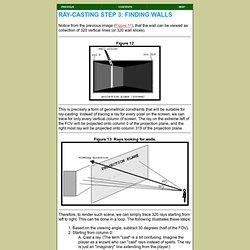
Figure 12 This is precisely a form of geometrical constraints that will be suitable for ray-casting. Instead of tracing a ray for every pixel on the screen, we can trace for only every vertical column of screen. The ray on the extreme left of the FOV will be projected onto column 0 of the projection plane, and the right most ray will be projected onto column 319 of the projection plane. Figure 13: Rays looking for walls. Therefore, to render such scene, we can simply trace 320 rays starting from left to right.
Figure 14: This ray intersects the grids at points A,B,C,D,E, and F. Canvas tutorial. <canvas> is an HTML element which can be used to draw graphics via scripting (usually JavaScript). This can, for instance, be used to draw graphs, combine photos, or create simple (and not so simple) animations. The images on this page show examples of <canvas> implementations which will be created in this tutorial. This tutorial describes how to use the <canvas> element to draw 2D graphics, starting with the basics. The examples provided should give you some clear ideas about what you can do with canvas, and will provide code snippets that may get you started in building your own content.
First introduced in WebKit by Apple for the OS X Dashboard, <canvas> has since been implemented in browsers. Before you start Using the <canvas> element is not very difficult, but you do need a basic understanding of HTML and JavaScript. Breakout – Beginner, Tutorials. <canvas> : Page de démonstration et tutoriel - <html5> par l'exemple - Le site de démo des balises HTML5 et de test du support des navigateurs. WebApp.Net. Optimiser son application web pour iPhone ou iPod Touch. Développement Web sur iPhone (iPhone+iPad DevCamp Québec) Astuces dévelopement Web iPad et iPhone. About. Building applications for each platform–iPhone, Android, Windows and more–requires different frameworks and languages.
PhoneGap solves this by using standards-based web technologies to bridge web applications and mobile devices. Since PhoneGap apps are standards compliant, they’re future-proofed to work with browsers as they evolve. Read an in-depth post explaining PhoneGap visually. PhoneGap has been downloaded millions of times and is being used by hundreds of thousands of developers. Thousands of apps built using PhoneGap are available in mobile app stores and directories. The PhoneGap code was contributed to the Apache Software Foundation (ASF) under the name Apache Cordova and graduated to top-level project status in October 2012. Java Script. Paper.js will be with us shortly. But now for a musical interlude: Tutoriel : Une application web offline HTML5 avec le cache manifest. Parmi l’ensemble des nouveautés apportées par l’HTML5, on entend surtout parler des plus “multimédia” d’entre elles, c’est à dire des balises audio, video, canvas… Pourtant, ces fonctionnalités ne sont pas vraiment nouvelles pour l’utilisateur final, qui était déjà habitué à de tels contenus avec Flash.

L’une des réelles révolutions apportées par l’HTML5, et une des moins médiatisée, est la possibilité de créer des applications web offline. Introduction Le terme “application offline” doit être un peu nuancé et compris plutôt comme : “Des applications web qui continuent à fonctionner même quand la connexion internet se coupe”. De plus, le terme “application” a été banalisé par l’avènement des smartphones, mais dans ce cadre, on doit plutôt comprendre des “sites web”. Cela dit la différence entre les deux va s’amoindrir de plus en plus dans les années à venir… Ces applications sont donc principalement destinées aux téléphones portables, qui subissent régulièrement des déconnexions.