
101 LINQ Samples. Using LINQ to SQL (Part 1) Over the last few months I wrote a series of blog posts that covered some of the new language features that are coming with the Visual Studio and .NET Framework "Orcas" release.
Here are pointers to the posts in my series: The above language features help make querying data a first class programming concept. We call this overall querying programming model "LINQ" - which stands for .NET Language Integrated Query. Developers can use LINQ with any data source. They can express efficient query behavior in their programming language of choice, optionally transform/shape data query results into whatever format they want, and then easily manipulate the results.
LINQ supports a very rich extensibility model that facilitates the creation of very efficient domain-specific operators for data sources. What Is LINQ to SQL? LINQ to SQL fully supports transactions, views, and stored procedures. Modeling Databases Using LINQ to SQL: Understanding the DataContext Class LINQ to SQL Code Examples Summary Scott. Extracting XML and Insert Bulk Data using LINQ to XML and LINQ to SQL in .NET 3.5. Introduction This article focuses on how to read XML content and perform a bulk insert to a database using LINQ to XML, LINQ to SQL, and LINQ, and discusses the significance of LINQ.

Background Commercial applications often require bulk data from various sources. This data is commonly available in the format of XML, and it requires the data to be updated in to the application's database. Most often, these are done as bulk operations. Of course, I am not looking into thousands of records here, since using LINQ to SQL for bulk updates takes considerable time due to its internal validations and transaction handlings. As to draw a similar scenario, let us read an XML content from an RSS feed and insert the content to a table with fields: PostID, Title, and Date.
Demonstration Through out the demo, Visual Studio 2008 and SQL Server 2005 will be used. . - Figure 01 - As for the source of the XML, let me use this blog’s RSS feed. . - Figure 02 - - Figure 03 - - Figure 04 - Here are the inserted records: Dynamic LINQ (Part 1: Using the LINQ Dynamic Query Library) LINQ (language integrated query) is one of the new features provided with VS 2008 and .NET 3.5.
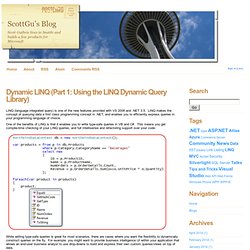
LINQ makes the concept of querying data a first class programming concept in .NET, and enables you to efficiently express queries in your programming language of choice. One of the benefits of LINQ is that it enables you to write type-safe queries in VB and C#. This means you get compile-time checking of your LINQ queries, and full intellisense and refactoring support over your code: While writing type-safe queries is great for most scenarios, there are cases where you want the flexibility to dynamically construct queries on the fly. For example: you might want to provide business intelligence UI within your application that allows an end-user business analyst to use drop-downs to build and express their own custom queries/views on top of data. Traditionally these types of dynamic query scenarios are often handled by concatenating strings together to construct dynamic SQL queries.
Scott. Articles : .NET - LINQ to SQL - part 4. In previous parts of this series of articles about LINQ to SQL I already covered the following topics : Part 4 will cover : Visualizers LINQ to SQL Visualizer Expression Tree Visualizer Refresh Refresh (re-execute) query Refresh one object Dynamic Where-clause Anonymous functions and IEnumerable Lambda expression trees and IQueryable PredicateBuilder class and combining expressions Predicate library Dynamic OrderBy-clause Anonymous functions and IEnumerable Lambda expression trees and IQueryable Predicate library Visualizers Visualizers are Visual Studio plugins which allow developers to view objects and data using a specialized user interface while debugging.

It seems that the LINQ to SQL Visualizer and Expression Tree Visualizer are not installed by default within Visual Studio 2008 RTM. How to install ? 1) Download the ZIP file with C# samples and unzip it. 2) In the LinqSamples folder you will find the QueryVisualizer and ExpressionTreeVisualizer solutions. Refresh. C# - Dynamically Build Linq Lambda Expression.