
What’s in a Story? « DanNorth.net. [This article has been translated into Korean by HongJoo Lee, French by Philippe Poumaroux, Spanish by Adrian Moya, Russian by Denis Oleynik, and German by Julia Kadauke.]
Behaviour-driven development is an “outside-in” methodology. It starts at the outside by identifying business outcomes, and then drills down into the feature set that will achieve those outcomes. Each feature is captured as a “story”, which defines the scope of the feature along with its acceptance criteria. This article introduces the BDD approach to defining and identifying stories and their acceptance criteria. Introduction Software delivery is about writing software to achieve business outcomes. Usually, the business outcomes are too coarse-grained to be used to directly write software (where do you start coding when the outcome is “save 5% of my operating costs”?)
This, then, is the role of a Story. The structure of a story. [#JENKINS-10309] Some environment variables are not resolved in command line - Jenkins JIRA. Robocopy. Robust File and Folder Copy.
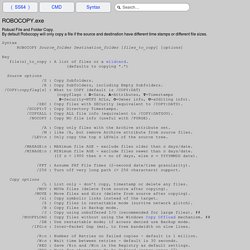
By default Robocopy will only copy a file if the source and destination have different time stamps or different file sizes. Syntax ROBOCOPY Source_folder Destination_folder [files_to_copy] [options] Key file(s)_to_copy : A list of files or a wildcard. (defaults to copying *.*) Source options /S : Copy Subfolders. /E : Copy Subfolders, including Empty Subfolders. /COPY:copyflag[s] : What to COPY (default is /COPY:DAT) (copyflags : D=Data, A=Attributes, T=Timestamps S=Security=NTFS ACLs, O=Owner info, U=aUditing info)
. # = New Option in Windows 7 and Windows 2008 R2 ## = New Option in Windows 8 and Windows 10 In Windows XP, Robocopy was only available via the Resource Kit but is a standard/built in command since Windows 7. Robocopy EXIT CODES File Attributes [RASHCNETO] R – Read only A – Archive S – System H – Hidden C – Compressed N – Not content indexed E – Encrypted T – Temporary O - Offline /REG Writes to the registry at HKCU\Software\Microsoft\ResKit\Robocopy. Introducing StyleCop on Legacy Projects - Microsoft StyleCop. A number of people have asked for tips on rolling out StyleCop on a large, pre-existing codebase.

This can prove challenging, since the tool will typically generate thousands of violations the first time it is run on existing code. For a large solution, this can make adoption of the tool a bit daunting. On the other hand, it is relatively easy to comply with StyleCop when writing new code, especially for developers who are already familiar with the tool. In this article I’ll describe a technique for doing a slow, staged rollout of StyleCop over your existing codebase. This technique has been used successfully by multiple teams within Microsoft, allowing them to adopt the tool in a controlled manner without generating a lot of noise up front.
One day one, StyleCop will not generate any violations against your code, and will have zero measurable impact on your team. The following steps explain how to introduce StyleCop over time, as described above. 1. 2. Resolving error MSB4019 Microsoft.WebApplication.targets was not found « Clinton's Blog. Parameterized Build. Sometimes, it is useful/necessary to have your builds take several "parameters.

" Consider the following use case: You set up a test job on Hudson, and it accepts a distribution bundle as a parameter and perform tests against it. You want to have developers do local builds and let them submit builds for test execution on Hudson. In such a case, your parameter is a zip file that contains a distribution. Your test suite takes so much time to run that in normal execution you can't afford to run the entire test cycle. The parameter are available as environment parameters.
First, you need to define parameters for your job by selecting "This build is parameterized", then using the drop-down button to add as many parameters as you need. There are different parameter types available, and it is extensible, too. String parameter String parameters are exposed as environment variables of the same name. Reference parameter by name in builder. Ant works equally well.