
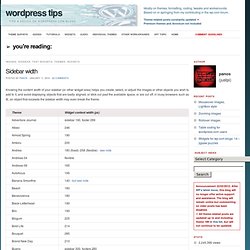
Sidebar width. Knowing the content width of your sidebar (or other widget area) helps you create, select, or adjust the images or other objects you wish to add to it, and avoid displaying objects that are badly aligned, or stick out past the available space, or are cut off; in lousy browsers such as IE, an object that exceeds the sidebar width may even break the theme.
Notes Like this: Like Loading... How To Add Facebook, Twitter, Google Buzz Buttons To Wordpress Blog. 48 incredible Mootools Scripts. Making a Beautiful HTML5 Portfolio. Martin Angelov In today’s tutorial we will be making a beautiful HTML5 portfolio powered by jQuery and the Quicksand plugin.

You can use it to showcase your latest work and it is fully customizable, so potentially you could expand it to do much more. The HTML The first step is to write down the markup of a new HTML5 document. In the head section, we will include the stylesheet for the page.