Excel

TwitterFacebook
Get flash to fully experience Pearltrees
I’ve been a long time fan of CouchDB , one of the many NoSQL databases to appear in the last few years. CouchDB is a document-oriented database, which with solid B-tree indexing and easy replication, topped off by a MapReduce style view mechanism, puts it up there as a best-of-breed noSQL datastore. Now it may seem strange that somebody whose SQL – does exactly what it says on the tin post clearly marks him out as an RDBMS fanboy, can also sing the praises of a noSQL database. Are they not mutually exclusive? To many, particularly in the noSQL world, this appears to be the case, with some clearly determined to re-invent the wheel, ignoring the lessons learned by relational database practitioners.

Excel as a document-oriented NoSQL database | Gobán Saor

http://blog.gobansaor.com/2010/03/02/excel-as-a-document-oriented-nosql-database/
It’s no secret that I’m a huge fan of SQLite and Excel, particularly when used in combination. I also greatly admire the open source BI engines, Palo and Mondrian . Mondrian appeals because of its “ROLAP with a cache” architecture and its implementation of MS’s excellent MDX language. When I say MDX is excellent I’m talking with my professional programmer’s hat on, as an end-user tool it’s a non-runner. http://blog.gobansaor.com/2009/09/29/tag-cubes-sqlite-star-query-part-iii/

TAG Cubes – SQLite Star Query Part III | Gobán Saor

http://blog.gobansaor.com/2010/07/09/star-schemas-to-boldly-go-where-no-excel-spreadsheet-has-gone-before/ Need help designing PowerPivot models One of the many things that delights me about PowerPivot is the central role played by the Star Schema. Those of you reading with a data-warehousing background would shrug your shoulders and say: “So what, what else would you expect to find at the core of a BI tool?”.

Star Schemas – to boldly go where no Excel spreadsheet has gone before | Gobán Saor

Macaferi's blog: NPOI with Excel Table and dynamic Chart

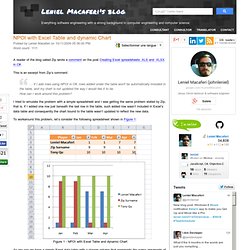
http://www.leniel.net/2009/10/npoi-with-excel-table-and-dynamic-chart.html#sthash.hKurLtsn.dpbs A reader of the blog called Zip wrote a comment on the post Creating Excel spreadsheets .XLS and .XLSX in C# . This is an excerpt from Zip’s comment: … if I add rows using NPOI in C#, rows added under the table won't be automatically included in the table, and my chart is not updated the way I would like it to be. How can I work around this problem? I tried to simulate the problem with a simple spreadsheet and I was getting the same problem stated by Zip, that is, if I added one row just beneath the last row in the table, such added row wasn’t included in Excel’s data table and consequently the chart bound to the table wasn’t updated to reflect the new data. To workaround this problem, let’s consider the following spreadsheet shown in Figure 1 :
http://www.joyedaniels.com/vba_excel.htm

Visual Basic for Applications (VBA) Code Samples for Microsoft Excel

'==Hide activity while macro runs: Application.ScreenUpdating = False '==Turn off automatic alerts: Application.DisplayAlerts = False '==Freeze panes: ActiveWindow.FreezePanes = True
http://www.ozgrid.com/VBA/ExcelRanges.htm

Excel Ranges: Finding the Last Cell in a Range

Back to: Excel VBA . Got any Excel/VBA Questions? Excel Help | Find & Return The Last Used Cell On An Excel Worksheet Or Column VBA Function Find the last used cell, before a blank in a Column: Sub LastCellBeforeBlankInColumn() Range("A1").End(xldown).Select End Sub Find the very last used cell in a Column: Sub LastCellInColumn() Range("A65536").End(xlup).Select End Sub Find the last cell, before a blank in a Row: Sub LastCellBeforeBlankInRow() Range("A1").End(xlToRight).Select End Sub Find the very last used cell in a Row: Sub LastCellInRow() Range("IV1").End(xlToLeft).Select End Sub Find the very last used cell on a Worksheet: Sub Demo() Cells.Find(What:="*", After:=[A1], SearchDirection:=xlPrevious).Select End Sub Find the last Row, Column or Cell