
How to Unblock and watch Olympic Games 2012 live on BBC iPlayer Outside the UK. To be able to watch the Olympic Games live via BBC iPlayer or other UK channel outside the UK you need a UK iP so we recommend to use one of our UK VPN list For UK VPN you can choose one from InterVPN Providers List check option of UK ip country, we recommend these providers : Screenshot of BBC iPlayer Site Before installing VPN: Screenshot of BBC iPlayer Site After installing VPN: Screenshot of BBC iPlayer Site After installing VPN (BBC Three): Note:ibvpn offer a 37% discount Hide My Ass offer up to 43% discount for all Plans PureVpn offer a 65% discount for all Plans.

Set up the VPN connection on iPad and iPhone. This tutorial shows how to setup a PPTP connection on iPad. 1- To access the VPN settings go to Settings/General/Network.
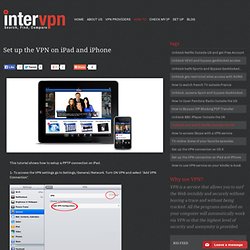
Turn ON VPN and select “Add VPN Connection”. 2- Select PPTP and fill the Description, Server, Account and Password. The server address will be (choose one from intervpn) depending on the server you want to connect. 3- To connect go back to the settings page and enable the VPN connection. If you have problems connection to ibVPN service please open a support ticket from your Client Area. original post. Set up the VPN connection on OS X. This tutorial shows how to setup a PPTP connection on Snow Leopard.
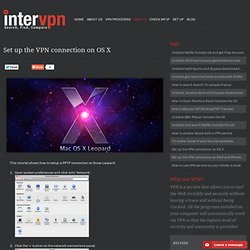
Open system preferences and click onto ‘Network’. Click the ‘+’ button on the network connections panel. From the drop down menu select ‘VPN’ followed by ‘PPTP’ then click ‘Create’. Enter the VPN server that you wish to connect (you must choose one from intervpn) into the ‘Server Address’ field and the account username in the ‘Account Name’ field then click the ‘Authentication Settings’ button. Enter your ‘Password’ and click ‘OK’. Click the ‘Advanced’ button.Tick ‘send all traffic over VPN connection’, press ‘OK’. Original post. TV online ABC CWTV Hulu plus. If you are a TV series/shows enthusiast, you might be aware about location limitation on some of the big TV streaming websites like HULU, NETFLIX and so on.

You are also aware that using our service can bypass this country limitation but this won't "by-pass" the monthly fee you will have to pay to the TV streaming websites in order to watch your favorite TV episodes/shows. What if you don't want to pay extra for every service? Well, some of you might already know the answer but for the ones who don't we will recommend you some of the Free Online TV websites, that we have recently tested. 1. Watch online streaming from ABC 2. How to Bypass ISP Blocking and hide the traces of your P2P data transfers. We will start with an important point: we do not want to encourage the prohibited P2P file sharing which has a copyright content.
But we want to improve your knowledge in terms of online security and anonymity of your data, we want to ensure that you use P2P and transfer your torrents anonymously and safely. First you must choose a VPN providers such as: After choosing your plan from This recommended providers or from the page of VPN Servers which allow the use of P2P tranfer or offers packages such as "Torrent VPN Pack" , Follow these simple steps: 1- Install your VPN (see VPN page setup depending on your system) 2- Connect your VPN and open your P2P client 3- Once connected to the P2P VPN ensures that your IP address is hidden, please check your ip at check My IP, Now that your IP address has been changed, all traffic is directed through a secure and anonymous Tunnel For the paid version of VPNwatchera discount of 20% special InterVPN visitors is available using the promo code: INTERVPN20.
How to Unblock and watch Netflix on Apple TV Outside the USA. To be able to watch Netflix outside the US on the Apple TV you need a VPN and a router that support VPN set up because the Apple TV does not have a VPN client build in.

You can see for a router that have this option like: - ASUS RT-N16 (recommended) - D-Link DIR 300 - Cisco Linksys E2000. How to Open Pandora Radio Outside the US. Pandora Radio has remained the most popular music streaming service in the U.S.

Moreover, 75% of online radio streaming usage is accounted by Pandora. This great service is restricted for users outside U.S., Australia and New Zealand. To avoid this restrictions we have to enter to Pandora using a U.S. or Australian or New Zeland IP. VPN service can offer this opportunity and you can enjoy your favorite music.