
Photography tips: basic & advanced. How to Photograph Silhouettes in 8 Easy Steps. I normally talk about the importance of using a flash when taking shots into the sun to give sufficient light to add features to your subject but there are also times when making your subject featureless apart from their outline against a bright background can be most effective – or when in other words silhouette is a worth exploring.

Silhouettes are a wonderful way to convey drama, mystery, emotion and mood to the viewers of your photos and often stand out in an album because of the combination of their simplicity but also the story that they convey. I love them because they don’t give the viewer of a clear picture of everything but leave part of the image up to their imagination to wonder about. In doing this your subject will be under exposed (and very dark, if not black). Here’s how to do it: 1. Almost any object can be made into a silhouette, however some are better than others. 2. 3. 4. 5. 6. 7. 8. UPDATE: Check out these 12 Amazing Silhouette Example Shots. Photoshop. Zombie-Fication! 30 Watercolor Tutorials and Brush Sets for Photoshop. Skin Retouching in Photoshop.
This tutorial will help you learn how to speed up skin retouching and polish photos in Photoshop using basic techniques.

Original Photo Step 1 Duplicate the background image and rename it to Layer 1. Step 2 Go to Filter > Other > High Pass and set the Radius to around 4.5 pixels. Step 3 Change the Blending Options for Layer 1 from Normal to Soft Light and uncheck the eye to make Layer 1 invisible for the next step. Step 4 Duplicate the background image again and rename it to Layer 2.
Step 5 As you’ll see the image will be just slightly blurred and smoothen out but not the edges. Photoshop CS5. 80+ Photoshop Actions for Giving Your Pictures a Vintage Look. Photoshop actions are great.
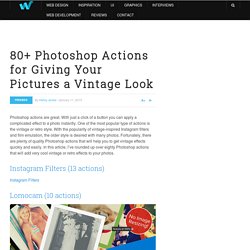
With just a click of a button you can apply a complicated effect to a photo instantly. One of the most popular type of actions is the vintage or retro style. With the popularity of vintage-inspired Instagram filters and film emulation, the older style is desired with many photos. Achieving a Vintage Look Through Color Tones in Photoshop CS.
By Guest Contributor Anna Gay Photographers are often striving for a “vintage” look in their photos, and even though there are endless ways of achieving a vintage look, there are a couple of characteristics to keep in mind.

First of all, the color tones in a vintage photo often lean towards either a blue or a red hue, or a cross-processed look. Vintage photos also have an element of noise or grain that can be achieved through textures, and also a certain amount of vignetting around the edges of the photo. In this tutorial, we will look at adjusting color tones and adding vignettes. This photo is the result of adjusting the color curves, adding two vignettes, and a color fill, which we will walk through step-by-step. Best Photoshop Tutorials. Photoshop is what makes the virtual world seem alive.

Its nothing less than a blessing for designers. The Internet is full of Photoshop Tutorials and you will find a tutorial on each and every tool. With that being said, we understand that these tutorials require time and effort to find so we’ve saved you both. How? Well, basically, we compiled a collection of easy to understand Photoshop tutorials that will aid you with just about every aspect of Photoshop and teach you the essentials of the software. Who knows, after going through these tutorials, you may end up being the next big thing in the world of Graphic Design. This article is divided in 14 Sections: The best 30 photo manipulation tutorials for Photoshop.
Learn the Basics of Photoshop: The Complete Guide. Photography tutorials. Tutorial Magazine 300 Most Amazing Photoshop Tutorials of Summer 2009. PS: We feature new, hand-picked tutorials every day!

Subscribe to our RSS feed and get them delivered! Photoshop 25 Worst Photoshop mistakes See what happens when designers mess up in Photoshop, good for a laugh. | 61570 views | by tutfreakz Recreate the Iron Man Interface Effect This tutorial will show you how to create the screen interface from the hit movie Iron Man. | 42391 views | by abduzeedo. Laurie McCanna's complete list of Photoshop tutorials. 44 essential digital camera tips and tricks. Free Digital Photography Courses, Photography Lessons, and Tutorials.
10 Street Photography Tips from an Anonymous Street Photographer. I recently got these 10 street photography tips from an anonymous street photographer who wanted to share this information with you.
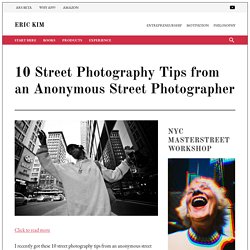
I found these tips to be very insightful, and I hope you will too! Keep reading more to learn about all the goodness. 1. Meter off your hand When there is nice light, hold your hand into the light and meter off that. Often time when you are shooting in automatic modes (Aperture-priority or program) the camera doesn’t always give you the best metering or exposure. How to Get the Perfect Exposure Using Your SLR Digital Photography Camera's Histogram. Edit Article Edited by Robert Benson, Teresa, Flickety, Maluniu and 4 others The most important tool in digital photography besides the camera - the histogram!

50 Free Photography Lessons You Should Take for Fun. Have a new camera or are ready to dust of the old one?
If you haven’t taken a picture in a while, there is lots to learn. But don’t panic. You don’t’ have to re enroll in school or spend hundreds on a professional photographer. Learn how to do it yourself. Whether doing it for the memories or to experience the new tech, the below 50 free photography lessons you should take for fun are jam packed with useful tips, tutorials, video lessons, and much more. 49 Awesome Photography Hacks, Mods And DIY Projects. Following the great demand, here are 49 Awesome Photography Hacks, Mods And DIY Projects.

Something for everyone with Tripod hacks, lighting hacks, light modifiers mods and a few crazy projects that are simply not classifiable. In this section tripod for macro photography, tripods for food photography, tripod for your bicycles. Did I say tripods? Here you’ll find all your light stand needs. If it’s mounting a flash where no flash can be mounted, clamping it, sticking it, of making a new lightstand out of PVC scraps. dZoom, Pasión por la Fotografia.