
Rollover. ColdFusion. Learn Fireworks CS4. ActionScript Syntax for Flex Applications. ActionScript Syntax for Flex Applications(Page 1 of 4 ) Understanding ActionScript Syntax Whether you’re writing ActionScript code inline, in an MXML script, or in a class, you’ll need to understand its basic syntax.

The following sections look at the basic elements of ActionScript, such as class syntax, variables, statements, expressions, functions, and objects. Understanding Packages The majority of classes are organized into structures called packages. A package groups together classes so that you can ensure uniqueness of scope. A package allows you to create several classes with the same name by placing them in different scopes. Organizing Frames and Layers. Organizing Frames and Layers(Page 1 of 5 ) Part 1 of this book gets you started launching Flash, creating your own drawings, and transforming them into moving animations.

Most animation work, though, takes place after you’ve got all the frames and layers in place. Like a film director slaving away in the cutting room, as an animator you spend most of your time testing, editing, and retesting your movie. This chapter is your crash course in Flash animation editing. Here you’ll see how to reorganize your animation horizontally (over time) by cutting, pasting, and rearranging frames on the Timeline. Working with Frames. Organizing Movie Clips in Flash MX. Organizing Movie Clips in Flash MX(Page 1 of 4 ) Movie Clip Instance Names When we create instances, we assign them identifiers, or instance names, that allow us to refer to them later.

Assigning identifiers to movie clips differs from assigning them to regular objects. When we create a typical object (not a movie clip), we must assign that object to a variable or other data container in order for the object to persist and in order for us to refer to it by name in the future. For example: new Object(); // Object dies immediately after it's created, and // we can't refer to it because we didn't store it. var thing = new Object(); // Object reference is stored in thing, // and can later be referred to as thing. Movie clip instances need not be stored in variables in order for us to refer to them. Select the instance on stage. (In Flash 5, the instance name is set via the Instance panel.) Ball_mc. Calling an ActionScript function from JavaScript Open Source Fla. Manipulating Data with ActionScript in Flex Applications. Manipulating Data with ActionScript in Flex Applications(Page 1 of 5 ) Methods A method is a way to group together statements, give that group a name, and defer the execution of those statements until the method is called by its name.

All method definitions must be placed within a class body, and they use the function keyword followed by the name of the method. Following the method name is a pair of parentheses enclosing any parameters that the method might accept. That is followed by a colon and the return type of the method. Function test():void{ } Thetest()method is declared so that it does not expect any parameters, and it does not expect to return a value. Thetrace()function writes text to an output such as a console or logfile. Now thetest()method declares a variable calledmessage, assigns a value to it (function message), and then usestrace()to output the value to the console (if debugging). test(); test("one", "two"); ActionScript does not allow overloading.
ActionScript in Flex Applications. ActionScript in Flex Applications(Page 1 of 4 ) ActionScript is the programming language that you can use along with MXML to create sophisticated Flex applications.

While MXML is an important part of a Flex application, it is mostly used for creating the user interface, and it can go only so far in creating a complete application. For data models and sophisticated client-side business logic, you’ll need to use ActionScript as well. Flex applications require ActionScript 3.0, which represents a significant maturation from earlier versions of the language. ActionScript 3.0 is compliant with the ECMA262 specification and leverages parts of the pending ECMAScript Edition 4 specification. ActionScript is a standards-based, object-oriented language. Flash Player APIs These APIs are part of the Flash Player itself, and they run natively in that runtime environment.
Flash: Building Blocks. Flash: Building Blocks - The Staging Area(Page 2 of 4 ) The stage, simply put, is where all the action takes place.
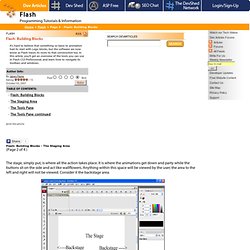
It is where the animations get down and party while the buttons sit on the side and act like wallflowers. Anything within this space will be viewed by the user; the area to the left and right will not be viewed. Consider it the backstage area. The backstage area is sometimes a useful place to store objects, though I would not recommend making a habit out of it; while they aren't supposed to, objects left in this area have a funny way of leaping onto the stage when you don't want them to.
Timeline The timeline allows the user to set his animation in flow. In addition to holding frames, the timeline can also hold actions and triggers for other movies. You'll also note that the Timeline section contains your Layers, which will be discussed in later chapters.