
Simple Home File Server (Based On Ubuntu) - Page 3. 4 Enable The root Account After the reboot you can login with your previously created username (e.g. administrator).
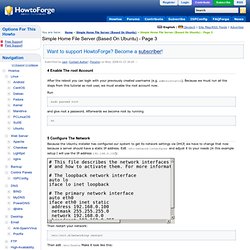
Because we must run all the steps from this tutorial as root user, we must enable the root account now. Run sudo passwd root and give root a password. Su 5 Configure The Network Because the Ubuntu installer has configured our system to get its network settings via DHCP, we have to change that now because a server should have a static IP address. . # This file describes the network interfaces available on your system # and how to activate them. Then restart your network: /etc/init.d/networking restart Then edit /etc/hosts. Vi /etc/hosts 127.0.0.1 localhost.localdomain localhost 192.168.0.100 server1.example.com server1 # The following lines are desirable for IPv6 capable hosts ::1 ip6-localhost ip6-loopback fe00::0 ip6-localnet ff00::0 ip6-mcastprefix ff02::1 ip6-allnodes ff02::2 ip6-allrouters ff02::3 ip6-allhosts# Now run Afterwards, run hostname hostname -f vi /etc/apt/sources.list.
DynamicDNS. Parent page: Internet and Networking Every computer attached to the Internet has an IP address.
Name Translation is the process of relating a name (like 'www.google.com') to an IP address (like '74.125.19.103') so that a website (or other service) on a computer can be accessed using an easily remembered name, rather than the IP address number of the computer. Name Translation is implemented via a distributed database known as the Domain Name System. This database is implemented on the Internet by DNS name servers which keep track of DNS records and exchange this information between each other to maintain consistency. Every request for a name (ie. a web browser) is then directed to one of these name servers. Most servers on the Internet have a fixed (static) IP address that never changes. However, many home users are assigned an IP address that changes more frequently. A number of DNS name servers offer a method to update the DNS database with dynamic IP name translations. Ddclient ssl=yes. SettingUpNFSHowTo.
A much shorter guide is available in the Ubuntu Server Guide If you need more info, read below.
NFS (Network File System) allows you to 'share' a directory located on one networked computer with other computers/devices on that network. The computer where directory located is called the server and computers or devices connecting to that server are called clients. Clients usually 'mount' the shared directory to make it a part of their own directory structure. NFS is perfect for creating NAS (Networked Attached Storage) in Linux/Unix environment. It is a native Linux/Unix protocol as opposed to Samba which uses the SMB protocol developed by Microsoft. NFS is perhaps best for more 'permanent' network mounted directories such as /home directories or regularly accessed shared resources.
Ubuntu Before deploying NFS you should be familiar with: Linux file and directory permissions Mounting and detaching (unmounting) filesystems This HowTo makes Ubuntu server NFSv4 ready. NFS server Portmap Lockdown.