
20 Free Logo Mockup PSDs to Present your Designs. Menu 20 Free Logo Mockup PSDs to Present your Designs Logo mockup templates are clever PSD files that allow you to easily place your logo onto various surfaces to create realistic simulations of how your design would look as a real life print.
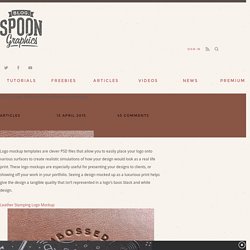
These logo mockups are especially useful for presenting your designs to clients, or showing off your work in your portfolio. Seeing a design mocked up as a luxurious print helps give the design a tangible quality that isn’t represented in a logo’s basic black and white design. Leather Stamping Logo Mockup. Make a Realistic Star Field. 50 great photoshop tutorials. Top Photoshop Tutorials on YouTube You Need to Watch. We know how much are readers love great Photoshop tutorials.
In this list we thought we would switch it up a bit and list some awesome Photoshop tutorials on video. While I prefer text and images when doing tutorials I know there are many people out there that would rather watch a video tutorial. Ladies and gentleman, without further delay I present to you the best Photoshop tutorials on YouTube. 1. Photo Manipulation 2. 3. 4. The Best Photoshop Tutorials of 2010 –August 2010. 44 Grunge Photoshop Tutorials.
What’s up today?
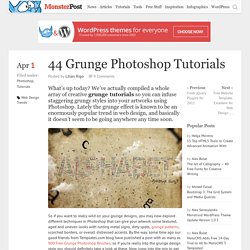
We’ve actually compiled a whole array of creative grunge tutorials so you can infuse staggering grungy styles into your artworks using Photoshop. Lately the grunge effect is known to be an enormously popular trend in web design, and basically it doesn’t seem to be going anywhere any time soon. So if you want to really wild on your grunge designs, you may now explore different techniques in Photoshop that can give your artwork some textured, aged and uneven looks with rusting metal signs, dirty spots, grunge patterns, scorched borders, or overall distressed accents. 8 Photoshop Tricks I Wish I Knew when I was a Student.
Graphics Photoshop is one of the (if not THE) most well known software used in the design industry when it comes to manipulating images and pixels.

Top 50 Stunning Text Effect Photoshop Tutorials. Under Articles Sometimes, you may find it difficult to look for some of the highest quality photoshop tutorials using search engines.
As most of time, almost all tutorials would label themselves to be good, high quality or even the best photoshop tutorial you can find. When searching through all these tutorials, your time is wasted. How To Give Your Photos a Dark Processed Lomo Effect. This post was originally published in 2010 The tips and techniques explained may be outdated.

Follow this step by step post processing guide to give your photos a dark lomo style effect with high contrast, blue tones and vignette burns. The effect is based on the popular lomographic technique and is similar to the processing effect used in many fashion shots and advertisement designs. Ultimate Photoshop Design Resources. There's no doubt that I like to design. Next to coding, I also love to edit photos, designing websites etc. My personal favorite tool to achieve this, has to be Adobe Photoshop. Next to a good tool, you'll need some good resources. Fonts, Plug-ins such as Brushes and Textures, Stock photos can help you tremendously when designing. Here's a list of my personal favorite photoshop design resources. Fonts, Stock Photos, Patterns, some Textures and Inspiring sites do not require Photoshop.
If you think that there's a top-source missing from the list, share it with us by posting them in the comments. Fonts. 50 Photoshop Actions For Every Photographer. Photoshop 50 Photoshop Actions For Every Photographer by Alex on Apr 1, 2011 • 12:17 pm 9 Comments Using Photoshop actions can make your life easier and help you edit your photos more quickly.

Basically, actions are nothing more than a series of normal Photoshop operations recorded so you can run them in sequence quickly, without having to remember just what steps to do, and in what order. 50 Photoshop Tricks for a Fast-Paced Work Environment. Are you a designer on a deadline?
If you are, then I’m sure you can recall the last time you thought to yourself, “if I had a little more time, I could…” what? Polish that button? Achieving a Vintage Look Through Color Tones in Photoshop CS. By Guest Contributor Anna Gay Photographers are often striving for a “vintage” look in their photos, and even though there are endless ways of achieving a vintage look, there are a couple of characteristics to keep in mind.

First of all, the color tones in a vintage photo often lean towards either a blue or a red hue, or a cross-processed look. Vintage photos also have an element of noise or grain that can be achieved through textures, and also a certain amount of vignetting around the edges of the photo. In this tutorial, we will look at adjusting color tones and adding vignettes. This photo is the result of adjusting the color curves, adding two vignettes, and a color fill, which we will walk through step-by-step. First, open your photo in Photoshop and make sure your foreground color is set to white in your side tool bar. You will see the above dialogue box. As you can see here, there should be three layers – your Background image, then your two gradient layers. 15 High Quality PSD’s that You’ll Actually Use.
It now seems that every designer under the sun is offering free PSD’s to help entice new business and increase traffic to their websites.
I’ll hold my hands up high as i’m one of these people. But out of all these free PSD’s how many of them do we actually find useful? So, i’ve put together a small list of high quality PSD’s I know you’ll love! Free PSDs and Resources for Designers. Making Complex Selections in Photoshop. Creating A Text Montage. May 8th, 2006 by ART-D Posted in Adobe Photoshop, Special Effects This is a technique that you have probably seen before. A face, or picture, is made up of a huge body of text, but the text is different colors or shades to make it look like the picture? Yea, it’s a really cool technique, and now you can easily re-create it. This effect looks like it would take a lot of time and effort, but in all reality it is pretty easy (just took me forever to figure out :P) and simple to do.
Photoshop Actions: How to Use them, and how to create your own. By Adrienne Cleveland (all rights reserved) This Tip is intended to be a very basic introduction for people wanting to learn how to use actions in Photoshop. We offer Photoshop actions, including some freebies, and this tip will tell you how you can record your own. Learn the Basics of Photoshop: The Complete Guide.
20 PSD Tuts That Will Turn You Into A Photoshop Guru. Many people can use Photoshop, but only a select few can call themselves gurus. Learn all the methods in the 20 tutorials below and you’ll be well on your way to joining this elite. Rather than focus on tuts for beginners, intermediates or advanced users, we’ve simply chosen ones which produce jaw-dropping effects. All of them are easy to follow, although most do require at least some prior knowledge and experience. 1. Colorful Plexi Text Effect Follow this tutorial to create dazzling, multi-layered, semi-transparent lettering, with a Perspex-like quality. 2. 3D Pixel Stretch Effect File this tutorial under “simple but effective”. 3.
Turn a simple cityscape into a torrentially flooded wasteland. 4. Become the master of light and glow on Photoshop with this brief, easy-to-follow guide. 5. Use masking tools, layers, gradients and lines to turn your favorite piece of 3D text into something more colorful and commercial. 6. 7. Custom Wallpaper Tutorial. It's very simple. Just follow the steps and you will be fine.
Rap Diamonds, bling in Photoshop. Begin with the text you want to turn into the gold and Diamond "Iced Out" effect. Right click on the layer palette and choose Rasterize layer. This will make the text editable. Casting Shadows From Complex Shapes. <a href=" onclick="addthis_url = location.href; addthis_title = document.title; return addthis_click(this);" target="_blank"><img src=" width="125" height="16" border="0" alt="Bookmark and Share" /></a><script type="text/javascript">var addthis_pub = 'PixelHive';</script><script type="text/javascript" src=" Category: Adobe Photoshop Tutorials Added: 06/24/2007 Views: 60,762 Tutorial Goal. Skin Retouching in Photoshop.
Removing Transparency with Brushes Photoshop Tutorial. Compatibility: Photoshop 7, CS-CS6, CC. Mastering Complex Selections in Photoshop.