
Retro Style Geometric Lines Poster Design Tutorial. This post was originally published in 2011 The tips and techniques explained may be outdated.

In the recent typography inspiration showcase a design by Jordan Metcalf particularly caught my interest, which reminded me of the design style used in the Mexico 1968 Olympics branding. I decided to combine these inspirations and create my own poster design artwork in a similar style. How To Create a Vintage Style Zombie Movie Poster. This post was originally published in 2010 The tips and techniques explained may be outdated.
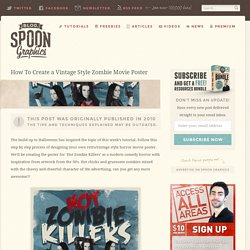
The build up to Halloween has inspired the topic of this week’s tutorial. Follow this step by step process of designing your own retro/vintage style horror movie poster. We’ll be creating the poster for ‘Hot Zombie Killers’ as a modern comedy horror with inspiration from artwork from the 50’s. Hot chicks and gruesome zombies mixed with the cheesy and cheerful character of 50s advertising, can you get any more awesome?!
View large scale Hot Zombie Killers poster design We’ll be designing the poster with the vintage style in mind and recreating effects that were a result of the cheap screenprinting methods used to manufacture the original posters. Taking the time to conduct a spot of research can really help develop the core ideas for your own poster. Most of my designs begin with a sketch. Start work in Photoshop by creating a new document. Repeat the process with two additional model images. How To Create a Cosmic Abstract Shards Poster Design. Follow this step by step Illustrator and Photoshop tutorial to create a vibrant poster design featuring abstract vector shards and intense cosmic colours.
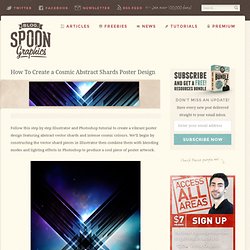
We’ll begin by constructing the vector shard pieces in Illustrator then combine them with blending modes and lighting effects in Photoshop to produce a cool piece of poster artwork. The cosmic abstract shards design we’ll be creating features an array of sharp vector objects that overlap to create a cool translucent pattern effect. A combination of cosmic background, intense lighting effects and a subtle pattern overlay gives the design a sleek futuristic style. View the Cosmic Abstract Shards Poster Design Open up Adobe Illustrator and draw a long thin rectangle on the artboard. Select the two upper most points with the Direct Selection tool and nudge them upwards and left to shear the shape and leave vertical edges. Design a Grungy Western Movie Poster in Photoshop. How To Create a Movie Style Photo Effect in Photoshop. Everyone loves photo effects, especially those that are super easy to create and really transform your photos.

Today we’re going to take a look at retouching a photo to create a cool cinematic movie effect with high contrast and blueish tones. Seeing as we’re going for a cinematic movie effect, a typical action movie style stock photo makes a great base for this tutorial, but the steps can be applied to any image. We all have imperfections in our skin, but one of the wonders of Photoshop is these blemishes can be zapped away in seconds. Use the Spot Healing Brush tool to zap any tiny pimples on the skin. A Guide To Designing Modern Movie Posters. North Carolina-based illustratorTravis Pitts has come up with a handy guide to designing movie posters that draw on Hollywood clichés.

His series titled, ‘6 Rules of Modern Poster Design’ includes a breakdown of logo placement, texts (in some cases, cheesy ones) and also use of typical colors. According to Pitt, his humorous yet rather accurate work is nothing more than an “annoyed rant” at the trends of movie posters today. [via Under Consideration] Receive interesting stories like this one in your inbox. How to make an ‘Obama’ HOPE Poster in GIMP.
There are a few tutorials for this in Photoshop and Illustrator, but I haven’t found any for the GIMP, so I attempted it myself!

It is a fairly simple method and easily done with great results! My Hope Poster :) 1. Starting Firstly choose your portrait – the less detail in the photograph the better the results! Add Alpha Channel 2. On First layer – Go, Colors –> ThresholdSet to ~25 as shown:REPEAT for each layer:Second Layer: set to ~50Third Layer: set to ~100Fourth Layer: set to ~130 Threshold 3. Now, for all layers again:Go, Filters –> Blur –> Gaussian BlurSet to ~2.00, ~2.00 (any more and they’ll be large white outlines later)(Speed up the process by selecting your layer –>go, Filters –> Repeat ‘Guassian Blur’ , Ctrl F) Blur 4.
Grab the Selection ToolSelect the parts you don’t want to include:Delete them from all layers (keep selection, then select layer – Press Delete)The most detail will be on the Fourth Layer: Remove Background 5. Delete the rest 6. Strip Pattern Creamy Colour Red Colour 7. Create a Raw Horror Movie Poster Design in Photoshop. Each year Halloween gives us a great excuse to hack at our designs with the most grungy brushes and textures in our collection to create the most raw and gory artwork we can.
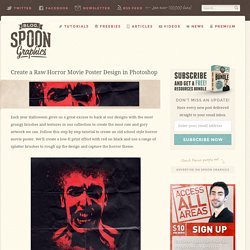
Follow this step by step tutorial to create an old school style horror movie poster. We’ll create a low-fi print effect with red on black and use a range of splatter brushes to rough up the design and capture the horror theme. The horror movie poster design we’ll be creating as part of this tutorial features a scary looking infected zombie fellow.