
Revised Waffle Definition. **SOFTlab. We are currently wrapping up a piece we have been working on in collaboration with NOOKA and Tietz-Baccon.
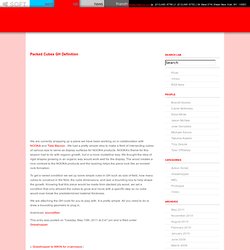
We had a pretty simple idea to make a field of intersecting cubes of various size to serve as display surfaces for NOOKA products. NOOKA’s theme for this season had to do with organic growth, but in a more crystalline way. We thought the idea of rigid shapes growing in an organic way would work well for the display. The wood creates a nice contrast to the NOOKA products and the layering helps the piece look like an eroded rock formation. To get a varied condition we set up some simple rules in GH such as size of field, how many cubes to construct in the field, the cube dimensions, and last, a bounding box to help shape the growth. We are attaching the GH code for you to play with. Download: sourcefiles. AA advanced - GH Material zum Seminar. Grasshopper « Rantomatic.
Help needed for creating catenary structure in grasshopper. Novedge Webinar Series Episode 17: An Introduction to Grasshopper for Rhino - RhinoJungle. Architecture Showcase. Flooding Shanghai. 10 GH 0.8.0009 example. Followings are 10 different GH definition which I used for half day Grasshopper training.
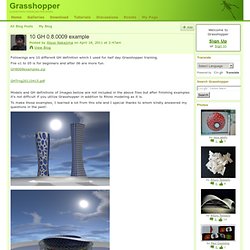
File o1 to 05 is for beginners and after 06 are more fun. GHTrng20110415.pdf Models and GH definitions of Images bellow are not included in the above files but after finishing examples it's not difficult if you utilize Grasshopper in addition to Rhino modeling as it is. Question for Teachers/Instructors. Grasshopper Analysis Key. This is a quick post about a definition that we’ve put together to create an analysis key in the Rhino viewport.
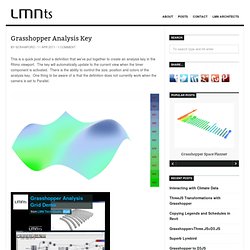
The key will automatically update to the current view when the timer component is activated. There is the ability to control the size, position and colors of the analysis key. One thing to be aware of is that the definition does not currently work when the camera is set to Parallel. Download Grasshopper Analysis Key, 28.26 kB This definition was built using Grasshopper 0.8.0007 Obligatory disclaimer: the author does not guarantee that these parametric models are bug-free or that they will solve all of your problems. Archive » Rhombic Disphenoid. This Grasshopper definition approximates a disphenoid minimal surface in Rhino.
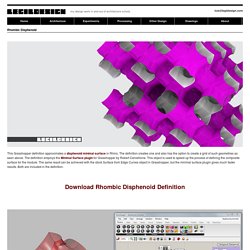
The definition creates one and also has the option to create a grid of such geometries as seen above. The definition employs the Minimal Surface plugin for Grasshopper by Robert Cervellione. This object is used to speed up the process of defining the composite surface for the module. The same result can be achieved with the stock Surface from Edge Curves object in Grasshopper, but the minimal surface plugin gives much faster results.
Both are included in the definition. Rhombic Disphenoid by Luis Gil is licensed under a Creative Commons Attribution-NonCommercial-ShareAlike 3.0 Unported License. Archive » Facade-O-Matic! Catchy name, yeah?
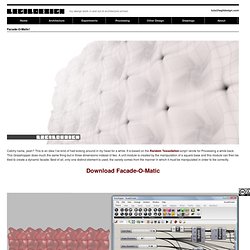
This is an idea I’ve kind of had kicking around in my head for a while. It is based on the Random Tessellation script I wrote for Processing a while back. This Grasshopper does much the same thing but in three dimensions instead of two. Archive » Grasshopper Basics.
Grasshopper script help? Hi I am trying to get this script to work.
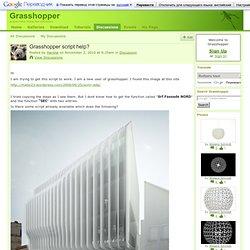
I am a new user of grasshopper. I found this image at this site I tried copying the steps as I see them. But I dont know how to get the function called "Srf Fassade NORD" and the function "SEC" with two entries. Is there some script already available which does the following? Tags: Grasshopper Rhinoceros - 01 Cubierta Tensil. Metaball equation. John Dolci's Page. Fb-loop architecture. I will be giving series of tutorials at Columbia University GSAPP Studio Daniels Core II.
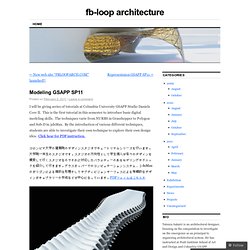
This is the first tutorial in this semester to introduce basic digital modeling skills. The techniques varie from NURBS in Grasshopper to Polygon and Sub-D in 3dsMax. By the introduction of various different techniques, students are able to investigate their own technique to explore their own design idea. Click hear for PDF instruction. Grasshopper blend morph surfaces. 16zu9 Blog. Grasshopper3d. Variables to effect design outcomes. Hello world :) I am doing my best to understand grasshopper and it's capabilities, so I am trying to use it for a project to help me in doing so.
How easy is it to add variables (obtained from site analysis) into a grasshopper script that will effect the way objects are placed, or formed? I have been all over the internet trying to find answers and had little luck so I decided to think of an example and post it to the forum. I have looked into functions, path mappers, data trees and many other components. Say my site had 2 buildings, one that was built in 1918 (B1) and one that was built in 1920 (B2).
If someone could help me out on this and show (tell) me how this could be used as a variable to create design/the placement of objects, it would be MUCH appreciated. Principal Stress Trajectories. Hello Everyone, I've been looking into deriving lines of principal stress on curved surfaces and have come across some really interesting stuff but I'm hoping to spark a discussion that might create a clearer picture of the processes involved.
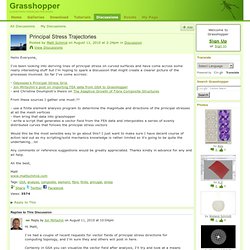
So far I've come accross: From these sources I gather one must:?? - use a finite element analysis program to determine the magnitude and directions of the principal stresses at all the mesh vertices. Ranom Tessellation and Weaver Bird. So I have this definition that has a series of lines conected to another series or rancom points, well "random" cause the items have values that have to be manually added though they were added in no particular order to sort of make a nice shape.
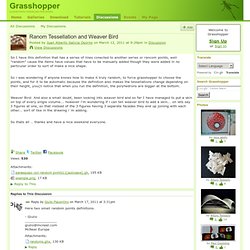
So i was wondering if anyone knows how to make it truly random, to force grasshopper to choose the points, and for it to be automatic because the definition also makes the tessellations change depending on their height, you{ll notice that when you run the definition, the polyhedrons are bigger at the bottom. Weaver Bird: And also a small doubt, been looking into weaver bird and so far I have managed to put a skin on top of every single volume... however i'm wondering if i can tell weaver bird to add a skin... on lets say 3 figures at one, so that instead of the 3 figures having 3 separate facades they end up joining with each other... sort of like in the drawing i´m adding. So thats all .. thanks and have a nice weekend everyone. Tags: Attachments: How to delete a list of points from a large list of points? O14 Building HELP plz! Hi everyone, I'm kinda noob in GH and doing some exercises for myself, I know some usefull stuff but now I'm trying to "parametrize" the O14 building...
I know I should apply some circles in a surface to make the holes and those things, and maybe an atractor woul be nice... The problem is... I DON'T HAVE A CLUE 'bout what to do! :P. How to do breb as a single surface? Change a rectangular grid into a hexagonal one ? Select branches of a tree whit a pattern. Voronoi on surface. BFXlog. Tutorial 3 - Reciprocal Systems - AAET. Picture: arup agu This tutorial will show how a reciprocal system can be constructed using Rhino, Grasshopper as design environment to inform a physical model.
Download Tutorial as pdf - workshopsafd8-digitalmaterialandfabrication-tut3-reciprocal Download Rhino and Grasshopper file example of the GH definition colouring sticks by length. How to create chain net like this? Create subsurfaces with equal area. With this definition you can divide a surface into U or V "stripes" of equal area. Maybe someone will find this useful. Tags: area, division, equal, subsurface, surface. Arrange surfaces! Degrees to Radians. RhinoCommon SDK - Table of Content. Abstract nonsense. OSCeleton GHowl Kinect Grasshopper. Surface Fitter. Blog Archive » Optimize Connections. AEC Magazine - Rhino Grasshopper. Popular among students and professionals, McNeel Associate’s Rhino modelling tool is endemic in the architectural design world. The new Grasshopper environment provides an intuitive way to explore designs without having to learn to script, writes Martyn Day.
Generative modelling is undoubtedly becoming one of the most exciting CAD developments adopted by the industry. While architectural practices lagged mechanical designer’s appetite for 3D by about 20 years, there has been a sharp increase in the use of 3D and advanced form-creation tools and Rhino is one of the more popular solutions. Zaha Hadid’s Guggenheim Hermitage Museum, Vilnius. This will be the new centre for international art house pieces from collections of both the New York-based Solomon R. Rhino has played a predominant role within that move to 3D because of its low cost, ease of use and powerful feature set. Grasshopper works within Rhino and uses standard Rhino geometry but has its own slick interface window. Performance. Final hand in cad-logic. ILYAS M. EKIZOGLU » Parametric Acoustic Pavilion. Systemik's Page. Flat tower (Evolo 2011-2nd place) Subdividing Voronoi Cells. How to change a flat hexagonal grid's density with an attractor ?
Ribbed Surface Definition. I finally managed to find the time to organize and finish a definition I had used quite a few times in the past for fabricating NURB Surfaces. This definition can switch between two cases of ribbed layouts. To download Ribs visit the [Sub]code page. Like this: Seam problem! Hexagon on a closed surface. "Set 1st point" function? Parametric Architecture. Architectureincombination's Blog. John locke » Blog Archive » kangaroo tests. Spent the better part of the day playing around with the incredibly cool Kangaroo , the live 3D physics engine for Rhino, developed by Daniel Piker. Grasshopper Modules - Proxy Wiki. From Phylogenesis, FOA 2003 The following Grasshopper modules were created in consultation with FOA's Phylogenesis, in particular the taxonomy of forms found at the conclusion of the book.
Invertible Seating Grasshopper - alex hogrefe architecture blog. To aid in the design of the transforming arena seating, I created a parametric model that would allow me to test out the mechanics of the structure as well as the density, spacing, slope, site lines, and other factors. The seating has a double function as seating for the arena on one side, then inverting and becoming seating for lecture halls on the other side. Data visualisation with GH definition. Grasshopper 3d. Grasshopper™ is a visual programming language developed by David Rutten at Robert McNeel & Associates.[1] Grasshopper runs within the Rhinoceros 3D CAD application.
Programs are created by dragging components onto a canvas. Box random subdivision by plane in grasshopper. **SOFTlab. We are working on an installation called CHROMAtex that is set to open at the Bridge Gallery on August 26th. The piece is comprised of over 4400 separate colorful panels. Rhino SDK goes open source. All of our business strategies are based on being open. OpenNURBS, our first open source code initiative, provides access to the native Rhino 3DM file format without restriction or royalties. Our latest open initiatives are RhinoCommon, Rhino 5’s new cross-platform SDK, our support of the Windows.Forms extension to the MonoMac project, .NET UI for the Mac, and Rhino 5’s RhinoPython libraries. Can I change the start point of closed curve? Finding the neighboring cell? Data Tree Utilities: Match Path and Partial Flatten. Grasshopper Resources. Dumo. Responsive roof. Remap domain from-to [0,1]
Parametric Joint. Quick post about a metal joint design that is modeled parametrically. Random points distributed inside a triangle.